Unity Helpers
Treasure chest of Unity developer tools. Professional inspector tooling, high-performance utilities, spatial queries, and 20+ editor tools.
Effects, Attributes, and Tags — Deep Dive
TL;DR — What Problem This Solves
- ⭐ Build buff/debuff systems without writing custom code for every effect.
- Data‑driven ScriptableObjects: designers create 100s of effects, programmers build the system once.
- Time saved: Weeks of boilerplate eliminated + designers empowered to iterate freely.
- ✨ Attributes are NOT required! Use the system purely for tag-based state management and timed cosmetic effects.
⭐ The Designer Empowerment Killer Feature
The Problem - Hardcoded Effects:
// Every buff needs its own custom MonoBehaviour:

public class HasteEffect : MonoBehaviour
{
    private float duration = 5f;
    private float originalSpeed;
    private PlayerStats player;

    void Start()
    {
        player = GetComponent<PlayerStats>();
        originalSpeed = player.speed;
        player.speed *= 1.5f;  // Apply speed boost
    }

    void Update()
    {
        duration -= Time.deltaTime;
        if (duration <= 0)
        {
            player.speed = originalSpeed;  // Restore
            Destroy(this);
        }
    }
}

// 20 effects × 50 lines each = 1000 lines of repetitive code
// Designers can't create effects without programmer
The Solution - Data-Driven:
// Programmers build system once (Unity Helpers provides this):
// - AttributesComponent base class
// - EffectHandler manages application/removal
// - ScriptableObject authoring

// Designers create effects in Editor (NO CODE):
// 1. Right-click → Create → Attribute Effect
// 2. Name: "Haste"
// 3. Add modification: Speed × 1.5
// 4. Duration: 5 seconds
// 5. Done!

// Apply at runtime (one line):
target.ApplyEffect(hasteEffect);
Designer Workflow:
- Create the effect asset in 30 seconds (no code)
- Test in-game immediately
- Tweak values and iterate freely
- Create variations (Haste II, Haste III) by duplicating assets
Impact:
- Programmer time saved: Weeks of boilerplate → system built once
- Designer empowerment: Create 100s of effects instantly
- Iteration speed: Change values without code changes/recompiles
- Maintainability: All effects in one system vs. scattered scripts
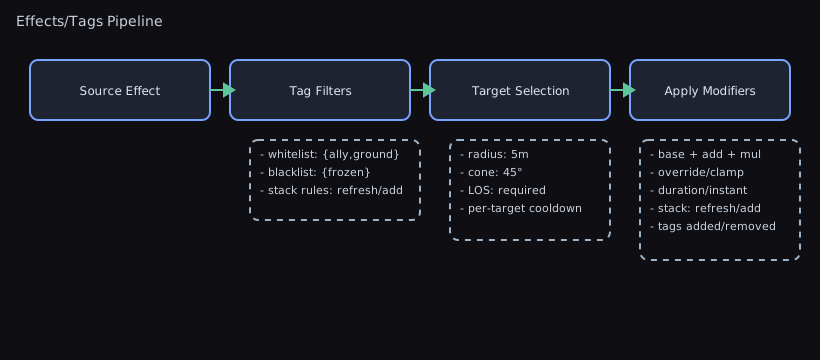
Data‑driven gameplay effects that modify stats, apply tags, and drive cosmetic presentation.
This guide explains the concepts, how they work together, authoring patterns, recipes, best practices, and FAQs.
Visual Reference
Concepts
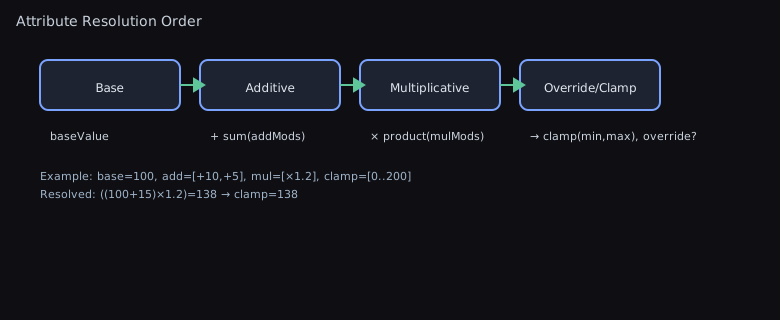
Attribute— A dynamic numeric value with a base and a calculated current value. Current value applies all active modifications.AttributeModification— Declarative change to anAttribute. Actions: Addition, Multiplication, Override. Applied in that order.AttributeEffect— ScriptableObject asset bundling modifications, tags, cosmetic data, duration policy, periodic tick schedules, and optional runtime behaviours.EffectHandle— Opaque identifier for a specific application instance (for Duration/Infinite effects). Used to remove one stack.AttributesComponent— Base MonoBehaviour exposing modifiableAttributefields (e.g., Health, Speed) on your character.EffectHandler— Component that applies/removes effects, tracks durations, forwards modifications toAttributesComponent, applies tags and cosmetics.TagHandler— Counts and queries string tags for gating gameplay (e.g., “Stunned”). Removes tags only when all sources are gone.CosmeticEffectData— Prefab‑like container withCosmeticEffectComponentbehaviours; reused or instanced per effect application.
How It Works
- You author an
AttributeEffectwith modifications, tags, cosmetics, and duration. - You apply it to a GameObject:
EffectHandle? handle = target.ApplyEffect(effect); EffectHandlerwill:- Create an
EffectHandle(for Duration/Infinite) and track expiration - Apply tags via
TagHandler(counted; multiple sources safe) - Apply cosmetic behaviours (
CosmeticEffectData) - Forward
AttributeModifications to allAttributesComponents on the GameObject
- Create an
- On removal (manual or expiration), all of the above are cleanly reversed.
Instant effects modify base values permanently and return null instead of a handle.
Authoring Guide
- Define stats:
public class CharacterStats : AttributesComponent
{
    public Attribute MaxHealth = 100f;
    public Attribute Speed = 5f;
    public Attribute AttackDamage = 10f;
    public Attribute Defense = 10f;
}
- Create an
AttributeEffectasset (Project view → Create → Wallstop Studios → Unity Helpers → Attribute Effect):
- modifications: e.g.,
{ attribute: "Speed", action: Multiplication, value: 1.5f } - durationType:
Durationwithduration = 5 - resetDurationOnReapplication: true to refresh timer on re-apply
- effectTags: e.g.,
[ "Haste" ] - cosmeticEffects: prefab with
CosmeticEffectData+CosmeticEffectComponentscripts
- Apply/remove at runtime:
GameObject player = ...;
AttributeEffect haste = ...; // ScriptableObject reference
EffectHandle? handle = player.ApplyEffect(haste);
// ... later ...
if (handle.HasValue)
{
    player.RemoveEffect(handle.Value);
}
- Query tags anywhere:
if (player.HasTag("Stunned"))
{
    // Disable input, play animation, etc.
}
Understanding Attributes: What to Model and What to Avoid
Important: Attributes are NOT required! The Effects System is extremely powerful even when used solely for tag-based state management and cosmetic effects.
What Makes a Good Attribute?
Attributes work best for values that are:
- Primarily modified by the effects system (buffs, debuffs, equipment)
- Derived from a base value (MaxHealth, Speed, AttackDamage, Defense)
- Calculated values where you need to see the result of all modifications
What Makes a Poor Attribute?
❌ DON’T use Attributes for “current” values like CurrentHealth, CurrentMana, or CurrentAmmo!
Why? These values are frequently modified by multiple systems:
- Combat system subtracts health upon damage
- Healing system adds health
- Regeneration ticks add health over time
- Death system resets health to zero
- Save/load system restores health
The Problem:
// ❌ BAD: CurrentHealth as an Attribute
public class PlayerStats : AttributesComponent
{
    public Attribute CurrentHealth = 100f; // DON'T DO THIS!
    public Attribute MaxHealth = 100f;     // This is fine
}

// Multiple systems modify CurrentHealth:
void TakeDamage(float damage)
{
    // Direct mutation bypasses the effects system
    playerStats.CurrentHealth.BaseValue -= damage;

    // Problem 1: If an effect was modifying CurrentHealth,
    //           it still applies! Now calculations are wrong.
    // Problem 2: If you remove an effect, it may restore
    //           the ORIGINAL base value, undoing damage taken.
    // Problem 3: Save/load becomes complicated - do you save
    //           base or current? What about active modifiers?
}
The Solution - Separate Current and Max:
// ✅ GOOD: CurrentHealth is a regular field, MaxHealth is an Attribute
public class PlayerStats : AttributesComponent
{
    // Regular field - modified by combat/healing systems directly
    private float currentHealth = 100f;

    // Attribute - modified by buffs/effects
    public Attribute MaxHealth = 100f;

    public float CurrentHealth
    {
        get => currentHealth;
        set => currentHealth = Mathf.Clamp(value, 0, MaxHealth.Value);
    }

    protected override void Awake()
    {
        base.Awake();
        // Initialize current health to max
        currentHealth = MaxHealth.Value;

        // When max health changes, clamp current health
        OnAttributeModified += (attributeName, oldVal, newVal) =>
        {
            if (attributeName == nameof(MaxHealth))
            {
                // If max decreased, ensure current doesn't exceed new max
                if (currentHealth > newVal)
                {
                    currentHealth = newVal;
                }
            }
        };
    }
}

// Combat system can now safely modify current health
void TakeDamage(float damage)
{
    playerStats.CurrentHealth -= damage; // Simple and correct
}

// Effects system modifies max health
void ApplyHealthBuff()
{
    // MaxHealth × 1.5 (buffs max, current stays same)
    player.ApplyEffect(healthBuffEffect);
}
Attribute Best Practices
✅ DO use Attributes for:
- MaxHealth, MaxMana, MaxStamina - caps that buffs modify
- Speed, MovementSpeed - continuous values modified by effects
- AttackDamage, Defense, CritChance - combat stats
- CooldownReduction, CastSpeed - multiplicative modifiers
- CarryCapacity, JumpHeight - gameplay parameters
❌ DON’T use Attributes for:
- CurrentHealth, CurrentMana - depleting resources with complex mutation
- Position, Rotation - physics/transform state
- Inventory count, Currency - discrete counts from multiple sources
- Quest progress, Level - progression state
- Input state, UI state - transient application state
Why This Matters
When you use Attributes for frequently mutated “current” values:
- State conflicts - The effects system and other systems fight over the value
- Save/load bugs - Unclear whether to save base value or current value with modifiers
- Unexpected restorations - Removing an effect may restore old base value, losing damage/healing
- Performance overhead - Recalculating modifications on every damage tick
- Complexity - Need to carefully coordinate between effects and direct mutations
The Golden Rule: If a value is modified by systems outside the effects system regularly (combat, regeneration, consumption), it should NOT be an Attribute. Use a regular field instead and let Attributes handle the maximums/limits.
Using Tags WITHOUT Attributes
Even without any Attributes, the Effects System is extremely powerful for tag-based state management and cosmetic effects.
When to Use Tags Without Attributes
You should consider tag-only effects when:
- Managing categorical states (“Stunned”, “Invisible”, “InDialogue”)
- Implementing temporary permissions (“CanDash”, “CanDoubleJump”)
- Coordinating system interactions (“InCombat”, “InCutscene”)
- Creating purely visual effects (particles, overlays) with timed lifetimes
- Building capability systems without numeric modifiers
Example: Pure Tag Effects
// No AttributesComponent needed!
public class StealthCharacter : MonoBehaviour
{
    [SerializeField] private AttributeEffect invisibilityEffect;
    [SerializeField] private AttributeEffect stunnedEffect;

    void Start()
    {
        // Apply invisibility for 5 seconds
        // InvisibilityEffect.asset:
        //   - durationType: Duration (5 seconds)
        //   - effectTags: ["Invisible", "Stealthy"]
        //   - modifications: (EMPTY - no attributes needed!)
        //   - cosmeticEffects: shimmer particles
        this.ApplyEffect(invisibilityEffect);
    }

    void Update()
    {
        // Check tags to gate behavior
        if (this.HasTag("Stunned"))
        {
            // Prevent all actions
            return;
        }

        // AI can't detect invisible characters
        if (!this.HasTag("Invisible"))
        {
            BroadcastPosition();
        }
    }
}
Example: Tag Lifetimes for Cosmetics
Tags with durations provide automatic cleanup for visual effects:
// Create a "ShowDamageIndicator" effect:
// DamageIndicator.asset:
//   - durationType: Duration (1.5 seconds)
//   - effectTags: ["DamageIndicator"]
//   - modifications: (EMPTY)
//   - cosmeticEffects: DamageNumbersPrefab

public class CombatFeedback : MonoBehaviour
{
    [SerializeField] private AttributeEffect damageIndicator;

    public void ShowDamage(float amount)
    {
        // Apply effect - cosmetic spawns automatically
        this.ApplyEffect(damageIndicator);

        // After 1.5 seconds, cosmetic is automatically cleaned up
        // No manual cleanup code needed!
    }
}
Benefits of Tag-Only Usage
✅ Simpler setup - No AttributesComponent required ✅ Automatic cleanup - Duration-based tags clean up themselves ✅ Reference counting - Multiple sources work naturally ✅ Cosmetic integration - Visual effects lifecycle managed automatically ✅ System decoupling - Any system can query tags without dependencies
Tag-Only Patterns
1. Temporary Permissions:
// PowerUpEffect.asset:
//   - durationType: Duration (10 seconds)
//   - effectTags: ["CanDash", "CanDoubleJump", "PoweredUp"]
//   - modifications: (EMPTY)

public void GrantPowerUp()
{
    player.ApplyEffect(powerUpEffect);
    // Player now has special abilities for 10 seconds
}
2. State Management:
// DialogueStateEffect.asset:
//   - durationType: Infinite
//   - effectTags: ["InDialogue", "InputDisabled"]

EffectHandle? dialogueHandle = player.ApplyEffect(dialogueState);
// ... dialogue system runs ...
player.RemoveEffect(dialogueHandle.Value);
3. Visual-Only Effects:
// LevelUpEffect.asset:
//   - durationType: Duration (2 seconds)
//   - effectTags: ["LevelingUp"]
//   - cosmeticEffects: GlowParticles, LevelUpSound

player.ApplyEffect(levelUpEffect);
// Particles and sound play, then clean up automatically
Cosmetic Effects - Complete Guide
Cosmetic effects handle the visual and audio presentation of effects. They provide a clean separation between gameplay logic (tags, attributes) and presentation (particles, sounds, UI).
Architecture Overview
Component Hierarchy:
CosmeticEffectData (Container GameObject/Prefab)
  └─ CosmeticEffectComponent (Base class - abstract)
       └─ Your custom implementations:
           - ParticleCosmeticEffect
           - AudioCosmeticEffect
           - UICosmeticEffect
           - AnimationCosmeticEffect
Creating a Cosmetic Effect
Step 1: Create a prefab with CosmeticEffectData
- Create a new GameObject in the scene
- Add Component →
CosmeticEffectData - Add your custom cosmetic components (particle systems, audio sources, etc.)
- Save as prefab
- Reference this prefab in your
AttributeEffect.cosmeticEffectslist
Step 2: Implement CosmeticEffectComponent subclasses
using UnityEngine;
using WallstopStudios.UnityHelpers.Tags;

public class ParticleCosmeticEffect : CosmeticEffectComponent
{
    [SerializeField] private ParticleSystem particles;

    // RequiresInstance = true creates a new instance per application
    // RequiresInstance = false shares one instance across all applications
    public override bool RequiresInstance => true;

    // CleansUpSelf = true means you handle destruction yourself
    // CleansUpSelf = false means EffectHandler destroys the GameObject
    public override bool CleansUpSelf => false;

    public override void OnApplyEffect(GameObject target)
    {
        base.OnApplyEffect(target);

        // Attach cosmetic to target
        transform.SetParent(target.transform);
        transform.localPosition = Vector3.zero;

        // Start visual effect
        particles.Play();
    }

    public override void OnRemoveEffect(GameObject target)
    {
        base.OnRemoveEffect(target);

        // Stop particles
        particles.Stop();

        // If CleansUpSelf = false, GameObject is destroyed automatically
        // If CleansUpSelf = true, you must handle destruction
    }
}
RequiresInstance: Shared vs Instanced
RequiresInstance = false (Shared):
- One cosmetic instance is reused for all applications
- Best for: UI overlays, status icons, shared audio managers
- Lower memory footprint
- All targets share the same cosmetic GameObject
public class StatusIconCosmetic : CosmeticEffectComponent
{
    public override bool RequiresInstance => false; // SHARED

    [SerializeField] private Image iconImage;
    private int activeCount = 0;

    public override void OnApplyEffect(GameObject target)
    {
        base.OnApplyEffect(target);
        activeCount++;

        // Show icon if this is first application
        if (activeCount == 1)
        {
            iconImage.enabled = true;
        }
    }

    public override void OnRemoveEffect(GameObject target)
    {
        base.OnRemoveEffect(target);
        activeCount--;

        // Hide icon when no more applications
        if (activeCount == 0)
        {
            iconImage.enabled = false;
        }
    }
}
RequiresInstance = true (Instanced):
- New cosmetic instance created for each application
- Best for: Particles, per-effect animations, independent visuals
- Each application has an isolated state
- Higher memory cost, but full independence
public class FireParticleCosmetic : CosmeticEffectComponent
{
    public override bool RequiresInstance => true; // INSTANCED

    [SerializeField] private ParticleSystem fireParticles;

    public override void OnApplyEffect(GameObject target)
    {
        base.OnApplyEffect(target);

        // Each instance is independent
        transform.SetParent(target.transform);
        transform.localPosition = Vector3.zero;
        fireParticles.Play();
    }
}
CleansUpSelf: Automatic vs Manual Cleanup
CleansUpSelf = false (Automatic - Default):
- EffectHandler destroys the GameObject when an effect is removed
- Simplest option for most cases
- Immediate cleanup
public class SimpleParticleEffect : CosmeticEffectComponent
{
    public override bool CleansUpSelf => false; // AUTOMATIC

    public override void OnRemoveEffect(GameObject target)
    {
        base.OnRemoveEffect(target);
        // GameObject destroyed automatically by EffectHandler
    }
}
CleansUpSelf = true (Manual Cleanup):
- You are responsible for destroying the GameObject
- Use when you need delayed cleanup (fade out animations, particle finish)
- More control over cleanup timing
public class FadeOutEffect : CosmeticEffectComponent
{
    public override bool CleansUpSelf => true; // MANUAL

    [SerializeField] private float fadeOutDuration = 1f;
    private bool isRemoving = false;

    public override void OnRemoveEffect(GameObject target)
    {
        base.OnRemoveEffect(target);

        if (!isRemoving)
        {
            isRemoving = true;
            StartCoroutine(FadeOutAndDestroy());
        }
    }

    private IEnumerator FadeOutAndDestroy()
    {
        // Fade out over time
        float elapsed = 0f;
        SpriteRenderer sprite = GetComponent<SpriteRenderer>();
        Color originalColor = sprite.color;

        while (elapsed < fadeOutDuration)
        {
            elapsed += Time.deltaTime;
            float alpha = 1f - (elapsed / fadeOutDuration);
            sprite.color = new Color(originalColor.r, originalColor.g, originalColor.b, alpha);
            yield return null;
        }

        // Now safe to destroy
        Destroy(gameObject);
    }
}
Complete Cosmetic Examples
Example 1: Buff Visual with Particles and Sound
public class BuffCosmetic : CosmeticEffectComponent
{
    [SerializeField] private ParticleSystem buffParticles;
    [SerializeField] private AudioSource audioSource;
    [SerializeField] private AudioClip applySound;
    [SerializeField] private AudioClip removeSound;

    public override bool RequiresInstance => true;
    public override bool CleansUpSelf => false;

    public override void OnApplyEffect(GameObject target)
    {
        base.OnApplyEffect(target);

        // Position cosmetic on target
        transform.SetParent(target.transform);
        transform.localPosition = Vector3.zero;

        // Play effects
        buffParticles.Play();
        audioSource.PlayOneShot(applySound);
    }

    public override void OnRemoveEffect(GameObject target)
    {
        base.OnRemoveEffect(target);

        audioSource.PlayOneShot(removeSound);
        buffParticles.Stop();
        // Automatic cleanup after this
    }
}
Example 2: Status UI Overlay (Shared)
public class StatusOverlayCosmetic : CosmeticEffectComponent
{
    [SerializeField] private SpriteRenderer overlaySprite;
    [SerializeField] private Color overlayColor = Color.red;

    public override bool RequiresInstance => false; // SHARED
    public override bool CleansUpSelf => false;

    private SpriteRenderer targetSprite;

    public override void OnApplyEffect(GameObject target)
    {
        base.OnApplyEffect(target);

        targetSprite = target.GetComponent<SpriteRenderer>();
        if (targetSprite != null)
        {
            // Tint the sprite
            targetSprite.color = overlayColor;
        }
    }

    public override void OnRemoveEffect(GameObject target)
    {
        base.OnRemoveEffect(target);

        if (targetSprite != null)
        {
            // Restore original color
            targetSprite.color = Color.white;
        }
    }
}
Example 3: Animation Trigger
public class AnimationCosmetic : CosmeticEffectComponent
{
    [SerializeField] private string applyTrigger = "BuffApplied";
    [SerializeField] private string removeTrigger = "BuffRemoved";

    public override bool RequiresInstance => false;

    public override void OnApplyEffect(GameObject target)
    {
        base.OnApplyEffect(target);

        Animator animator = target.GetComponent<Animator>();
        if (animator != null)
        {
            animator.SetTrigger(applyTrigger);
        }
    }

    public override void OnRemoveEffect(GameObject target)
    {
        base.OnRemoveEffect(target);

        Animator animator = target.GetComponent<Animator>();
        if (animator != null)
        {
            animator.SetTrigger(removeTrigger);
        }
    }
}
Combining Multiple Cosmetics
A single effect can have multiple cosmetic components with different behaviors:
// PoisonEffect prefab:
//   - CosmeticEffectData
//   - PoisonParticles (RequiresInstance = true)  // One per stack
//   - PoisonStatusIcon (RequiresInstance = false) // Shared UI element
//   - PoisonAudioLoop (RequiresInstance = true)   // One audio loop per stack
Cosmetic Lifecycle
Application Flow:
AttributeEffectapplied to GameObjectEffectHandlercheckscosmeticEffectslist- For each
CosmeticEffectData:- If
RequiresInstancing = true: Instantiate and parent to target - If
RequiresInstancing = false: Reuse existing instance
- If
- Call
OnApplyEffect(target)on all components - Cosmetics remain active while an effect is active
Removal Flow:
- Effect expires or is manually removed
EffectHandlercallsOnRemoveEffect(target)on all components- For each component:
- If
CleansUpSelf = false: EffectHandler destroys GameObject immediately - If
CleansUpSelf = true: Component handles its own destruction
- If
Best Practices
Performance:
- ✅ Prefer
RequiresInstance = falsewhen possible (lower overhead) - ✅ Use object pooling for frequently spawned instanced cosmetics
- ✅ Keep
OnApplyEffectandOnRemoveEffectlightweight - ❌ Avoid expensive operations in these callbacks
Architecture:
- ✅ One responsibility per cosmetic component (particles, audio, UI separate)
- ✅ Store references in
OnApplyEffect, use them inOnRemoveEffect - ✅ Always call
base.OnApplyEffect()andbase.OnRemoveEffect() - ❌ Don’t access gameplay logic from cosmetics (maintain separation)
Cleanup:
- ✅ Use
CleansUpSelf = falseunless you need delayed cleanup - ✅ If using
CleansUpSelf = true, ensure you always destroy the GameObject - ✅ Handle null targets gracefully (target may be destroyed early)
- ❌ Don’t leak GameObjects by forgetting to clean up
Recipes
1) Buff with % Speed for 5s (refreshable)
- Effect: Multiplication
Speed *= 1.5f,Duration=5,resetDurationOnReapplication=true, tagHaste. - Apply to extend: reapply before expiry to reset the timer.
2) Poison: “Poisoned” tag 10s with periodic damage
- periodicEffects: add a definition with
interval = 1s,maxTicks = 10, and an emptymodificationsarray (ticks drive behaviours) - behaviors: attach a
PoisonDamageBehaviorthat applies damage duringOnPeriodicTick(sample below) - durationType: Duration
10s(or Infinite if the periodic schedule should drive expiry) - effectTags:
[ "Poisoned" ] - cosmetics: particles + UI icon
- Optional: add an immediate modification for on-apply burst damage
[CreateAssetMenu(menuName = "Combat/Effects/Poison Damage")]
public sealed class PoisonDamageBehavior : EffectBehavior
{
    [SerializeField]
    private float damagePerTick = 5f;

    public override void OnPeriodicTick(
        EffectBehaviorContext context,
        PeriodicEffectTickContext tickContext
    )
    {
        if (!context.Target.TryGetComponent(out PlayerHealth health))
        {
            return;
        }

        health.ApplyDamage(damagePerTick);
    }
}
Pair this with a health component that owns mutable current-health state instead of modelling CurrentHealth as an Attribute.
3) Equipment Aura: +10 Defense while equipped
- durationType: Infinite
- modifications: Addition
{ attribute: "Defense", value: 10f } - Apply on equip, store the handle, remove on unequip.
4) One‑off Permanent Bonus
- durationType: Instant (returns null)
- modifications: Addition or Override on base value (no handle; cannot be removed).
5) Stacking Multiple Instances
- Set
stackingModeon the effect asset to control reapplication:Stackkeeps separate handles (respectingmaximumStacks, trimming the oldest when the cap is reached).Refreshreuses the first handle; setresetDurationOnReapplication = trueif the timer should reset on reapplication.Replaceremoves existing handles in the same group before adding a new one.Ignorerejects duplicate applications.
- Use
stackGroup = CustomKeywith a sharedstackGroupKeywhen different assets should share a stack identity. - Inspect active stacks with
EffectHandler.GetEffectStackCount(effect)or tag counts for debugging and UI.
6) Shared vs. Instanced Cosmetics
- In
CosmeticEffectData, set a component’sRequiresInstance = truefor per‑application instances (e.g., particles). - Keep
RequiresInstance = falsefor shared presenters (e.g., status icon overlay).
Periodic Tick Payloads
- Populate the
periodicEffectslist on anAttributeEffectto schedule damage/heal-over-time, resource regen, or scripted pulses without external coroutines. - Each definition supports
initialDelay,interval, andmaxTicks(0 = infinite) plus its ownAttributeModificationbundle applied on every tick. - Periodic payloads run only for Duration/Infinite effects; they automatically stop after
maxTicksor when the effect handle is removed. - Combine multiple definitions for mixed cadences (e.g., fast minor regen + slower burst heals).
Effect Behaviours
- Attach
EffectBehaviorScriptableObjects to thebehaviorslist for per-handle runtime logic. - The system clones behaviours on application and calls
OnApply,OnTick(each frame),OnPeriodicTick(after periodic payloads fire), andOnRemove. - Behaviours are ideal for integrating bespoke systems (e.g., camera shakes, AI hooks, quest tracking) while keeping designer-authored effects data-driven.
- Keep behaviours stateless or store per-handle state on the cloned instance; clean up in
OnRemove.
Best Practices
- Use Addition for flat changes; Multiplication for percentage changes; Override sparingly (wins last).
- Use the Attribute Metadata Cache generator to power editor dropdowns for
attributenames and avoid typos. - Centralize tag strings as constants to prevent mistakes and improve refactor safety.
- Prefer shared cosmetics where feasible; instantiate only when the state must be isolated per application.
- If reapplication should refresh timers, set
resetDurationOnReapplication = trueon the effect.
Type-Safe Effect References with Enums
Instead of managing effects through inspector references or Resources.Load calls, consider using an enum-based registry for centralized, type-safe access to all your effects:
The Pattern:
// 1. Define an enum for all your effects
public enum EffectType
{
    HastePotion,
    StrengthBuff,
    PoisonDebuff,
    ShieldBuff,
    FireDamageOverTime,
}

// 2. Create a centralized registry
public class EffectRegistry : ScriptableObject
{
    [System.Serializable]
    private class EffectEntry
    {
        public EffectType type;
        public AttributeEffect effect;
    }

    [SerializeField] private EffectEntry[] effects;
    private Dictionary<EffectType, AttributeEffect> effectLookup;

    private void OnEnable()
    {
        effectLookup = effects.ToDictionary(e => e.type, e => e.effect);
    }

    public AttributeEffect GetEffect(EffectType type)
    {
        return effectLookup.TryGetValue(type, out AttributeEffect effect)
            ? effect
            : null;
    }
}

// 3. Usage - type-safe and refactorable
public class PlayerAbilities : MonoBehaviour
{
    [SerializeField] private EffectRegistry effectRegistry;

    public void DrinkHastePotion()
    {
        // Compiler ensures this effect exists
        AttributeEffect haste = effectRegistry.GetEffect(EffectType.HastePotion);
        this.ApplyEffect(haste);

        // Typos are caught at compile time
        // effectRegistry.GetEffect(EffectType.HastPotoin); // ❌ Won't compile
    }
}
Using DisplayName for Editor-Friendly Names:
using System.ComponentModel;

public enum EffectType
{
    [Description("Haste Potion")]
    HastePotion,

    [Description("Strength Buff (10s)")]
    StrengthBuff,

    [Description("Poison DoT")]
    PoisonDebuff,

    [Description("Shield (+50 Defense)")]
    ShieldBuff,
}

// Custom PropertyDrawer can display Description in inspector
// Or use Unity's [InspectorName] attribute in Unity 2021.2+:
// [InspectorName("Haste Potion")] HastePotion,
Cached Name Pattern for Performance:
If you’re doing frequent lookups or displaying effect names in UI, cache the enum-to-string mappings:
public static class EffectTypeExtensions
{
    private static readonly Dictionary<EffectType, string> DisplayNames = new()
    {
        { EffectType.HastePotion, "Haste Potion" },
        { EffectType.StrengthBuff, "Strength Buff" },
        { EffectType.PoisonDebuff, "Poison" },
        { EffectType.ShieldBuff, "Shield" },
    };

    public static string GetDisplayName(this EffectType type)
    {
        return DisplayNames.TryGetValue(type, out string name)
            ? name
            : type.ToString();
    }
}

// Usage in UI
void UpdateEffectTooltip(EffectType effectType)
{
    tooltipText.text = effectType.GetDisplayName();
    // No allocations, no typos, refactor-safe
}
Benefits:
✅ Type safety - Compiler catches typos and missing effects ✅ Refactoring - Rename effects across the entire codebase reliably ✅ Autocomplete - IDE suggests all available effects ✅ Performance - Dictionary lookup faster than Resources.Load ✅ No magic strings - Effect references are code symbols, not brittle strings
Drawbacks:
⚠️ Centralization - All effects must be registered in the enum and registry ⚠️ Designer friction - Programmers must add enum entries for new effects ⚠️ Scalability - With 100+ effects, enum becomes unwieldy (consider categories) ⚠️ Asset decoupling - Effects are tied to code enum, harder to add via mods/DLC
When to Use:
- ✅ Small to medium projects (< 50 effects)
- ✅ Programmer-driven effect creation
- ✅ Need strong refactoring safety
- ✅ Want compile-time validation
When to Avoid:
- ❌ Designer-driven workflows (they can’t add enum entries)
- ❌ Modding/DLC systems (effects defined outside codebase)
- ❌ Very large effect catalogs (enums become bloated)
- ❌ Rapid prototyping (slows iteration)
Integration with Unity Helpers’ Built-in Enum Utilities:
This package already includes high-performance EnumDisplayNameAttribute and ToCachedName() extensions (see EnumExtensions.cs:437-478). You can leverage these for optimal performance:
using WallstopStudios.UnityHelpers.Core.Attributes;
using WallstopStudios.UnityHelpers.Core.Extension;

public enum EffectType
{
    [EnumDisplayName("Haste Potion")]
    HastePotion,

    [EnumDisplayName("Strength Buff (10s)")]
    StrengthBuff,

    [EnumDisplayName("Poison DoT")]
    PoisonDebuff,
}

// High-performance cached display name (zero allocation after first call)
void UpdateEffectTooltip(EffectType effectType)
{
    tooltipText.text = effectType.ToDisplayName(); // Uses EnumDisplayNameCache<T>
}

// Or use ToCachedName() for the enum's field name without attributes
void LogEffect(EffectType effectType)
{
    Debug.Log($"Applied: {effectType.ToCachedName()}"); // Uses EnumNameCache<T>
}
Performance characteristics:
ToDisplayName(): O(1) lookup, zero allocations (array-based for enums ≤256 values)ToCachedName(): O(1) lookup, zero allocations, thread-safe with concurrent dictionary- Both use aggressive inlining and avoid boxing
This eliminates the need to manually maintain a DisplayNames dictionary as shown in the earlier example—the package already provides optimized caching infrastructure.
API Reference
AttributeEffect Query Methods
Checking for Tags:
// Check if effect has a specific tag
bool hasTag = effect.HasTag("Haste");

// Check if effect has any of the specified tags
bool hasAny = effect.HasAnyTag(new[] { "Haste", "Speed", "Boost" });
bool hasAnyFromList = effect.HasAnyTag(myTagList); // IReadOnlyList<string> overload
Checking for Attribute Modifications:
// Check if effect modifies a specific attribute
bool modifiesSpeed = effect.ModifiesAttribute("Speed");

// Get all modifications for a specific attribute
using var lease = Buffers<AttributeModification>.List.Get(out List<AttributeModification> mods);
effect.GetModifications("Speed", mods);
foreach (AttributeModification mod in mods)
{
    Debug.Log($"Action: {mod.action}, Value: {mod.value}");
}
TagHandler Query Methods
Basic Tag Queries:
// Check if a single tag is active
if (player.HasTag("Stunned"))
{
    DisableInput();
}

// Check if any of the tags are active
if (player.HasAnyTag(new[] { "Stunned", "Frozen", "Sleeping" }))
{
    PreventMovement();
}

// Check if all tags are active
if (player.HasAllTags(new[] { "Wet", "Grounded" }))
{
    ApplyElectricShock();
}

// Check if none of the tags are active
if (player.HasNoneOfTags(new[] { "Invulnerable", "Untargetable" }))
{
    AllowDamage();
}
Tag Count Queries:
// Get the active count for a tag
if (player.TryGetTagCount("Poisoned", out int stacks) && stacks >= 3)
{
    TriggerCriticalPoisonWarning();
}

// Get all active tags
List<string> activeTags = player.GetActiveTags();
foreach (string tag in activeTags)
{
    Debug.Log($"Active tag: {tag}");
}
Collection Type Support:
All tag query methods support multiple collection types with optimized implementations:
IReadOnlyList<string>(optimized with index-based iteration)List<string>HashSet<string>SortedSet<string>Queue<string>Stack<string>LinkedList<string>- Any
IEnumerable<string>
// Example with different collection types
HashSet<string> immunityTags = new() { "Invulnerable", "Immune" };
if (player.HasAnyTag(immunityTags))
{
    PreventDamage();
}

List<string> crowdControlTags = new() { "Stunned", "Rooted", "Silenced" };
if (player.HasNoneOfTags(crowdControlTags))
{
    EnableAllAbilities();
}
EffectHandler Query Methods
Effect State Queries:
// Check if a specific effect is currently active
if (effectHandler.IsEffectActive(hasteEffect))
{
    ShowHasteIndicator();
}

// Get the stack count for an effect
int hasteStacks = effectHandler.GetEffectStackCount(hasteEffect);
Debug.Log($"Haste stacks: {hasteStacks}");

// Get remaining duration for a specific effect instance
if (effectHandler.TryGetRemainingDuration(effectHandle, out float remaining))
{
    UpdateDurationUI(remaining);
}
Effect Manipulation:
// Refresh an effect's duration
if (effectHandler.RefreshEffect(effectHandle))
{
    Debug.Log("Effect duration refreshed");
}

// Refresh effect ignoring reapplication policy
effectHandler.RefreshEffect(effectHandle, ignoreReapplicationPolicy: true);
FAQ
Q: Should I use an Attribute for CurrentHealth?
- No! Use Attributes for values primarily modified by the effects system (MaxHealth, Speed, AttackDamage). CurrentHealth is modified by multiple systems (combat, healing, regeneration) and should be a regular field. See “Understanding Attributes: What to Model and What to Avoid” section above for details. Mixing direct mutations with effect modifications causes state conflicts and save/load bugs.
Q: Why didn’t I get an EffectHandle?
- Instant effects modify the base value permanently and do not return a handle (
null). Duration/Infinite do.
Q: Do modifications stack across multiple effects?
- Yes. Each
Attributeapplies all active modifications ordered by action: Addition → Multiplication → Override.
Q: How do I remove just one instance of an effect?
- Keep the
EffectHandlereturned fromApplyEffectand pass it toRemoveEffect(handle).
Q: Two systems apply the same tag. Who owns removal?
- The tag is reference‑counted. Each application increments the count; removal decrements it. The tag is removed when the count reaches 0.
Q: When should I use tags vs. checking stats?
- Use tags to represent categorical states (e.g., Stunned/Poisoned/Invulnerable) independent of numeric values. Check stats for numeric thresholds or calculations.
Q: How do I check if an effect modifies a specific attribute?
- Use
effect.ModifiesAttribute("AttributeName")to check if an effect contains modifications for a specific attribute, oreffect.GetModifications("AttributeName", buffer)to retrieve all modifications for that attribute.
Q: How do I query tag counts or check multiple tags at once?
- Use
TryGetTagCount(tag, out int count)to get the active count for a tag,HasAllTags(tags)to check if all tags are active, orHasNoneOfTags(tags)to check if none are active.
Troubleshooting
- Attribute name doesn’t apply
- Ensure the
attributefield matches a public/privateAttributefield name on anAttributesComponentsubclass. - Regenerate the Attribute Metadata Cache to update editor dropdowns.
- Ensure the
- Effect didn’t clean up cosmetics
- Confirm
RequiresInstanceis set correctly and components either clean up themselves (CleansUpSelf) or are destroyed byEffectHandler.
- Confirm
- Duration didn’t refresh on reapplication
- Set
resetDurationOnReapplication = trueon theAttributeEffect.
- Set
Advanced Scenarios: Beyond Buffs and Debuffs
While the Effects System excels at traditional buff/debuff mechanics, its true power lies in building robust capability systems that drive complex gameplay decisions across your entire codebase. This section explores advanced patterns that transform tags from “nice-to-have” into mission-critical architecture.
Understanding the Capability Pattern
The Problem with Flags:
Many developers start with hardcoded boolean flags:
// ❌ OLD WAY: Scattered boolean flags
public class PlayerController : MonoBehaviour
{
    public bool isInvulnerable;
    public bool canDash;
    public bool hasDoubleJump;
    public bool isInvisible;
    // 50+ booleans later...

    void TakeDamage(float damage)
    {
        if (isInvulnerable) return;
        // ...
    }

    void Update()
    {
        if (Input.GetKeyDown(KeyCode.Space) && canDash)
            Dash();
    }
}

// Problems:
// 1. Every system needs direct references to check flags
// 2. Adding temporary effects requires custom timers
// 3. Multiple sources granting same capability = conflicts
// 4. No centralized place to see what capabilities exist
// 5. Difficult to debug "why can't I do X?"
The Solution - Tag-Based Capabilities:
// ✅ NEW WAY: Tag-based capability system
public class PlayerController : MonoBehaviour
{
    void TakeDamage(float damage)
    {
        // Any system can grant "Invulnerable" tag
        if (this.HasTag("Invulnerable")) return;
        // ...
    }

    void Update()
    {
        // Check capability before allowing action
        if (Input.GetKeyDown(KeyCode.Space) && this.HasTag("CanDash"))
            Dash();
    }
}

// Benefits:
// 1. Decoupled - systems query tags, don't need direct references
// 2. Multiple sources work automatically (reference-counted)
// 3. Temporary effects are free - just apply/remove tag
// 4. Debuggable - inspect TagHandler to see all active tags
// 5. Designer-friendly - add capabilities via ScriptableObjects
When to Use This Pattern
✅ Perfect for:
- State management - “Stunned”, “Invisible”, “Invulnerable”, “Flying”
- Capability gating - “CanDash”, “CanDoubleJump”, “CanCastSpells”
- System coordination - “InCombat”, “InCutscene”, “InDialogue”
- Permission systems - “HasQuestItem”, “UnlockedArea”, “CompletedTutorial”
- AI behavior - “Aggressive”, “Fleeing”, “Alerted”, “Patrolling”
- Complex gameplay - “Burning”, “Wet”, “Electrified” (element interactions)
❌ Not ideal for:
- Simple one-off checks - If you only check in one place, a boolean is fine
- Continuous numeric values - Use Attributes for health, speed, damage
- Performance-critical inner loops - Cache tag checks outside hot paths
Pattern 1: Invulnerability System
The Problem: Many different sources need to grant invulnerability (power-ups, cutscenes, dash moves, debug mode). Without tags, you need complex logic to track all sources.
The Solution:
// === Setup (done once by programmer) ===

// 1. Create invulnerability effects as ScriptableObjects
// DashInvulnerability.asset:
//   - durationType: Duration (0.3 seconds)
//   - effectTags: ["Invulnerable", "Dashing"]
//   - cosmeticEffects: flash sprite white

// PowerStarInvulnerability.asset:
//   - durationType: Duration (10 seconds)
//   - effectTags: ["Invulnerable", "PowerStar"]
//   - cosmeticEffects: rainbow sparkles + music

// DebugInvulnerability.asset:
//   - durationType: Infinite
//   - effectTags: ["Invulnerable", "Debug"]
//   - cosmeticEffects: debug overlay

// === Usage (everywhere in codebase) ===

// Combat system
public class CombatSystem : MonoBehaviour
{
    public void TakeDamage(GameObject target, float damage)
    {
        // One simple check - doesn't care WHY they're invulnerable
        if (target.HasTag("Invulnerable"))
        {
            Debug.Log("Target is invulnerable!");
            return;
        }

        // Apply damage...
    }
}

// Player dash ability
public class DashAbility : MonoBehaviour
{
    [SerializeField] private AttributeEffect dashInvulnerability;

    public void Dash()
    {
        // Grant 0.3s of invulnerability during dash
        this.ApplyEffect(dashInvulnerability);
        // Automatically removed after 0.3s
    }
}

// Debug menu
public class DebugMenu : MonoBehaviour
{
    [SerializeField] private AttributeEffect debugInvulnerability;
    private EffectHandle? debugHandle;

    public void ToggleInvulnerability()
    {
        if (debugHandle.HasValue)
        {
            player.RemoveEffect(debugHandle.Value);
            debugHandle = null;
        }
        else
        {
            debugHandle = player.ApplyEffect(debugInvulnerability);
        }
    }
}

// Cutscene controller
public class CutsceneController : MonoBehaviour
{
    [SerializeField] private AttributeEffect cutsceneInvulnerability;
    private EffectHandle? cutsceneHandle;

    void StartCutscene()
    {
        // Prevent player from taking damage during cutscenes
        cutsceneHandle = player.ApplyEffect(cutsceneInvulnerability);
    }

    void EndCutscene()
    {
        if (cutsceneHandle.HasValue)
            player.RemoveEffect(cutsceneHandle.Value);
    }
}

// AI system
public class EnemyAI : MonoBehaviour
{
    void ChooseTarget()
    {
        // Don't waste time attacking invulnerable targets
        List<GameObject> validTargets = allTargets
            .Where(t => !t.HasTag("Invulnerable"))
            .ToList();

        // Attack closest valid target...
    }
}
Why This Works:
- ✅ Multiple sources - Dash, power-ups, debug mode all grant invulnerability independently
- ✅ Reference-counted - All sources must end before invulnerability is removed
- ✅ Decoupled - The combat system doesn’t know about dash, debug, or cutscene systems
- ✅ Designer-friendly - Create new invulnerability sources without code changes
- ✅ Debuggable - Inspect TagHandler to see exactly why someone is invulnerable
Common Pitfall to Avoid:
// ❌ DON'T: Check multiple specific tags
if (target.HasTag("DashInvulnerable") ||
    target.HasTag("PowerStarInvulnerable") ||
    target.HasTag("DebugInvulnerable"))
{
    // Now you need to update this everywhere you add a new invulnerability source!
}

// ✅ DO: Check one general capability tag
if (target.HasTag("Invulnerable"))
{
    // Works with all current and future invulnerability sources
}
Pattern 2: Complex AI Decision-Making
The Problem: AI needs to make decisions based on complex state (player stealth, environmental conditions, buffs, etc.). Without a unified system, you end up with brittle if/else chains.
The Solution:
// === Setup effects that grant capability tags ===

// Stealth.asset:
//   - effectTags: ["Invisible", "Stealthy"]
//   - modifications: (none - just tags)

// InWater.asset:
//   - effectTags: ["Wet", "Swimming"]
//   - modifications: Speed × 0.5

// OnFire.asset:
//   - effectTags: ["Burning", "OnFire"]
//   - modifications: Health + (-5 per second)

// === AI uses tags to make robust decisions ===

public class EnemyAI : MonoBehaviour
{
    public void UpdateAI()
    {
        GameObject player = FindPlayer();

        // 1. Visibility checks
        if (player.HasTag("Invisible"))
        {
            // Can't see invisible targets - use last known position
            PatrolToLastKnownPosition();
            return;
        }

        // 2. Threat assessment
        if (player.HasTag("Invulnerable") && player.HasTag("PowerStar"))
        {
            // Player is powered up - flee!
            Flee(player.transform.position);
            return;
        }

        // 3. Environmental awareness
        if (this.HasTag("Burning"))
        {
            // On fire - prioritize finding water
            GameObject water = FindNearestWater();
            if (water != null)
            {
                MoveTowards(water.transform.position);
                return;
            }
        }

        // 4. Tactical decisions
        if (player.HasTag("Stunned") || player.HasTag("Slowed"))
        {
            // Player is vulnerable - aggressive pursuit
            AggressiveAttack(player);
            return;
        }

        // 5. Element interactions
        if (this.HasTag("Wet") && player.HasTag("ElectricWeapon"))
        {
            // We're wet and player has electric weapon - dangerous!
            MaintainDistance(player, minDistance: 10f);
            return;
        }

        // Default behavior
        ChaseAndAttack(player);
    }

    // Helper: Check multiple conditions easily
    bool CanEngageInCombat()
    {
        // Can't fight if we're stunned, fleeing, or in a cutscene
        return !this.HasTag("Stunned") &&
               !this.HasTag("Fleeing") &&
               !this.HasTag("InCutscene");
    }
}
Why This Works:
- ✅ Readable - AI logic is self-documenting (“if player is invisible”)
- ✅ Extensible - Add new capabilities without modifying AI code
- ✅ Composable - Combine multiple tags for complex conditions
- ✅ Testable - Apply tags in tests to verify AI behavior
- ✅ Designer-friendly - Designers can create new effects that AI automatically responds to
Pattern 3: Permission and Unlock Systems
The Problem: Games have many gated systems (abilities, areas, features). Tracking all unlockables with individual booleans becomes unwieldy.
The Solution:
// === Setup unlock effects ===

// UnlockDoubleJump.asset:
//   - durationType: Infinite (permanent unlock)
//   - effectTags: ["CanDoubleJump", "HasUpgrade"]

// QuestKeyItem.asset:
//   - durationType: Infinite
//   - effectTags: ["HasKeyItem", "CanEnterDungeon"]

// TutorialComplete.asset:
//   - durationType: Infinite
//   - effectTags: ["TutorialComplete", "CanAccessMultiplayer"]

// === Usage throughout game systems ===

// Ability system
public class PlayerAbilities : MonoBehaviour
{
    void Update()
    {
        // Jump
        if (Input.GetKeyDown(KeyCode.Space))
        {
            if (isGrounded)
            {
                Jump();
            }
            // Double jump only works if unlocked
            else if (this.HasTag("CanDoubleJump") && !hasUsedDoubleJump)
            {
                Jump();
                hasUsedDoubleJump = true;
            }
        }

        // Dash
        if (Input.GetKeyDown(KeyCode.LeftShift))
        {
            if (this.HasTag("CanDash"))
            {
                Dash();
            }
            else
            {
                ShowMessage("Unlock dash ability first!");
            }
        }
    }
}

// Level gate
public class DungeonGate : MonoBehaviour
{
    void OnTriggerEnter2D(Collider2D other)
    {
        GameObject player = other.gameObject;

        if (player.HasTag("HasKeyItem"))
        {
            // Has the key - open gate
            OpenGate();
        }
        else
        {
            // Missing key - show hint
            ShowMessage("You need the Ancient Key to enter.");
        }
    }
}

// UI system
public class MainMenuUI : MonoBehaviour
{
    [SerializeField] private Button multiplayerButton;

    void Update()
    {
        // Disable multiplayer until tutorial is complete
        multiplayerButton.interactable = player.HasTag("TutorialComplete");
    }
}

// Save system
public class SaveSystem : MonoBehaviour
{
    public SaveData CreateSaveData(GameObject player)
    {
        // Save all permanent unlocks
        var saveData = new SaveData
        {
            unlockedAbilities = new List<string>()
        };

        // Check all capability tags
        if (player.HasTag("CanDoubleJump"))
            saveData.unlockedAbilities.Add("DoubleJump");

        if (player.HasTag("CanDash"))
            saveData.unlockedAbilities.Add("Dash");

        if (player.HasTag("HasKeyItem"))
            saveData.unlockedAbilities.Add("KeyItem");

        return saveData;
    }

    public void LoadSaveData(GameObject player, SaveData saveData)
    {
        // Reapply permanent unlocks
        foreach (string ability in saveData.unlockedAbilities)
        {
            AttributeEffect unlock = LoadUnlockEffect(ability);
            player.ApplyEffect(unlock);
        }
    }
}
Why This Works:
- ✅ Persistent - Infinite duration effects work like permanent flags
- ✅ Serializable - Easy to save/load by checking tags
- ✅ Discoverable - Inspect TagHandler to see all unlockables
- ✅ No hardcoded strings - Create unlock effects as assets
- ✅ Prevents duplication - Reference-counting handles multiple unlock sources
Pattern 4: Elemental Interaction Systems
The Problem: Complex element systems (wet + electric = shock, burning + ice = extinguish) require tracking multiple states and their interactions.
The Solution:
// === Setup element effects ===

// Wet.asset:
//   - durationType: Duration (10 seconds)
//   - effectTags: ["Wet", "ConductsElectricity"]
//   - cosmeticEffects: water drips

// Burning.asset:
//   - durationType: Duration (5 seconds)
//   - effectTags: ["Burning", "OnFire"]
//   - modifications: Health + (-5 per second)
//   - cosmeticEffects: fire particles

// Frozen.asset:
//   - durationType: Duration (3 seconds)
//   - effectTags: ["Frozen", "Immobilized"]
//   - modifications: Speed × 0

// Electrified.asset:
//   - durationType: Duration (4 seconds)
//   - effectTags: ["Electrified", "Stunned"]
//   - modifications: Speed × 0

// === Interaction system ===

public class ElementalInteractions : MonoBehaviour
{
    [SerializeField] private AttributeEffect wetEffect;
    [SerializeField] private AttributeEffect burningEffect;
    [SerializeField] private AttributeEffect frozenEffect;
    [SerializeField] private AttributeEffect electrifiedEffect;

    public void OnEnvironmentalEffect(GameObject target, string effectType)
    {
        switch (effectType)
        {
            case "Water":
                // Apply wet
                target.ApplyEffect(wetEffect);

                // Water puts out fire
                if (target.HasTag("Burning"))
                {
                    target.RemoveEffects(target.GetHandlesWithTag("Burning"));
                    CreateSteamParticles(target.transform.position);
                }
                break;

            case "Fire":
                // Fire dries wet targets
                if (target.HasTag("Wet"))
                {
                    target.RemoveEffects(target.GetHandlesWithTag("Wet"));
                    CreateSteamParticles(target.transform.position);
                }
                else
                {
                    // Set on fire if dry
                    target.ApplyEffect(burningEffect);
                }
                break;

            case "Ice":
                // Ice freezes wet targets (stronger effect)
                if (target.HasTag("Wet"))
                {
                    target.ApplyEffect(frozenEffect);
                    target.RemoveEffects(target.GetHandlesWithTag("Wet"));
                }
                break;

            case "Electric":
                // Electric shocks wet targets
                if (target.HasTag("Wet"))
                {
                    // Extra damage and stun
                    target.ApplyEffect(electrifiedEffect);
                    target.TakeDamage(20f); // Bonus damage
                    CreateElectricParticles(target.transform.position);
                }
                break;
        }
    }

    public float CalculateElementalDamageMultiplier(GameObject attacker, GameObject target)
    {
        float multiplier = 1f;

        // Fire does extra damage to frozen targets (they thaw)
        if (attacker.HasTag("FireWeapon") && target.HasTag("Frozen"))
            multiplier *= 1.5f;

        // Electric does massive damage to wet targets
        if (attacker.HasTag("ElectricWeapon") && target.HasTag("Wet"))
            multiplier *= 2.0f;

        // Ice does extra damage to burning targets (extinguish)
        if (attacker.HasTag("IceWeapon") && target.HasTag("Burning"))
            multiplier *= 1.5f;

        return multiplier;
    }
}
Why This Works:
- ✅ Composable - Elements interact naturally through tags
- ✅ Discoverable - All active elements visible in TagHandler
- ✅ Designer-friendly - Create new elements without code changes
- ✅ Debuggable - See the exact element state at any moment
- ✅ Extensible - Add new elements and interactions easily
Pattern 5: State Machine Replacement
The Problem: Traditional state machines become complex with many states and transitions. Tags can represent state more flexibly.
Traditional Approach:
// ❌ OLD WAY: Rigid state machine
public enum PlayerState
{
    Idle,
    Walking,
    Running,
    Jumping,
    Attacking,
    Stunned,
    // What if player is jumping AND attacking?
    // What if player is attacking AND stunned?
    // Need combinatorial explosion of states!
}

private PlayerState currentState;

void Update()
{
    switch (currentState)
    {
        case PlayerState.Stunned:
            // Can't do anything when stunned
            return;

        case PlayerState.Attacking:
            // Can't move while attacking
            // But what if we want to allow movement during some attacks?
            break;

        // 50 more cases...
    }
}
Tag-Based Approach:
// ✅ NEW WAY: Flexible tag-based state
void Update()
{
    // States can overlap naturally
    bool isGrounded = CheckGrounded();
    bool isMoving = Input.GetAxis("Horizontal") != 0;

    // Check capabilities, not rigid states
    if (this.HasTag("Stunned") || this.HasTag("Frozen"))
    {
        // Can't act while crowd-controlled
        return;
    }

    // Movement
    if (isMoving && !this.HasTag("Immobilized"))
    {
        Move();

        // Can attack while moving (if not attacking already)
        if (Input.GetButtonDown("Fire1") && !this.HasTag("Attacking"))
        {
            Attack();
        }
    }

    // Jumping
    if (Input.GetButtonDown("Jump") && isGrounded)
    {
        if (this.HasTag("CanJump") && !this.HasTag("Jumping"))
        {
            Jump();
        }
    }

    // Special abilities
    if (Input.GetButtonDown("Dash"))
    {
        if (this.HasTag("CanDash") && !this.HasTag("Dashing"))
        {
            Dash();
        }
    }
}

// Actions apply tags to themselves
void Attack()
{
    // Apply "Attacking" tag for duration of attack
    this.ApplyEffect(attackingEffect); // 0.5s duration
    // Play animation...
}

void Dash()
{
    // Apply multiple tags during dash
    this.ApplyEffect(dashingEffect);
    // Effect grants: ["Dashing", "Invulnerable", "FastMovement"]
    // All removed automatically after duration
}
Why This Works:
- ✅ Composable - Multiple states can be active simultaneously
- ✅ Flexible - Easy to add conditional behavior based on tags
- ✅ No spaghetti - Avoid complex state transition logic
- ✅ Self-documenting - Tag names describe what’s happening
- ✅ Designer-friendly - Add new states via ScriptableObjects
Pattern 6: Debugging and Cheat Codes
The Problem: Debug tools and cheat codes need to temporarily grant capabilities without affecting production code.
The Solution:
public class DebugConsole : MonoBehaviour
{
    [SerializeField] private AttributeEffect godModeEffect;
    [SerializeField] private AttributeEffect noclipEffect;
    [SerializeField] private AttributeEffect unlockAllEffect;

    private Dictionary<string, EffectHandle?> activeDebugEffects = new();

    void Update()
    {
        // God mode (invulnerable + infinite resources)
        if (Input.GetKeyDown(KeyCode.F1))
        {
            ToggleDebugEffect("GodMode", godModeEffect);
        }

        // Noclip (fly through walls)
        if (Input.GetKeyDown(KeyCode.F2))
        {
            ToggleDebugEffect("Noclip", noclipEffect);
        }

        // Unlock all abilities
        if (Input.GetKeyDown(KeyCode.F3))
        {
            ApplyDebugEffect("UnlockAll", unlockAllEffect);
        }
    }

    void ToggleDebugEffect(string name, AttributeEffect effect)
    {
        if (activeDebugEffects.TryGetValue(name, out EffectHandle? handle) && handle.HasValue)
        {
            player.RemoveEffect(handle.Value);
            activeDebugEffects.Remove(name);
            Debug.Log($"Debug: {name} OFF");
        }
        else
        {
            EffectHandle? newHandle = player.ApplyEffect(effect);
            activeDebugEffects[name] = newHandle;
            Debug.Log($"Debug: {name} ON");
        }
    }

    void ApplyDebugEffect(string name, AttributeEffect effect)
    {
        player.ApplyEffect(effect);
        Debug.Log($"Debug: Applied {name}");
    }
}

// GodMode.asset:
//   - durationType: Infinite
//   - effectTags: ["Invulnerable", "InfiniteResources", "Debug"]
//   - modifications: Health × 999, Stamina × 999

// Noclip.asset:
//   - durationType: Infinite
//   - effectTags: ["Noclip", "Flying", "Debug"]
//   - cosmeticEffects: ghost transparency

// UnlockAll.asset:
//   - durationType: Infinite
//   - effectTags: ["CanDoubleJump", "CanDash", "CanWallJump", "Debug"]
Why This Works:
- ✅ Non-invasive - Debug code doesn’t pollute production code
- ✅ Discoverable - Inspect TagHandler to see active debug effects
- ✅ Reusable - Same effects can be used by actual gameplay
- ✅ Safe - Easy to ensure debug effects don’t ship (check for “Debug” tag)
Comparison to Other Approaches
| Approach | Pros | Cons |
|---|---|---|
| Boolean Flags | Simple, fast | Not composable, hard to debug, scattered |
| Enums | Type-safe, clear options | Rigid, can’t combine states |
| Bitflags | Combinable, fast | Limited to 64 states, not designer-friendly |
| State Machines | Structured, predictable | Complex with many states, rigid transitions |
| Tag System (this!) | Flexible, composable, designer-friendly | Slightly slower than booleans, strings less type-safe |
When to Use Tags vs Attributes:
| Use Case | Solution | Example |
|---|---|---|
| Binary state | Tag | “Invulnerable”, “CanDash” |
| Numeric value | Attribute | Health, Speed, Damage |
| Temporary state | Tag with Duration | “Stunned” for 3 seconds |
| Stacking bonuses | Attribute with Multiplication | Speed × 1.5 from multiple haste effects |
| Category membership | Tag | “Enemy”, “Friendly”, “Neutral” |
| Resource management | Attribute | Stamina, Mana |
| Permission/unlock | Tag with Infinite duration | “CanEnterDungeon”, “TutorialComplete” |
| Complex interactions | Multiple Tags | “Wet” + “Electrified” = shocked |
Best Practices for Capability Systems
-
Namespace your tags - Use prefixes to avoid conflicts
// ✅ Good: Clear categories "Status_Stunned" "Ability_CanDash" "Quest_HasKeyItem" "Element_Burning" // ❌ Bad: Ambiguous "Stunned" // Status or ability? "Fire" // On fire or has fire weapon? -
Create tag constants - Avoid string typos
public static class GameplayTags { // States public const string Invulnerable = "Invulnerable"; public const string Stunned = "Stunned"; public const string Invisible = "Invisible"; // Capabilities public const string CanDash = "CanDash"; public const string CanDoubleJump = "CanDoubleJump"; // Elements public const string Burning = "Burning"; public const string Wet = "Wet"; public const string Frozen = "Frozen"; } // Usage if (player.HasTag(GameplayTags.Invulnerable)) { // Compiler will catch typos! } -
Document tag meanings - Keep a central registry
/// Tags Registry /// =================================== /// Invulnerable - Cannot take damage from any source /// Stunned - Cannot perform any actions (move, attack, cast) /// InCombat - Currently engaged in combat (prevents resting, saving) /// Invisible - Cannot be seen by AI or targeted /// CanDash - Has unlocked dash ability /// CanDoubleJump - Has unlocked double jump ability /// Wet - Conducts electricity, prevents fire, can be frozen /// Burning - Takes fire damage over time, can ignite others -
Use effect tags for internal organization
// EffectTags vs GrantTags: // - EffectTags: Internal organization (removable via GetHandlesWithTag + RemoveEffects) // - GrantTags: Gameplay queries (checked via HasTag) // Example effect: // HastePotion.asset: // - effectTags: ["Potion", "Buff", "Consumable"] // For removal/organization // - grantTags: ["Haste", "MovementBuff"] // For gameplay queries -
Test tag combinations - Verify interactions work correctly
[Test]
public void TestInvulnerability_MultipleSourcesStack()
{
    GameObject player = CreateTestPlayer();

    // Apply invulnerability from two sources
    EffectHandle? dash = player.ApplyEffect(dashInvulnerability);
    EffectHandle? powerup = player.ApplyEffect(powerupInvulnerability);

    Assert.IsTrue(player.HasTag("Invulnerable"));

    // Remove one source - should still be invulnerable
    player.RemoveEffect(dash.Value);
    Assert.IsTrue(player.HasTag("Invulnerable"));

    // Remove second source - now vulnerable
    player.RemoveEffect(powerup.Value);
    Assert.IsFalse(player.HasTag("Invulnerable"));
}
Performance Notes
- Attribute field discovery is cached (and can be precomputed by the Attribute Metadata Cache generator).
- Tag queries provide overloads for lists to minimize allocations; prefer
IReadOnlyList<string>overloads in hot paths. - Cosmetics can be a significant cost; prefer shared presenters when possible.
Related:
- README section: “Effects, Attributes, and Tags”
- Attribute Metadata Cache (Editor Tools) for dropdowns and performance