Unity Helpers

Treasure chest of Unity developer tools. Professional inspector tooling, high-performance utilities, spatial queries, and 20+ editor tools.
Serialization Guide
TL;DR — What Problem This Solves
- Save/load data and configs reliably with JSON or Protobuf using one unified API.
- Unity‑aware converters handle common engine types; pooled buffers keep GC low.
- Pick Pretty/Normal for human‑readable; Fast/FastPOCO for hot paths.
Visuals
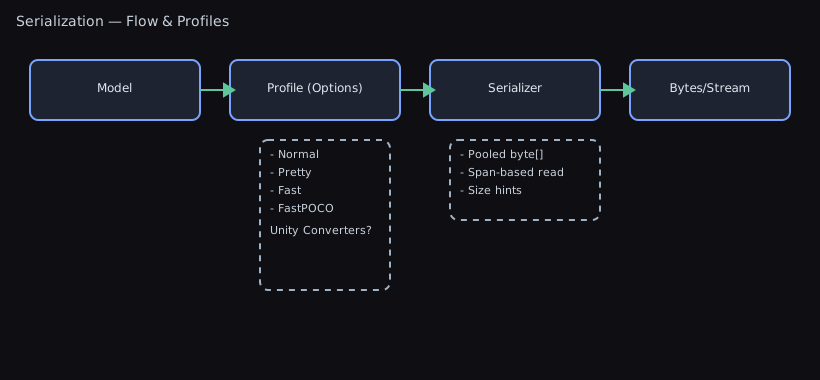
This package provides fast, compact serialization for save systems, configuration, and networking with a unified API.
- Json — System.Text.Json with Unity-aware converters
- Protobuf — protobuf-net for compact, schema-evolvable binary
- SystemBinary — .NET BinaryFormatter for legacy/trusted-only scenarios
All formats are exposed via WallstopStudios.UnityHelpers.Core.Serialization.Serializer and selected with SerializationType.
Formats Provided
- Json
- Human-readable; ideal for settings, debug, modding, and Git diffs.
- Includes converters for Unity types (ignores cycles, includes fields by default, case-insensitive by default; enums as strings in Normal/Pretty):
- Vector2, Vector3, Vector4, Vector2Int, Vector3Int
- Color, Color32, ColorBlock
- Quaternion, Matrix4x4, Pose, Plane, SphericalHarmonicsL2
- Bounds, BoundsInt, Rect, RectInt, RectOffset, RangeInt
- Ray, Ray2D, RaycastHit, BoundingSphere
- Resolution, RenderTextureDescriptor, LayerMask, Hash128, Scene
- AnimationCurve, Gradient, Touch, GameObject
- ParticleSystem.MinMaxCurve, ParticleSystem.MinMaxGradient
- System.Type (type metadata)
- Profiles: Normal, Pretty, Fast, FastPOCO (see below)
- Protobuf (protobuf-net)
- ⭐ Killer Feature: Schema Evolution — Players can load saves from older game versions without breaking! Add new fields, remove old ones, rename types—all while maintaining compatibility.
- Small and fast; best for networking and large save payloads.
- Forward/backward compatible message evolution (see the Schema Evolution guide below).
- SystemBinary (BinaryFormatter)
- Only for legacy or trusted, same-version, local data. Avoid for long-term persistence or untrusted input.
- ⚠️ Cannot handle version changes - a single field addition breaks all existing saves.
When To Use What
Use this decision flowchart to pick the right serialization format:
START: What are you serializing?
  │
  ├─ Game settings / Config files
  │   │
  │   ├─ Need human-readable / Git-friendly?
  │   │   → JSON (Normal or Pretty) ✓
  │   │
  │   └─ Performance critical (large files)?
  │       → JSON (Fast or FastPOCO) ✓
  │
  ├─ Save game data
  │   │
  │   ├─ First save system / Need debugging?
  │   │   → JSON (Pretty) ✓
  │   │
  │   ├─ Mobile / Size matters?
  │   │   → Protobuf ✓
  │   │
  │   └─ Need cross-version compatibility?
  │       → Protobuf ✓
  │
  ├─ Network messages (multiplayer)
  │   │
  │   └─ Bandwidth is critical
  │       → Protobuf ✓
  │
  ├─ Editor-only / Temporary cache (trusted environment)
  │   │
  │   └─ Same Unity version, local only
  │       → SystemBinary (⚠️ legacy, consider JSON Fast)
  │
  └─ Hot path / Per-frame serialization
      │
      ├─ Pure C# objects (no Unity types)?
      │   → JSON (FastPOCO) ✓
      │
      └─ Mixed with Unity types?
          → JSON (Fast) ✓
Quick Reference
- Use JSON for:
- Player/tool settings, human-readable saves, serverless workflows, text diffs
- Quick iteration and debugging
- First-time save system implementation
- Use Protobuf for:
- Network payloads and large, bandwidth-sensitive saves
- Cases where schema evolves across versions
- Mobile games where save file size matters
- Use SystemBinary only for:
- Transient caches in trusted environments with exact version match
- ⚠️ Consider JSON Fast instead - SystemBinary is legacy
JSON Examples (Unity-aware)
- Serialize/deserialize and write/read files
using System.Collections.Generic;
using UnityEngine;
using WallstopStudios.UnityHelpers.Core.Serialization;

public class SaveData
{
    public Vector3 position;
    public Color playerColor;
    public List<GameObject> inventory;
}

var data = new SaveData
{
    position = new Vector3(1, 2, 3),
    playerColor = Color.cyan,
    inventory = new List<GameObject>()
};

// Serialize to UTF-8 JSON bytes (Unity types supported)
byte[] jsonBytes = Serializer.JsonSerialize(data);

// Pretty stringify and parse from string
string jsonText = Serializer.JsonStringify(data, pretty: true);
SaveData fromText = Serializer.JsonDeserialize<SaveData>(jsonText);

// File helpers
Serializer.WriteToJsonFile(data, path: "save.json", pretty: true);
SaveData fromFile = Serializer.ReadFromJsonFile<SaveData>("save.json");

// Generic entry points (choose format at runtime)
byte[] bytes = Serializer.Serialize(data, SerializationType.Json);
SaveData loaded = Serializer.Deserialize<SaveData>(bytes, SerializationType.Json);
Advanced JSON APIs
Unity Helpers provides several advanced APIs for high-performance and robust file operations.
Async File Operations
For non-blocking file I/O (useful in loading screens or background saves):
using WallstopStudios.UnityHelpers.Core.Serialization;

// Async read from file
SaveData data = await Serializer.ReadFromJsonFileAsync<SaveData>("save.json");

// Async write to file
await Serializer.WriteToJsonFileAsync(data, "save.json", pretty: true);

// With cancellation token (for interruptible operations)
var cts = new CancellationTokenSource();
SaveData data = await Serializer.ReadFromJsonFileAsync<SaveData>("save.json", cts.Token);
await Serializer.WriteToJsonFileAsync(data, "save.json", pretty: true, cts.Token);
When to use async:
- Loading screens where you don’t want to block the main thread
- Auto-save systems running in the background
- Large save files that may take noticeable time
Safe Try-Pattern APIs
For graceful error handling without try-catch blocks:
using WallstopStudios.UnityHelpers.Core.Serialization;

// TryRead - returns false if file missing or invalid JSON
if (Serializer.TryReadFromJsonFile<SaveData>("save.json", out SaveData data))
{
    // File exists and parsed successfully
    LoadGame(data);
}
else
{
    // File missing or corrupted - start new game
    StartNewGame();
}

// TryWrite - returns false if write failed
if (!Serializer.TryWriteToJsonFile(data, "save.json"))
{
    Debug.LogError("Failed to save game!");
    ShowSaveErrorDialog();
}
When to use Try-pattern:
- Loading saves that may not exist (new players)
- Handling corrupted save files gracefully
- Writing to paths that may not be writable
Fast Serialization (Hot Paths)
For performance-critical scenarios where you serialize/deserialize frequently:
using WallstopStudios.UnityHelpers.Core.Serialization;

// Fast serialize - stricter options, Unity converters, minimal validation
byte[] fastBytes = Serializer.JsonSerializeFast(networkMessage);

// Fast deserialize
NetworkMessage msg = Serializer.JsonDeserializeFast<NetworkMessage>(fastBytes);

// Fast serialize with buffer reuse (zero-allocation after warmup)
byte[] buffer = null;
int length = Serializer.JsonSerializeFast(networkMessage, ref buffer);
// Use buffer[0..length], buffer is reused on subsequent calls
Fast options differences:
| Setting | Normal/Pretty | Fast |
|---|---|---|
| Case-insensitive | ✅ | ❌ |
| Comments allowed | ✅ | ❌ |
| Trailing commas | ✅ | ❌ |
| Include fields | ✅ | ❌ |
| Reference handling | Safe | Disabled |
| Unity type converters | ✅ | ✅ |
Creating Custom Options
Create your own options based on the Fast presets:
using WallstopStudios.UnityHelpers.Core.Serialization;
using System.Text.Json;

// Get a copy of Fast options to customize
JsonSerializerOptions myOptions = Serializer.CreateFastJsonOptions();
myOptions.WriteIndented = true;  // Add pretty-printing

// FastPOCO - for pure C# objects with NO Unity types (fastest)
JsonSerializerOptions pocoOptions = Serializer.CreateFastPocoJsonOptions();

// Use with any serialize method
byte[] bytes = Serializer.JsonSerialize(data, myOptions);
Serializer.WriteToJsonFile(data, "file.json", myOptions);
Option profiles:
CreateFastJsonOptions()— Fast parsing + Unity type converters (Vector3, Color, etc.)CreateFastPocoJsonOptions()— Fastest, no converters, pure C# objects only
Performance Comparison
// 🐌 Normal (most compatible, slightly slower)
byte[] normal = Serializer.JsonSerialize(data);

// 🚀 Fast (stricter, faster parsing/writing)
byte[] fast = Serializer.JsonSerializeFast(data);

// 🚀🚀 Fast + buffer reuse (zero-allocation after first call)
byte[] buffer = null;
int len = Serializer.JsonSerializeFast(data, ref buffer);

// 🚀🚀🚀 Fast POCO (pure C# objects, no Unity types)
JsonSerializerOptions pocoOpts = Serializer.CreateFastPocoJsonOptions();
byte[] fastest = Serializer.JsonSerialize(pureCSharpData, pocoOpts);
Protobuf Examples (Compact + Evolvable)
- Basic usage
using ProtoBuf; // protobuf-net
using WallstopStudios.UnityHelpers.Core.Serialization;

[ProtoContract]
public class PlayerInfo
{
    [ProtoMember(1)] public int id;
    [ProtoMember(2)] public string name;
}

var info = new PlayerInfo { id = 1, name = "Hero" };
byte[] buf = Serializer.ProtoSerialize(info);
PlayerInfo again = Serializer.ProtoDeserialize<PlayerInfo>(buf);

// Generic entry points
byte[] buf2 = Serializer.Serialize(info, SerializationType.Protobuf);
PlayerInfo again2 = Serializer.Deserialize<PlayerInfo>(buf2, SerializationType.Protobuf);

// Buffer reuse (reduce GC in hot paths)
byte[] buffer = null;
int len = Serializer.Serialize(info, SerializationType.Protobuf, ref buffer);
PlayerInfo sliced = Serializer.Deserialize<PlayerInfo>(buffer.AsSpan(0, len).ToArray(), SerializationType.Protobuf);
- Unity types with Protobuf: built-in surrogates
// This package registers protobuf-net surrogates at startup so Unity structs just work in protobuf models.
// The following Unity types are protobuf-compatible out of the box:
// - Vector2, Vector3, Vector2Int, Vector3Int
// - Quaternion
// - Color, Color32
// - Rect, RectInt
// - Bounds, BoundsInt
// - Resolution
// Example: use Vector3 directly in a protobuf-annotated model
using ProtoBuf;              // protobuf-net
using UnityEngine;           // Unity types
using WallstopStudios.UnityHelpers.Core.Serialization;

[ProtoContract]
public class NetworkMessage
{
    [ProtoMember(1)] public int playerId;
    [ProtoMember(2)] public Vector3 position;   // Works via registered surrogates
    [ProtoMember(3)] public Quaternion facing;  // Works via registered surrogates
}

// Serialize/deserialize as usual
var msg = new NetworkMessage { playerId = 7, position = new Vector3(1,2,3), facing = Quaternion.identity };
byte[] bytes = Serializer.ProtoSerialize(msg);
NetworkMessage again = Serializer.ProtoDeserialize<NetworkMessage>(bytes);
Notes
- Surrogates are registered in the Serializer static initializer; you don’t need to call anything.
- If you define your own DTOs, they will continue to work; surrogates simply make Unity structs first-class.
- Keep using [ProtoContract]/[ProtoMember] and stable field numbers for your own types.
⚠️ IL2CPP and Code Stripping Warning
Critical for IL2CPP builds (WebGL, iOS, Android, Consoles):
Protobuf uses reflection internally to serialize/deserialize types. Unity’s IL2CPP managed code stripping may remove types or fields that are only accessed via reflection, causing silent data loss or runtime crashes in release builds.
Common symptoms:
NullReferenceExceptionorTypeLoadExceptionduring Protobuf deserialization- Fields mysteriously have default values after loading (data appears to be lost)
- Works perfectly in Editor/Development builds, fails in Release/IL2CPP builds
- “Type not found” or “Method not found” errors at runtime
Solution: Create a link.xml file
In your Assets folder (or any subfolder), create link.xml to preserve your Protobuf types:
<linker>
  <!-- Preserve all your Protobuf-serialized types -->
  <assembly fullname="Assembly-CSharp">
    <!-- Preserve specific types -->
    <type fullname="MyGame.PlayerSave" preserve="all"/>
    <type fullname="MyGame.InventoryData" preserve="all"/>
    <type fullname="MyGame.NetworkMessage" preserve="all"/>

    <!-- Or preserve entire namespace -->
    <namespace fullname="MyGame.SaveData" preserve="all"/>
  </assembly>

  <!-- If using Protobuf types across assemblies -->
  <assembly fullname="MyGame.Shared">
    <namespace fullname="MyGame.Shared.Protocol" preserve="all"/>
  </assembly>

  <!-- Preserve Unity Helpers if needed -->
  <assembly fullname="WallstopStudios.UnityHelpers.Runtime">
    <!-- Usually not needed, but if you see errors: -->
    <type fullname="WallstopStudios.UnityHelpers.Core.Serialization.Serializer" preserve="all"/>
  </assembly>
</linker>
Testing checklist (CRITICAL):
- ✅ Test every IL2CPP build - Development builds don’t strip code, so issues only appear in Release
- ✅ Test on actual devices - WebGL/Mobile stripping can differ from standalone builds
- ✅ Test full save/load cycle - Save in one session, load in another to verify persistence
- ✅ Update link.xml when adding new types - Every
[ProtoContract]type needs preservation - ✅ Check build logs for stripping warnings - Unity logs which types/methods are stripped
- ✅ Test after Unity upgrades - Stripping behavior can change between Unity versions
When you might not need link.xml:
- Only using JSON serialization (source-generated, no reflection)
- Already preserving entire assembly with
preserve="all" - Using a custom IL2CPP link file that preserves everything
Advanced: Preserve only what’s needed
Instead of preserve="all", you can be more selective:
<type fullname="MyGame.PlayerSave">
  <method signature="System.Void .ctor()" preserve="all"/>
  <field name="playerId" />
  <field name="level" />
  <field name="inventory" />
</type>
However, this is error-prone. Start with preserve="all" and optimize later if build size is critical.
Related documentation:
<a id="protobuf-schema-evolution-the-killer-feature"></a>
## Protobuf Schema Evolution: The Killer Feature

**The Problem Protobuf Solves:**

You ship your game with this save format:
```csharp
[ProtoContract]
public class PlayerSave
{
    [ProtoMember(1)] public int level;
    [ProtoMember(2)] public string name;
}
A month later, you want to add a new feature and change the format:
[ProtoContract]
public class PlayerSave
{
    [ProtoMember(1)] public int level;
    [ProtoMember(2)] public string name;
    [ProtoMember(3)] public int gold;        // NEW FIELD
    [ProtoMember(4)] public bool isPremium;  // NEW FIELD
}
With JSON or BinaryFormatter: Players’ existing saves break. You must write migration code or wipe their progress.
With Protobuf: It just works! Old saves load perfectly with gold = 0 and isPremium = false defaults.
Real-World Save Game Evolution Example 🟡 Intermediate
Version 1.0 (Launch):
[ProtoContract]
public class PlayerSave
{
    [ProtoMember(1)] public string playerId;
    [ProtoMember(2)] public int level;
    [ProtoMember(3)] public Vector3DTO position;
}
Version 1.5 (Inventory System Added):
[ProtoContract]
public class PlayerSave
{
    [ProtoMember(1)] public string playerId;
    [ProtoMember(2)] public int level;
    [ProtoMember(3)] public Vector3DTO position;
    [ProtoMember(4)] public List<string> inventory = new();  // NEW: defaults to empty
}
Version 2.0 (Stats Overhaul - level renamed to xp):
[ProtoContract]
public class PlayerSave
{
    [ProtoMember(1)] public string playerId;
    // [ProtoMember(2)] int level - REMOVED, but tag 2 is NEVER reused
    [ProtoMember(3)] public Vector3DTO position;
    [ProtoMember(4)] public List<string> inventory = new();
    [ProtoMember(5)] public int xp;              // NEW: experience points
    [ProtoMember(6)] public int skillPoints;     // NEW: unspent skill points
}
Result: Players who saved in v1.0 can load their save in v2.0:
- Old
levelvalue (tag 2) is ignored - New
xpandskillPointsdefault to 0 - All existing data (
playerId,position,inventory) loads correctly - Zero migration code required!
Schema Evolution Rules
✅ Safe Changes (Always Compatible):
- Add new fields with new tag numbers
- Remove fields (but never reuse their tag numbers)
- Change field names (tags are what matter, not names)
- Add new message types
- Change default values (only affects new saves)
⚠️ Requires Care:
- Changing field types (e.g.,
int→longworks,int→stringdoesn’t) - Changing
repeatedto singular or vice versa (usually breaks) - Renumbering existing tags (breaks everything!)
❌ Never Do This:
- Reuse deleted field tag numbers
- Change the meaning of an existing tag
- Remove required fields (avoid
requiredentirely - use validation instead)
Multi-Version Compatibility Pattern 🔴 Advanced
Handle breaking changes across major versions gracefully:
[ProtoContract]
public class SaveFile
{
    [ProtoMember(1)] public int version = 3;  // Track your save version

    // Version 1-3 fields
    [ProtoMember(2)] public string playerId;
    [ProtoMember(3)] public Vector3DTO position;

    // Version 2+ fields
    [ProtoMember(10)] public List<string> inventory;

    // Version 3+ fields
    [ProtoMember(20)] public PlayerStats stats;

    public void PostDeserialize()
    {
        if (version < 2)
        {
            // Migrate v1 saves: initialize empty inventory
            inventory ??= new List<string>();
        }

        if (version < 3)
        {
            // Migrate v2 saves: create default stats
            stats ??= new PlayerStats { xp = 0, level = 1 };
        }

        version = 3; // Update to current version
    }
}
⚠️ Common Mistake: Don’t put migration logic in the constructor. Use
PostDeserialize()or a dedicated method called after loading. Constructors don’t run during deserialization.
Testing Schema Evolution 🟢 Beginner
Recommended Testing Pattern:
// 1. Save a file with version N:
var oldSave = new PlayerSave { level = 10, name = "Hero" };
byte[] bytes = Serializer.ProtoSerialize(oldSave);
File.WriteAllBytes("test_v1.save", bytes);

// 2. Update your schema (add new fields)

// 3. Load the old file with new schema:
byte[] oldBytes = File.ReadAllBytes("test_v1.save");
var loaded = Serializer.ProtoDeserialize<PlayerSave>(oldBytes);

// New fields have defaults, old fields are preserved
Assert.AreEqual(10, loaded.level);
Assert.AreEqual("Hero", loaded.name);
Assert.AreEqual(0, loaded.gold);  // New field defaults to 0
Best Practice: Keep regression test files — Store save files from each version in your test suite.
Common Save System Patterns
Pattern 1: Version-Aware Loading 🟡 Intermediate
public SaveFile LoadSave(string path)
{
    byte[] bytes = File.ReadAllBytes(path);
    SaveFile save = Serializer.ProtoDeserialize<SaveFile>(bytes);

    // Perform any version-specific migrations
    save.PostDeserialize();

    return save;
}
Pattern 2: Gradual Migration (preserve old format for rollback) 🔴 Advanced
public class SaveManager
{
    public void SaveGame(PlayerData data)
    {
        var protobuf = ConvertToProtobuf(data);
        byte[] bytes = Serializer.ProtoSerialize(protobuf);

        // Write both formats during transition period
        File.WriteAllBytes("save.dat", bytes);
        Serializer.WriteToJsonFile(data, "save.json.backup");
    }
}
Pattern 3: Automatic Backup Before Save 🟡 Intermediate
public void SaveGame(SaveFile save)
{
    string path = "player.save";
    string backup = $"player.save.backup_{DateTime.Now:yyyyMMdd_HHmmss}";

    // Backup existing save before overwriting
    if (File.Exists(path))
    {
        File.Copy(path, backup);
    }

    byte[] bytes = Serializer.ProtoSerialize(save);
    File.WriteAllBytes(path, bytes);

    // Keep only last 3 backups
    CleanupOldBackups("player.save.backup_*", keepCount: 3);
}
Why This Matters for Live Games
Without schema evolution (JSON/BinaryFormatter):
- ❌ Every update risks breaking player saves
- ❌ Must write complex migration code for every version
- ❌ Players lose progress if migration fails
- ❌ Can’t roll back broken updates (saves are corrupted)
- ❌ Hotfixes that change save format are terrifying
With Protobuf schema evolution:
- ✅ Add features freely without breaking existing saves
- ✅ Graceful degradation (old clients ignore new fields)
- ✅ Can roll back game versions without data loss
- ✅ Hotfixes are safe (just add new optional fields)
- ✅ Reduces QA burden (less migration testing needed)
Protobuf Compatibility Tips
- Add fields with new numbers; old clients ignore unknown fields; new clients default missing fields.
- Never reuse or renumber existing field tags; reserve removed numbers if needed.
- Avoid changing scalar types on the same number.
- Prefer optional/repeated instead of required.
- Use sensible defaults to minimize payloads.
- Group field numbers by version (e.g., v1: 1-10, v2: 11-20, v3: 21-30) for clarity.
Protobuf Polymorphism (Inheritance + Interfaces)
- Abstract base with [ProtoInclude] (recommended)
- Protobuf-net does not infer subtype graphs unless you tell it. The recommended pattern is to put
[ProtoContract]on an abstract base and list all concrete subtypes with[ProtoInclude(tag, typeof(Subtype))]. - Declare your fields/properties as the abstract base so protobuf can deserialize to the correct subtype.
- Protobuf-net does not infer subtype graphs unless you tell it. The recommended pattern is to put
using ProtoBuf;

[ProtoContract]
public abstract class Message { }

[ProtoContract]
public sealed class Ping : Message { [ProtoMember(1)] public int id; }

[ProtoContract]
[ProtoInclude(100, typeof(Ping))]
public abstract class MessageBase : Message { }

[ProtoContract]
public sealed class Envelope { [ProtoMember(1)] public MessageBase payload; }

// round-trip works: Envelope.payload will be Ping at runtime
byte[] bytes = Serializer.ProtoSerialize(new Envelope { payload = new Ping { id = 7 } });
Envelope again = Serializer.ProtoDeserialize<Envelope>(bytes);
- Interfaces require a root mapping
- Protobuf cannot deserialize directly to an interface because it needs a concrete root. You have three options:
- Use an abstract base with
[ProtoInclude]and declare fields as that base (preferred). - Register a mapping from the interface to a concrete root type at startup:
- Use an abstract base with
- Protobuf cannot deserialize directly to an interface because it needs a concrete root. You have three options:
Serializer.RegisterProtobufRoot<IMsg, Ping>();
IMsg msg = Serializer.ProtoDeserialize<IMsg>(bytes);
- Or specify the concrete type with the overload:
IMsg msg = Serializer.ProtoDeserialize<IMsg>(bytes, typeof(Ping));
- Random system example
- All PRNGs derive from
AbstractRandom, which is[ProtoContract]and declares each implementation via[ProtoInclude]. - Do this in your models:
- All PRNGs derive from
[ProtoContract]
public class RNGHolder { [ProtoMember(1)] public AbstractRandom rng; }

// Serialize any implementation without surprises
RNGHolder holder = new RNGHolder { rng = new PcgRandom(seed: 123) };
byte[] buf = Serializer.ProtoSerialize(holder);
RNGHolder rt = Serializer.ProtoDeserialize<RNGHolder>(buf);
- If you truly need an
IRandomfield, register a root or pass the concrete type when deserializing:
Serializer.RegisterProtobufRoot<IRandom, PcgRandom>();
IRandom r = Serializer.ProtoDeserialize<IRandom>(bytes);
// or
IRandom r2 = Serializer.ProtoDeserialize<IRandom>(bytes, typeof(PcgRandom));
- Tag numbers are API surface
- Tags in
[ProtoInclude(tag, ...)]and[ProtoMember(tag)]are part of your schema. Add new numbers for new types/fields; never reuse or renumber existing tags once shipped.
- Tags in
SystemBinary Examples (Legacy/Trusted Only)
using WallstopStudios.UnityHelpers.Core.Serialization;

var obj = new SomeSerializableType();
byte[] bin = Serializer.BinarySerialize(obj);
SomeSerializableType roundtrip = Serializer.BinaryDeserialize<SomeSerializableType>(bin);

// Generic
byte[] bin2 = Serializer.Serialize(obj, SerializationType.SystemBinary);
var round2 = Serializer.Deserialize<SomeSerializableType>(bin2, SerializationType.SystemBinary);
Watch-outs
- BinaryFormatter is obsolete for modern .NET and unsafe for untrusted input.
- Version changes often break BinaryFormatter payloads; restrict to same-version caches.
Features
- Unity converters for JSON: Vector2/3/4, Color, Matrix4x4, GameObject, Type
- Protobuf (protobuf-net) integration
- LZMA compression utilities (
Runtime/Utils/LZMA.cs) - Pooled buffers/writers to reduce allocations
References
- API:
Runtime/Core/Serialization/Serializer.cs:1 - LZMA:
Runtime/Utils/LZMA.cs:1
Migration
- Replace direct
System.Text.Json.JsonSerializercalls in app code withSerializer.JsonSerialize/JsonDeserialize/JsonStringify, or withSerializer.Serialize/Deserialize+SerializationType.Jsonto centralize options and Unity converters. - Replace any custom protobuf helpers with
Serializer.ProtoSerialize/ProtoDeserializeor the genericSerializer.Serialize/DeserializeAPIs. Ensure models are annotated with[ProtoContract]and stable[ProtoMember(n)]tags. - For existing binary saves using BinaryFormatter, prefer migrating to Json or Protobuf. If you must keep BinaryFormatter, scope it to trusted, same-version caches only.
2.0 changes
- BinaryFormatter (
SerializationType.SystemBinary) is deprecated but remains functional for trusted/legacy scenarios. Prefer:SerializationType.Json(System.Text.Json with Unity-aware converters) for readable, diffable content.SerializationType.Protobuf(protobuf-net) for compact, high-performance binary payloads.
IL2CPP / AOT guidance
System.Text.Json can require extra care under AOT (e.g., IL2CPP):
- Prefer explicit
JsonSerializerOptionsand concrete generic APIs overobject-based serialization to reduce reflection. - For hot POCO models, consider adding a source-generated context (JsonSerializerContext) in your game assembly and pass it to
JsonSerializercalls. - If you rely on many custom converters, ensure they are referenced by code so the linker doesn’t strip them. The UnityHelpers converters are referenced via options by default.
- Avoid deserializing
System.Typefrom untrusted input (seeTypeConverter); this is intended for trusted configs/tools.