Unity Helpers

Treasure chest of Unity developer tools. Professional inspector tooling, high-performance utilities, spatial queries, and 20+ editor tools.
Hulls (Convex vs Concave)
TL;DR — When To Use Which
- Convex hull: fastest, safe outer bound; great for coarse collisions and visibility.
- Concave hull: follows shape detail; tunable fidelity vs. stability via k/alpha parameters.
This guide explains convex and concave hulls, when to use each, and how they differ.
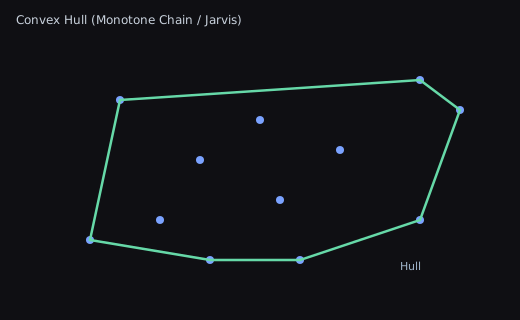
Convex Hull
- The smallest convex polygon that contains all points.
- Algorithms: Monotone Chain (a.k.a. Andrew’s), Graham Scan, Jarvis March.
- Characteristics
- Always convex; no inward dents.
- Stable and deterministic for fixed input.
- Often used for coarse collision proxies, shape bounds, and visibility.
Illustration:
Concave Hull
- A polygon that can indent to follow the shape of points more closely.
- Algorithms: k-nearest-neighbor based, alpha-shapes, ball-pivoting variants.
- Characteristics
- Can capture shape detail; may exclude sparse outliers.
- Parameterized by k (neighbors) or alpha (radius) controlling “concavity”.
- May create holes or self-intersections if not constrained; validate output.
Illustration:

Choosing Between Them
- Use convex hull when you need a fast, safe, and simple bound with predictable performance.
- Use concave hull when shape fidelity matters (e.g., silhouette, path enclosure) and you accept a tunable trade-off between detail and stability.
Tips
- Preprocess: remove duplicate points and optionally simplify clusters.
- Postprocess: enforce clockwise/CCW winding and run self-intersection checks for concave hulls.
- Numerical stability: add small epsilons for collinear checks; include or exclude boundary points consistently.
API Reference (Grid vs. Gridless)
All hull helpers now offer both grid-aware (Grid + FastVector3Int) and gridless variants so you can work directly with Vector2/FastVector3Int data:
- Convex hull
points.BuildConvexHull(includeColinearPoints: false)for pureVector2.fastPoints.BuildConvexHull(includeColinearPoints: false)forFastVector3Intwithout aGrid.fastPoints.BuildConvexHull(grid, includeColinearPoints: false)when you needGrid.CellToWorldconversions.- Algorithm selection via
ConvexHullAlgorithmis available for both gridful and gridless overloads.
- Concave hull
vectorPoints.BuildConcaveHull(options)/BuildConcaveHullKnn/BuildConcaveHullEdgeSplitforVector2.fastPoints.BuildConcaveHull(options)plus theKnn/EdgeSplithelpers forFastVector3Intwithout requiring aGrid.fastPoints.BuildConcaveHull(grid, options)remains available when your data lives in grid space.-
⚠️ The legacy line-division overload
BuildConcaveHull(IEnumerable<FastVector3Int>, Grid, float scaleFactor, float concavity)has been retired and now throwsNotSupportedException. Switch toConcaveHullStrategy.KnnorConcaveHullStrategy.EdgeSplitinstead.
Because the new overloads reuse the pooled implementations under the hood, behaviour (winding, pruning, GC profile) matches the grid versions—pick whichever signature best matches your data source.
Gridless vs. Grid-Aware Quickstart
- Pick the gridless overloads when your points already live in world/local space (
Vector2,Vector3, orFastVector3Intwithout aGrid). This keeps the hull math independent of Unity’s tile conversion layer. - Pick the grid-aware overloads when you have cell coordinates tied to a
GridorTilemapand you want the helper to respectGrid.CellToWorldso you can visualize the hull in scene space.
Gridless example — pure Vector2 data for nav areas or spline fitting:
using System.Collections.Generic;
using UnityEngine;
using WallstopStudios.UnityHelpers.Core.Extension;

// outlinePoints could come from mouse clicks or a baked spline
List<Vector2> outlinePoints = CollectOutlineSamples();
UnityExtensions.ConcaveHullOptions outlineOptions = UnityExtensions.ConcaveHullOptions.Default
    .WithStrategy(UnityExtensions.ConcaveHullStrategy.EdgeSplit)
    .WithBucketSize(32)
    .WithAngleThreshold(70f);

List<Vector2> hull = outlinePoints.BuildConcaveHull(outlineOptions);
Grid-aware example — FastVector3Int tiles aligned to a Grid for tilemaps or voxel data:
using System.Collections.Generic;
using UnityEngine;
using WallstopStudios.UnityHelpers.Core.DataStructure.Adapters;
using WallstopStudios.UnityHelpers.Core.Extension;

Grid grid = GetComponent<Grid>();
List<FastVector3Int> tileSamples = CollectTileCoordinates();
UnityExtensions.ConcaveHullOptions tileOptions = UnityExtensions.ConcaveHullOptions.Default
    .WithStrategy(UnityExtensions.ConcaveHullStrategy.Knn)
    .WithNearestNeighbors(5);

List<FastVector3Int> gridHull = tileSamples.BuildConcaveHull(grid, tileOptions);
See Samples~/Spatial Structures - 2D and 3D/Scripts/HullUsageDemo.cs for a runnable MonoBehaviour that draws both loops (cyan for gridless, yellow for grid-aware) and logs the strategy/neighbor counts so you can copy the pattern directly into your own tooling, or just open Samples~/Spatial Structures - 2D and 3D/Scenes/HullUsageDemo.unity and press Play to watch both flows without extra setup.
Collinear Points & includeColinearPoints
- Convex hull helpers prune collinear points by default so only the true corners remain, even after grid-to-world projections introduce float skew.
- Opt into boundary retention by passing
includeColinearPoints: truetoBuildConvexHull(gridless) or its grid-aware overloads. - Concave hulls inherit the pruned convex frontier; enabling collinear inclusion widens the seed set and can improve fidelity for dense edge sampling.
- The comprehensive tests
UnityExtensionsComprehensiveTests.ConvexHullDenseSamplesOnAllEdgesCollapseToCorners(grid) and.Vector2ConvexHullDenseSamplesCollapseToCorners(gridless) cover both paths so you can trust the deterministic behavior.
List<FastVector3Int> cornersOnly = gridPoints.BuildConvexHull(grid, includeColinearPoints: false);
List<FastVector3Int> withEdges = gridPoints.BuildConvexHull(grid, includeColinearPoints: true);