Unity Helpers
Treasure chest of Unity developer tools. Professional inspector tooling, high-performance utilities, spatial queries, and 20+ editor tools.
2D Spatial Trees — Concepts and Usage
This practical guide complements performance and semantics pages with diagrams and actionable selection advice.
TL;DR — What Problem This Solves
- You often need to answer: “What’s near X?” or “What’s inside this area?”
- ⭐ Naive loops are O(n) — check every object. Spatial trees are O(log n) — only check nearby objects.
- Result: 10-100x faster queries, scaling from dozens to millions of objects.
The Scaling Advantage
| Object Count | Naive Approach (checks) | Spatial Tree (checks) | Speedup |
|---|---|---|---|
| 100 | 100 | ~7 | 14x |
| 1,000 | 1,000 | ~10 | 100x |
| 10,000 | 10,000 | ~13 | 769x |
| 100,000 | 💀 Unplayable | ~17 | ∞ |
Quick picks
- Many moving points, frequent rebuilds, broad searches: QuadTree2D
- Static points, nearest‑neighbor/k‑NN: KdTree2D (Balanced)
- Fast builds with good‑enough queries on points: KdTree2D (Unbalanced)
- Objects with size (bounds), intersect/contain queries: RTree2D
Quick Start (Code)
Points (QuadTree2D / KdTree2D)
using WallstopStudios.UnityHelpers.Core.DataStructure;
using UnityEngine;
using System.Collections.Generic;

// Example element with a position
struct Enemy { public Vector2 pos; public int id; }

var enemies = new List<Enemy>(/* fill with positions */);

// Build a tree from points
var quad = new QuadTree2D<Enemy>(enemies, e => e.pos);
var kd   = new KdTree2D<Enemy>(enemies, e => e.pos); // balanced by default

// Range query (circle)
var inRange = new List<Enemy>();
quad.GetElementsInRange(playerPos, 10f, inRange);

// Bounds (box) query
var inBox = new List<Enemy>();
kd.GetElementsInBounds(new Bounds(center, size), inBox);

// Approximate nearest neighbors
var neighbors = new List<Enemy>();
kd.GetApproximateNearestNeighbors(playerPos, count: 10, neighbors);
Sized objects (RTree2D)
using WallstopStudios.UnityHelpers.Core.DataStructure;
using UnityEngine;
using System.Collections.Generic;

struct Tile { public Bounds bounds; public int kind; }

var tiles = new List<Tile>(/* fill with bounds */);

// Build from bounds (AABBs)
var rtree = new RTree2D<Tile>(tiles, t => t.bounds);

// Bounds query (fast for large areas)
var hits = new List<Tile>();
rtree.GetElementsInBounds(worldBounds, hits);

// Range query (treats items by their bounds)
var near = new List<Tile>();
rtree.GetElementsInRange(center, radius, near);
Notes
- These trees are immutable: rebuild when positions/bounds change significantly.
- For lots of moving points, consider
SpatialHash2Dfor broad‑phase. - See Spatial Tree Semantics for boundary behavior and edge cases.
⭐ Zero-Allocation Queries: The Performance Killer Feature
The Problem - GC Spikes Every Frame:
void Update()
{
    // 🔴 BAD: Allocates new List every frame
    List<Enemy> nearby = tree.GetElementsInRange(playerPos, 10f);

    foreach (Enemy e in nearby)
    {
        e.ReactToPlayer();
    }
    // Result: GC runs frequently = frame drops
}
The Solution - Buffering Pattern:
// Reusable buffer (declare once)
private List<Enemy> nearbyBuffer = new(64);

void Update()
{
    nearbyBuffer.Clear();

    // 🟢 GOOD: Reuses same List = zero allocations
    tree.GetElementsInRange(playerPos, 10f, nearbyBuffer);

    foreach (Enemy e in nearbyBuffer)
    {
        e.ReactToPlayer();
    }
    // Result: No GC, stable 60fps
}
Impact:
- Before: GC spikes every 2-3 seconds, frame drops to 40fps
- After: Zero GC from queries, stable 60fps even with 1000s of queries/second
All spatial trees support this pattern:
QuadTree2D.GetElementsInRange(pos, radius, buffer)KdTree2D.GetElementsInBounds(bounds, buffer)RTree2D.GetElementsInRange(pos, radius, buffer)
💡 Pro Tip: Pre-size your buffers based on expected max results.
new List<Enemy>(64)avoids internal resizing for results up to 64 items.
Maximum Ergonomics:
These APIs return the buffer you pass in, so you can use them directly in foreach loops:
private List<Enemy> nearbyBuffer = new(64);

void Update()
{
    // Returns the same buffer - use it directly in foreach!
    foreach (Enemy e in tree.GetElementsInRange(playerPos, 10f, nearbyBuffer))
    {
        e.ReactToPlayer();
    }
}
Using Pooled Buffers:
Don’t want to manage buffers yourself? Use the built-in pooling utilities:
using WallstopStudios.UnityHelpers.Utils;

void Update()
{
    // Get pooled buffer - automatically returned when scope exits
    using var lease = Buffers<Enemy>.List.Get(out List<Enemy> buffer);

    // Use it directly in foreach - combines zero-alloc query + pooled buffer!
    foreach (Enemy e in tree.GetElementsInRange(playerPos, 10f, buffer))
    {
        e.ReactToPlayer();
    }
    // buffer automatically returned to pool here
}
See Buffering Pattern for the complete guide and Pooling Utilities for more pooling options.
Structures
QuadTree2D
- Partition: Recursively splits space into four quadrants.
- Use for: Broad-phase proximity, view culling, general spatial bucketing.
- Pros: Simple structure; predictable performance; incremental updates straightforward.
- Cons: Data hotspots deepen local trees; nearest neighbors slower than KDTree.
Diagram: 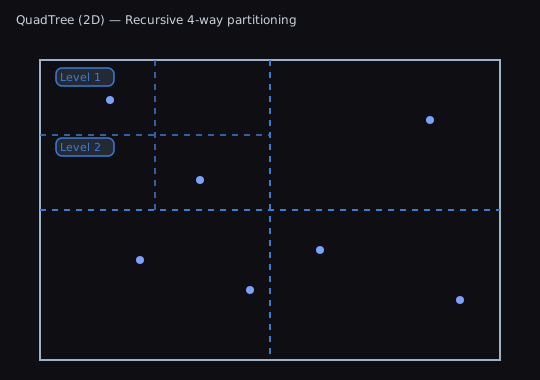
KDTree2D
- Partition: Alternating axis-aligned splits (x/y), often median-balanced.
- Use for: Nearest neighbor, k-NN, range queries on points.
- Pros: Strong NN performance; balanced variant gives consistent query time.
- Cons: Costly to maintain under heavy churn; unbalanced variant can degrade.
Diagram: 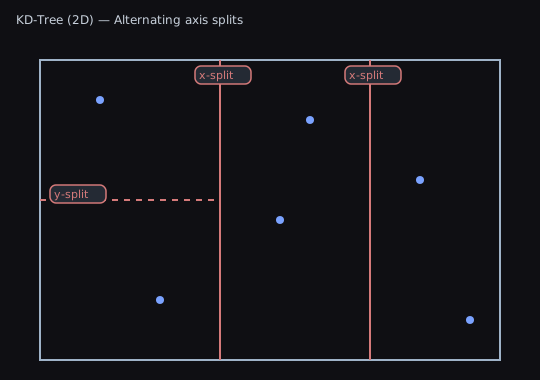
RTree2D
- Partition: Groups items by minimum bounding rectangles (MBRs) with hierarchical MBRs.
- Use for: Items with size (AABBs): sprites, tiles, colliders; bounds intersection.
- Pros: Great for large bounds queries; matches bounds semantics.
- Cons: Overlapping MBRs can increase node visits; not optimal for point NN.
Diagram: 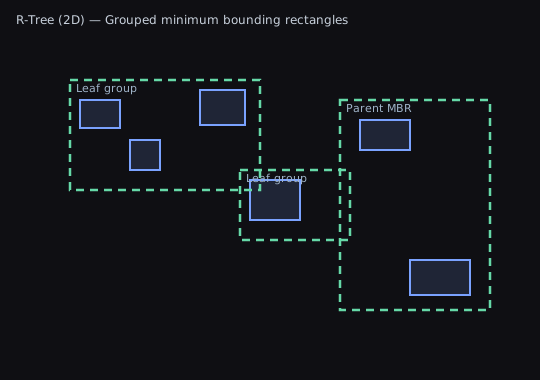
Choosing a Structure
Use this decision flowchart to pick the right spatial tree:
START: Do your objects move frequently?
  │
  ├─ YES → Consider SpatialHash2D instead (see README)
  │         (Spatial trees require rebuild on movement)
  │
  └─ NO → Continue to next question
      │
      └─ What type of queries do you need?
          │
          ├─ Primarily nearest neighbor (k-NN)
          │   │
          │   ├─ Static data, want consistent performance
          │   │   → KDTree2D (Balanced) ✓
          │   │
          │   └─ Data changes occasionally, need fast rebuilds
          │       → KDTree2D (Unbalanced) ✓
          │
          ├─ Do objects have size/bounds (not just points)?
          │   │
          │   ├─ YES → Need bounds intersection queries
          │   │   → RTree2D ✓
          │   │
          │   └─ NO → Continue
          │
          └─ General range/circular queries, broad-phase
              → QuadTree2D ✓ (best all-around choice)
Quick Reference
- Many moving points, rebuild or frequent updates: QuadTree2D
- Nearest neighbors on static points: KDTree2D (Balanced)
- Fast builds with good-enough queries: KDTree2D (Unbalanced)
- Objects with area; bounds queries primary: RTree2D
- Very frequent movement (every frame): SpatialHash2D (see README)
Query Semantics
- Points vs. Bounds: QuadTree2D and KDTree2D are point-based; RTree2D is bounds-based.
- Boundary inclusion: normalize half-open vs. closed intervals. Add epsilons for edge cases.
- Numeric stability: prefer consistent ordering for collinear and boundary points.
For deeper details, performance data, and diagrams, see: