Unity Helpers

Treasure chest of Unity developer tools. Professional inspector tooling, high-performance utilities, spatial queries, and 20+ editor tools.
Singleton Utilities (Runtime + ScriptableObject)
Visual
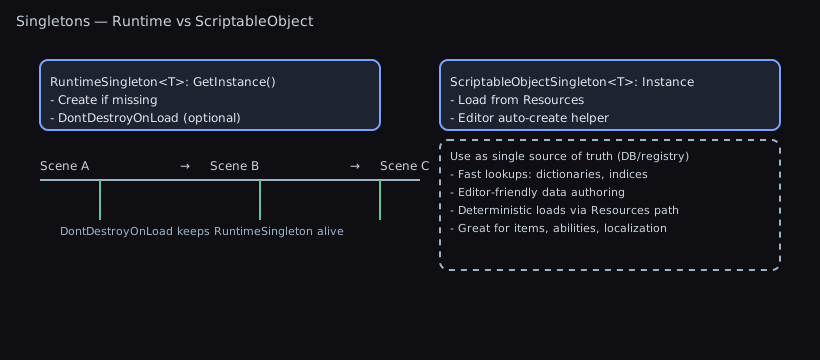
This package includes two lightweight, production‑ready singleton helpers that make global access patterns safe, consistent, and testable:
RuntimeSingleton<T>— a component singleton that ensures one instance exists in play mode, optionally persists across scenes, and self‑initializes when first accessed.ScriptableObjectSingleton<T>— a configuration/data singleton backed by a single asset underResources/, with an editor auto‑creator to keep assets present and correctly placed.
Odin compatibility: When Odin Inspector is present (
ODIN_INSPECTORdefined), these types derive fromSerializedMonoBehaviour/SerializedScriptableObjectfor richer serialization. Without Odin, they fall back to Unity base types. No code changes required.
TL;DR — What Problem This Solves
- Stop hand‑rolling global access. Get a single, safe instance you can call from anywhere.
- Choose between a scene‑resident component or a project asset for settings/data.
- No manual setup: instances auto‑create on first use; ScriptableObject assets auto‑create/move under
Resources/in the Editor.
Auto-loading singletons
- Add
[AutoLoadSingleton]to anyRuntimeSingleton<T>orScriptableObjectSingleton<T>to have it instantiated automatically. - The editor’s Attribute Metadata generator discovers those attributes (via
TypeCache) and serializes the type name + load phase intoAttributeMetadataCache. No manual registration or code-generation is required. - At runtime (play mode only),
SingletonAutoLoaderreads the serialized entries and uses reflection to touch each singleton’sInstanceduring the configuredRuntimeInitializeLoadType(defaultBeforeSplashScreen). - Prefer auto-loading only for global services/data that every scene requires; optional or level-specific systems should still call
Instancemanually. - Example:
[AutoLoadSingleton(RuntimeInitializeLoadType.BeforeSceneLoad)]
public sealed class GlobalAudioSettings : ScriptableObjectSingleton<GlobalAudioSettings>
{
    public float masterVolume = 0.8f;
}
Quick decision guide
- Need a behaviour that runs (Update, events, coroutines) and may persist across scenes? Use
RuntimeSingleton<T>. - Need global config/data you edit in the Inspector and load from any scene? Use
ScriptableObjectSingleton<T>.
Quick Start (1 minute)
RuntimeSingleton
public sealed class GameServices : RuntimeSingleton<GameServices>
{
    // Optional: keep across scene loads
    protected override bool Preserve => true;
}

// Use anywhere
GameServices.Instance.DoThing();
ScriptableObjectSingleton
[CreateAssetMenu(menuName = "Game/Audio Settings")]
[ScriptableSingletonPath("Settings/Audio")] // Assets/Resources/Settings/Audio/AudioSettings.asset
public sealed class AudioSettings : ScriptableObjectSingleton<AudioSettings>
{
    public float masterVolume = 0.8f;
}

// Use anywhere (asset auto‑created/moved by the editor tool)
float vol = AudioSettings.Instance.masterVolume;
Contents
- Odin Compatibility
- When To Use / Not To Use
- RuntimeSingleton
- Lifecycle diagram, examples, pitfalls
- ScriptableObjectSingleton
- Lookup + auto‑creator diagrams, examples, tips
- Scenarios & Guidance
- Troubleshooting
Odin Compatibility
- With Odin installed (symbol
ODIN_INSPECTOR), base classes inherit fromSerializedMonoBehaviourandSerializedScriptableObjectto enable serialization of complex types (dictionaries, polymorphic fields) with Odin drawers. - Without Odin, bases inherit from Unity’s
MonoBehaviour/ScriptableObjectwith no behavior change.
When To Use
RuntimeSingleton<T>- Cross‑scene services (thread dispatcher, audio router, global managers).
- Utility components that should always be available via
T.Instance. - Creating the instance on demand when not found in the scene.
ScriptableObjectSingleton<T>- Global settings/configuration (graphics, audio, feature flags).
- Data that should be edited as an asset and loaded via
Resources. - Consistent project setup for teams (auto‑created asset on editor load).
When Not To Use
- Prefer DI/service locators for heavily decoupled architectures requiring multiple implementations per environment, or for test seams where global state is undesirable.
- Avoid
RuntimeSingleton<T>for ephemeral, per‑scene logic or objects that should be duplicated in additive scenes. - Avoid
ScriptableObjectSingleton<T>for save data or level‑specific data that should not live in Resources or should have multiple instances.
RuntimeSingleton<T> Overview
- Access via
T.Instance(creates a newGameObjectnamed"<Type>-Singleton"and addsTif none exists; otherwise finds an existing active instance). HasInstancelets you check for an existing instance without creating one.Preserve(virtual, defaulttrue) controlsDontDestroyOnLoad.- Handles duplicate detection and cleans up instance reference on destroy. Instance is cleared on domain reload before scene load.
Example: Simple service
using UnityEngine;
using WallstopStudios.UnityHelpers.Utils;

public sealed class GameServices : RuntimeSingleton<GameServices>
{
    // Disable cross‑scene persistence if desired
    protected override bool Preserve => false;

    public void Log(string message)
    {
        Debug.Log($"[GameServices] {message}");
    }
}

// Usage from anywhere
GameServices.Instance.Log("Hello world");
Odin note: With Odin installed, the class inherits SerializedMonoBehaviour, enabling dictionaries and other complex serialized types.
Common pitfalls:
- If an inactive instance exists in the scene,
Instancewon’t find it (search excludes inactive objects) and will create a new one. - If two active instances exist, the newer one logs an error and destroys itself.
- If
Preserveistrue, the instance is detached and markedDontDestroyOnLoad.
Lifecycle diagram:
T.Instance ─┬─ Has _instance? ──▶ return
            │
            ├─ Find active T in scene? ──▶ set _instance, return
            │
            └─ Create GameObject("T-Singleton") + Add T
                 └─ Awake(): assign _instance, if Preserve: DontDestroyOnLoad
                         └─ Start(): if duplicate, log + destroy self
Notes:
- To avoid creation during a sensitive frame, place a pre‑made instance in your bootstrap scene.
- For scene‑local managers, override
Preserve => false.
ScriptableObjectSingleton<T> Overview
- Access via
T.Instance(lazy‑loads fromResources/using either a custom path or the type name; warns if multiple assets found and chooses the first by name). HasInstanceindicates whether the lazy value exists and is not null.- Optional
[ScriptableSingletonPath("Sub/Folder")]to control theResourcessubfolder. - Editor utility auto‑creates and relocates assets: see the “ScriptableObject Singleton Creator” in the Editor Tools Guide.
Example: Settings asset
using WallstopStudios.UnityHelpers.Utils;
using WallstopStudios.UnityHelpers.Core.Attributes;

[ScriptableSingletonPath("Settings/Audio")]
public sealed class AudioSettings : ScriptableObjectSingleton<AudioSettings>
{
    public float musicVolume = 0.8f;
    public bool enableSpatialAudio = true;
}

// Usage at runtime
float vol = AudioSettings.Instance.musicVolume;
Odin note: With Odin installed, the class inherits SerializedScriptableObject, so you can safely serialize complex collections without custom drawers.
Asset management tips:
- Place the asset under
Assets/Resources/(or under the path from[ScriptableSingletonPath]). - The Editor’s “ScriptableObject Singleton Creator” runs on load to create missing assets and move misplaced ones. It also supports a test‑assembly toggle used by our test suite.
Lookup order diagram:
Instance access:
  [1] Resources.LoadAll<T>(custom path from [ScriptableSingletonPath])
  [2] if none: Resources.Load<T>(type name)
  [3] if none: Resources.LoadAll<T>(root)
  [4] if multiple: warn + pick first by name (sorted)
Auto‑creator flow (Editor):
On editor load:
  - Scan all ScriptableObjectSingleton<T> types
  - For each non-abstract type:
      - Determine Resources path (attribute or type name)
      - Ensure folder under Assets/Resources
      - If asset exists elsewhere: move to target path
      - Else: create new asset at target path
  - Save & Refresh if changes
Asset structure diagram:
Default (no attribute):
Assets/
  Resources/
    AudioSettings.asset         // type name

With [ScriptableSingletonPath("Settings/Audio")]:
Assets/
  Resources/
    Settings/
      Audio/
        AudioSettings.asset
Scenarios & Guidance
- Global dispatcher: See
UnityMainThreadDispatcherwhich derives fromRuntimeSingleton<UnityMainThreadDispatcher>. - Global data caches or registries: Use
ScriptableObjectSingleton<T>so data lives in a single editable asset and loads fast. - Cross‑scene managers: Keep
Preserve = trueto avoid duplicates across scene loads.
Data Registries & Lookups (Single Source of Truth)
ScriptableObject singletons excel as in‑project “databases” for content/config:
- Centralize definitions (items, abilities, buffs, NPCs, localization) in one asset.
- Build fast lookup indices (by ID/tag/category) at load or validation time.
- Keep workflows simple: edit in Inspector, no runtime bootstrapping needed.
Example: Items DB with indices
using System.Collections.Generic;
using UnityEngine;
using WallstopStudios.UnityHelpers.Utils;

[CreateAssetMenu(menuName = "Game/Items DB")]
[ScriptableSingletonPath("DB")] // Assets/Resources/DB/ItemsDb.asset
public sealed class ItemsDb : ScriptableObjectSingleton<ItemsDb>
{
    [System.Serializable]
    public sealed class ItemDef { public int id; public string name; public Sprite icon; }

    public List<ItemDef> items = new();

    // Non-serialized runtime indices
    private readonly Dictionary<int, ItemDef> _byId = new();
    private readonly Dictionary<string, List<ItemDef>> _byName = new();

    private void OnEnable() => RebuildIndices();
    private void OnValidate() => RebuildIndices();

    private void RebuildIndices()
    {
        _byId.Clear();
        _byName.Clear();
        foreach (var it in items)
        {
            if (it == null) continue;
            _byId[it.id] = it;
            (_byName.TryGetValue(it.name, out var list) ? list : (_byName[it.name] = new())).Add(it);
        }
    }

    public static bool TryGetById(int id, out ItemDef def) => Instance._byId.TryGetValue(id, out def);
}

// Usage
if (ItemsDb.TryGetById(42, out var sword)) { /* equip sword */ }
Tips
- The auto-creator now maintains
Assets/Resources/Wallstop Studios/Unity Helpers/ScriptableObjectSingletonMetadata.asset, which records the exactResourcesload path + GUID for every singleton asset. At runtime,ScriptableObjectSingleton<T>consults this metadata so it can callResources.Load("Folder/MySingleton")directly (orResources.LoadAllscoped toFolder/when it needs to detect duplicates) and never falls back toResources.LoadAll(string.Empty). - When metadata is missing or stale (e.g., if you deleted the metadata asset in a test project), the runtime logs a warning once per type and falls back to a bounded search (
Resources.Load<T>(typeName)+ editor-onlyAssetDatabaselookups) instead of scanning the entireResourcestree. - Keep serialized lists as your source of truth; build dictionaries at load/validate.
- Use
[ScriptableSingletonPath]to place the asset predictably underResources/. - Split huge DBs into themed sub‑assets and cross‑reference via indices.
- Consider GUIDs or string IDs for modding; validate uniqueness in
OnValidate.
Example: Content DB with tags, categories, GUIDs (Addressables)
using System.Collections.Generic;
using UnityEngine;
using WallstopStudios.UnityHelpers.Utils;
#if UNITY_EDITOR
using UnityEditor;
using UnityEditor.AddressableAssets;
using UnityEditor.AddressableAssets.Settings;
#endif
using UnityEngine.AddressableAssets;

public enum ContentCategory { Weapon, Armor, Consumable, Quest }

[CreateAssetMenu(menuName = "Game/Content DB")]
[ScriptableSingletonPath("DB")] // Assets/Resources/DB/ContentDb.asset
public sealed class ContentDb : ScriptableObjectSingleton<ContentDb>
{
    [System.Serializable]
    public sealed class ContentDef
    {
        public string guid;                 // stable ID for saves/mods
        public string displayName;
        public ContentCategory category;
        public string[] tags;               // e.g., "fire", "ranged"
        public AssetReferenceGameObject prefab; // addressable ref (optional)
    }

    public List<ContentDef> entries = new();

    // Indices (runtime only)
    private readonly Dictionary<string, ContentDef> _byGuid = new();
    private readonly Dictionary<ContentCategory, List<ContentDef>> _byCategory = new();
    private readonly Dictionary<string, List<ContentDef>> _byTag = new();

    private void OnEnable() => RebuildIndices();
    private void OnValidate() { RebuildIndices(); ValidateEditor(); }

    private void RebuildIndices()
    {
        _byGuid.Clear(); _byCategory.Clear(); _byTag.Clear();
        foreach (var e in entries)
        {
            if (e == null || string.IsNullOrEmpty(e.guid)) continue;
            _byGuid[e.guid] = e;
            (_byCategory.TryGetValue(e.category, out var listCat) ? listCat : (_byCategory[e.category] = new())).Add(e);
            if (e.tags != null)
                foreach (var t in e.tags)
                    if (!string.IsNullOrEmpty(t))
                        (_byTag.TryGetValue(t, out var listTag) ? listTag : (_byTag[t] = new())).Add(e);
        }
    }

    public static bool TryGetByGuid(string guid, out ContentDef def) => Instance._byGuid.TryGetValue(guid, out def);
    public static IReadOnlyList<ContentDef> GetByCategory(ContentCategory cat) =>
        Instance._byCategory.TryGetValue(cat, out var list) ? list : (IReadOnlyList<ContentDef>)System.Array.Empty<ContentDef>();
    public static IReadOnlyList<ContentDef> GetByTag(string tag) =>
        Instance._byTag.TryGetValue(tag, out var list) ? list : (IReadOnlyList<ContentDef>)System.Array.Empty<ContentDef>();

#if UNITY_EDITOR
    private void ValidateEditor()
    {
        // Validate GUID uniqueness
        var seen = new HashSet<string>();
        foreach (var e in entries)
        {
            if (e == null) continue;
            if (string.IsNullOrEmpty(e.guid))
                Debug.LogWarning($"[ContentDb] Entry '{e?.displayName}' has empty GUID", this);
            else if (!seen.Add(e.guid))
                Debug.LogError($"[ContentDb] Duplicate GUID '{e.guid}' detected", this);
        }

        // Validate Addressables (if package installed and editor context)
        var settings = AddressableAssetSettingsDefaultObject.Settings;
        if (settings != null)
        {
            foreach (var e in entries)
            {
                if (e?.prefab == null) continue;
                var guid = e.prefab.AssetGUID;
                if (string.IsNullOrEmpty(guid) || settings.FindAssetEntry(guid) == null)
                    Debug.LogWarning($"[ContentDb] Prefab for '{e.displayName}' is not marked Addressable", this);
            }
        }
    }
#endif
}
Why this works well
- One authoritative asset; code reads through stable APIs.
- Deterministic load path via Resources; Addressables used only for content references.
- Indices rebuilt automatically to keep lookups fast and in sync while editing.
When Not To Use ScriptableObject Singletons as DBs
Use alternatives when one or more of these apply:
- Very large datasets (tens of thousands of records or >10–20 MB serialized)
- Prefer Addressables catalogs, binary blobs, streaming assets, or an external store; load by page or on demand.
- Frequent live updates/patches without app updates
- External data sources (remote JSON/Protobuf), Addressables content updates, or platform DBs are better suited.
- Strong need for async/background loading or partial paging
- Addressables + async APIs give finer loading control versus a monolithic Resources asset.
- Cross‑team/content pipelines that generate data at build time
- Import raw data into Addressables or assets at build; consider codegen for IDs and indices.
- Complex versioning/migrations of data formats
- Store version tags and migrate on load, or keep data outside Resources where migrations are simpler to stage.
- Sensitive/untrusted inputs
- Don’t deserialize untrusted data into SOs; use validated formats and sandboxed loaders.
- Save data
- Keep save/progression separate from the content DB; reference content by GUID/ID in saves.
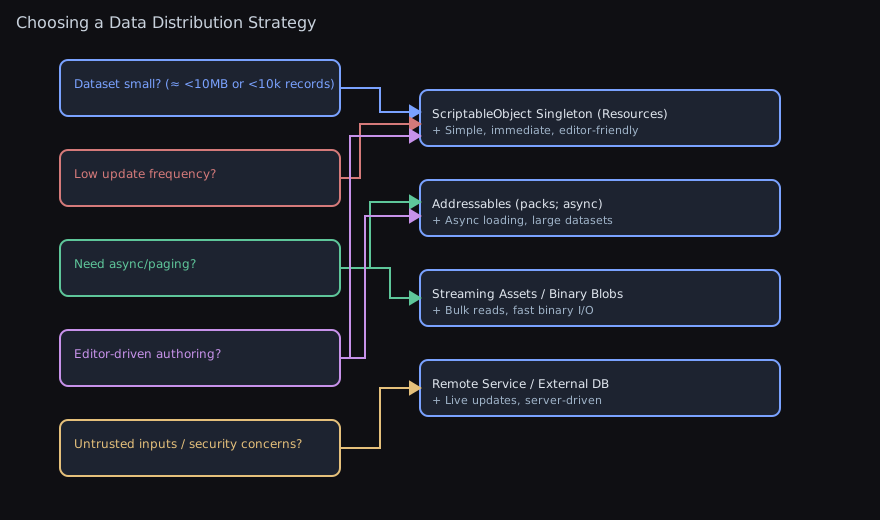
Choosing a Data Distribution Strategy
Use this chart to pick an approach based on constraints:
Testing Patterns
Testing with RuntimeSingleton<T>
Runtime singletons require special handling in tests to avoid leaked GameObjects and unpredictable state across test runs. The recommended pattern uses CommonTestBase which handles cleanup automatically.
Pattern 1: Extend CommonTestBase
using WallstopStudios.UnityHelpers.Tests.Core;

public sealed class MyServiceTests : CommonTestBase
{
    [Test]
    public void MyServiceInitializesCorrectly()
    {
        // CommonTestBase automatically manages dispatcher lifecycle
        // and cleans up any spawned GameObjects after each test
        var service = MyService.Instance;
        Assert.That(service != null);
    }
}
Pattern 2: Manual Scope Management
For tests that need finer control over singleton lifecycle:
using UnityMainThreadDispatcher = WallstopStudios.UnityHelpers.Core.Helper.UnityMainThreadDispatcher;

public sealed class CustomSingletonTests
{
    private UnityMainThreadDispatcher.AutoCreationScope _scope;

    [SetUp]
    public void SetUp()
    {
        // Disable auto-creation, destroy any existing instance, then re-enable
        _scope = UnityMainThreadDispatcher.CreateTestScope(destroyImmediate: true);
    }

    [TearDown]
    public void TearDown()
    {
        // Restores previous auto-creation state and destroys test-created instances
        _scope?.Dispose();
        _scope = null;
    }

    [Test]
    public void DispatcherIsAvailableInTest()
    {
        var dispatcher = UnityMainThreadDispatcher.Instance;
        Assert.That(dispatcher != null);
    }
}
Pattern 3: Temporarily Disable Auto-Creation
For specific tests that need to verify behavior when the singleton doesn’t exist:
[Test]
public void CodeHandlesMissingDispatcherGracefully()
{
    using (UnityMainThreadDispatcher.AutoCreationScope.Disabled(
        destroyExistingInstanceOnEnter: true,
        destroyInstancesOnDispose: true,
        destroyImmediate: true))
    {
        // Inside this scope, accessing Instance won't auto-create
        bool hasInstance = UnityMainThreadDispatcher.HasInstance;
        Assert.That(hasInstance, Is.False);
    }
    // Auto-creation restored after scope exits
}
Testing with ScriptableObjectSingleton<T>
ScriptableObject singletons load from Resources/ and are typically tested in Editor tests where asset manipulation is possible.
Pattern 1: Use Editor Test Fixtures
using WallstopStudios.UnityHelpers.Tests.Core;
#if UNITY_EDITOR
using UnityEditor;
#endif

public sealed class AudioSettingsTests : CommonTestBase
{
    [Test]
    public void AudioSettingsLoadsFromResources()
    {
        // ScriptableObjectSingleton loads lazily from Resources
        var settings = AudioSettings.Instance;
        Assert.That(settings != null);
        Assert.That(settings.masterVolume, Is.InRange(0f, 1f));
    }
}
Pattern 2: Create Test-Specific Assets
For tests that need controlled data:
#if UNITY_EDITOR
[Test]
public void SettingsWithCustomValuesWork()
{
    // Create a test instance (tracked by CommonTestBase for cleanup)
    var testSettings = CreateScriptableObject<AudioSettings>();
    testSettings.masterVolume = 0.5f;

    // Test logic using the instance directly (not via Instance property)
    Assert.That(testSettings.masterVolume, Is.EqualTo(0.5f));
}
#endif
Key Testing Guidelines
-
Inherit from
CommonTestBase: This handles most singleton cleanup automatically, including dispatcher scope management. -
Use
CreateTestScopefor dispatcher: TheUnityMainThreadDispatcher.CreateTestScope()method packages the common test setup pattern: disable auto-creation → destroy existing → re-enable auto-creation. -
Prefer
destroyImmediate: truein EditMode: EditMode tests should useDestroyImmediateto ensure synchronous cleanup without Unity’s delayed destruction. -
Track created objects: Use
Track<T>()orTrackDisposable<T>()to ensure objects are cleaned up after tests. -
Clear singleton state between tests: Domain reloads clear singleton instances, but within a test run you may need explicit cleanup.
Troubleshooting
Best Practices
- Prefer placing a pre-made runtime singleton in a bootstrap scene when construction order matters; avoid first-access implicit creation during critical frames.
- For scene-local managers, override
Preserve => falseto prevent cross-scene persistence. - Keep exactly one singleton asset under
Resources/for eachScriptableObjectSingleton<T>; let the auto-creator relocate any strays. - Use
[ScriptableSingletonPath]to group related settings; avoid deep nesting that hurts discoverability. -
With Odin installed, take advantage of
Serialized*bases for complex serialized fields; without Odin, keep fields Unity-serializable. - Multiple ScriptableObject assets found: a warning is logged and the first by name is used. Resolve by keeping only one asset in Resources or by letting the auto‑creator relocate the correct one.
Instancereturns null for ScriptableObject: Ensure the asset exists underResources/and the type name or custom path matches.- Domain reloads: Both singletons clear cached instances before scene load.
- Leaked GameObjects in tests: Use
CommonTestBaseor wrap test code withAutoCreationScope.Disabled()to ensure cleanup.
Related Docs
- Editor tool: ScriptableObject Singleton Creator.
- Tests:
Tests/Runtime/Utils/RuntimeSingletonTests.csandTests/Editor/Utils/ScriptableObjectSingletonTests.cs. - Dispatcher testing: Unity Main Thread Dispatcher Guide.