Unity Helpers
Treasure chest of Unity developer tools. Professional inspector tooling, high-performance utilities, spatial queries, and 20+ editor tools.
Inspector Selection Attributes
Transform selection controls from dropdowns to designer-friendly interfaces.
Unity Helpers provides four powerful selection attributes that replace standard dropdowns with toggle buttons, searchable lists, and type-safe selection controls. Perfect for flags, enums, predefined values, and dynamic option lists.
Table of Contents
WEnumToggleButtons
Draws enum and flag enum fields as a toolbar of toggle buttons.
Basic Usage
using UnityEngine;
using WallstopStudios.UnityHelpers.Core.Attributes;

public class EntityPermissions : MonoBehaviour
{
    [System.Flags]
    public enum Permissions
    {
        None = 0,
        Move = 1 << 0,
        Attack = 1 << 1,
        UseItems = 1 << 2,
        CastSpells = 1 << 3,
    }

    [WEnumToggleButtons]
    public Permissions currentPermissions = Permissions.Move | Permissions.Attack;
}
Visual Reference
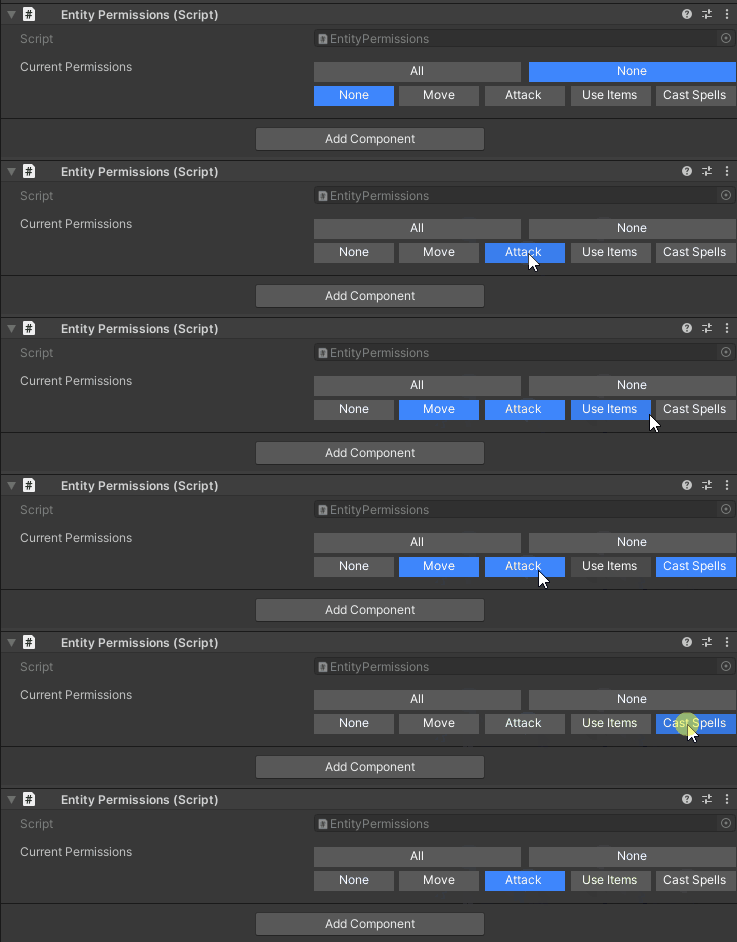
Flag enum permissions rendered as toggle buttons
Parameters
[WEnumToggleButtons(
    int buttonsPerRow = 0,                  // Force column count (0 = automatic)
    bool showSelectAll = false,             // Show "Select All" button (flags only)
    bool showSelectNone = false,            // Show "Select None" button (flags only)
    bool enablePagination = true,           // Allow pagination for many options
    int pageSize = -1,                      // Override page size (defaults to project setting)
    string colorKey = "Default"             // Color palette key
)]
Flag Enums
[System.Flags]
public enum DamageTypes
{
    None = 0,
    Physical = 1 << 0,
    Fire = 1 << 1,
    Ice = 1 << 2,
    Lightning = 1 << 3,
    Poison = 1 << 4,
}

[WEnumToggleButtons(showSelectAll: true, showSelectNone: true, buttonsPerRow: 3)]
public DamageTypes resistances = DamageTypes.Fire | DamageTypes.Ice;
Visual Reference
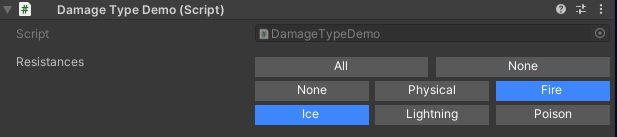
Flag enum with Select All and Select None quick action buttons
Behavior:
- Each flag value gets its own toggle button
- Multiple flags can be active simultaneously
- “Select All” and “Select None” buttons for quick configuration
Standard Enums (Radio Buttons)
public enum WeaponType { Melee, Ranged, Magic }

[WEnumToggleButtons(buttonsPerRow: 3, colorKey: "Default-Dark")]
public WeaponType weaponType = WeaponType.Melee;
Visual Reference
Standard enum rendered as radio-style toggle buttons (only one active)

Behavior:
- Only one option can be selected at a time
- Clicking a button deselects others
Pagination
[System.Flags]
public enum AllAbilities
{
    None = 0,
    Ability1 = 1 << 0,
    Ability2 = 1 << 1,
    // ... 20 more abilities ...
    Ability22 = 1 << 21,
}

[WEnumToggleButtons(enablePagination: true, pageSize: 10)]
public AllAbilities unlockedAbilities;
Visual Reference
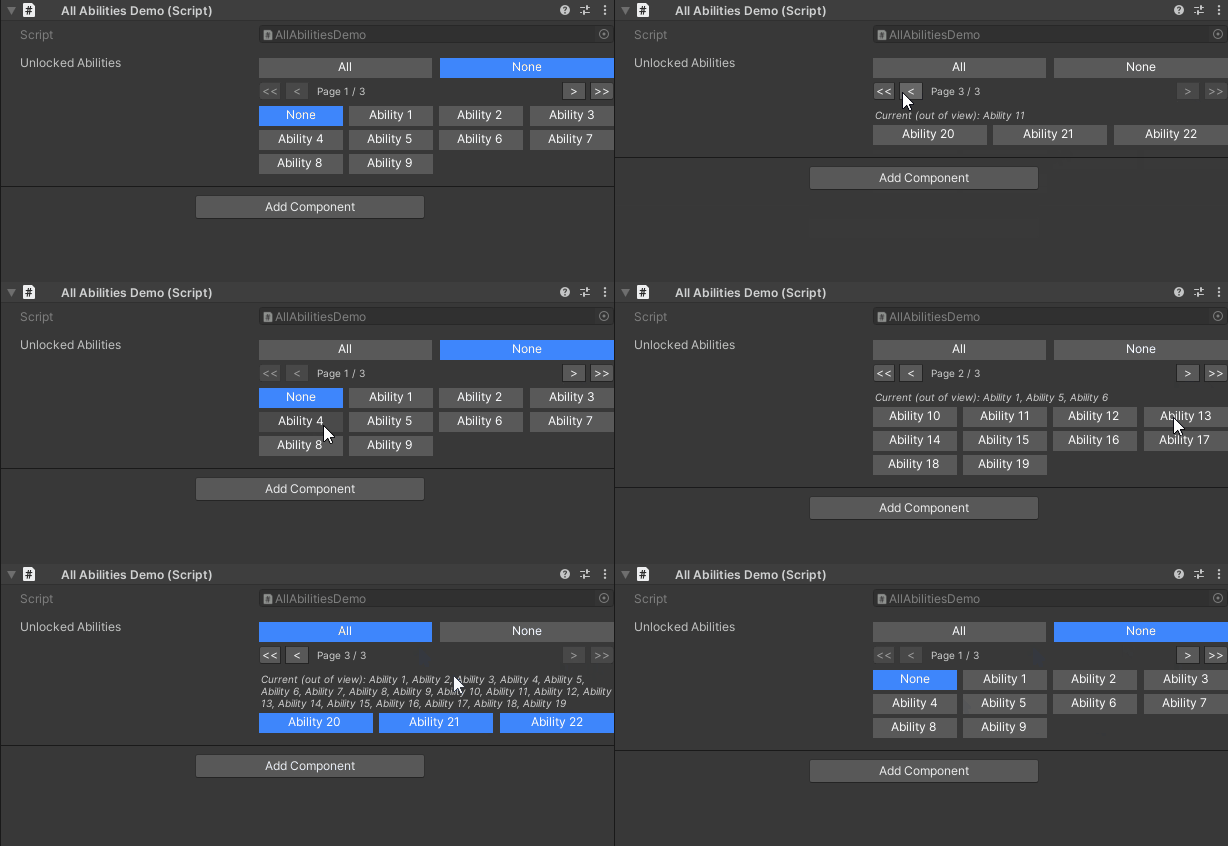
Paginated toggle buttons with First, Previous, Next, Last navigation controls
Features:
- Automatic pagination for many options
- Page size controlled by
pageSizeparameter orUnityHelpersSettings.EnumToggleButtonsPageSize - Navigation: First, Previous, Next, Last buttons
- Summary badge shows selections on other pages
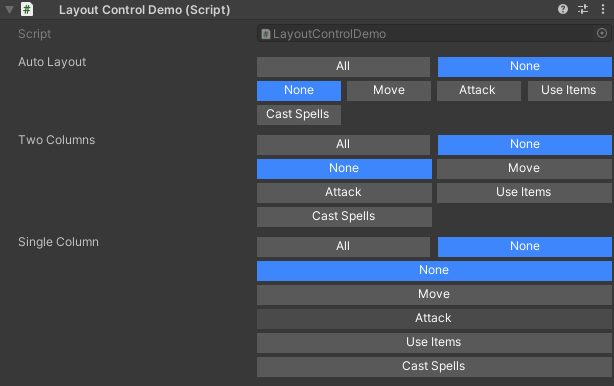
Layout Control
// Automatic layout (fits to inspector width)
[WEnumToggleButtons]
public Permissions autoLayout;

// Force 2 columns
[WEnumToggleButtons(buttonsPerRow: 2)]
public Permissions twoColumns;

// Force single column
[WEnumToggleButtons(buttonsPerRow: 1)]
public Permissions singleColumn;
Visual Reference
Different column layouts: automatic, 2 columns, and single column
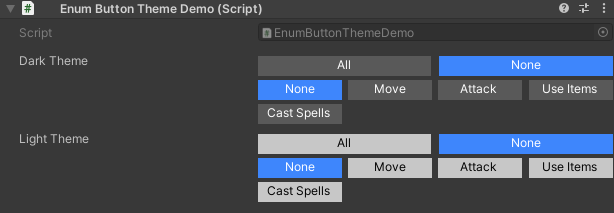
Color Theming
[WEnumToggleButtons(colorKey: "Default-Dark")]
public Permissions darkTheme;

[WEnumToggleButtons(colorKey: "Default-Light")]
public Permissions lightTheme;
Visual Reference
Toggle buttons with dark and light color themes
Combining with Other Attributes
// Works with IntDropDown/StringInList/WValueDropDown!
[IntDropDown(0, 30, 60, 120)]
[WEnumToggleButtons]
public int frameRate = 60;  // Shows as toggle buttons instead of dropdown
Composite Flags Behavior
The drawer intentionally filters out composite flag values (e.g., ReadWrite = Read | Write). This keeps the UI focused on atomic toggles and avoids ambiguous interactions. Use the “Select All” and “Select None” buttons for bulk operations.
Best Practices for WEnumToggleButtons
- Keep option counts manageable — toggle groups work best for short lists where designers can see everything without scrolling
- Name enum members descriptively so automatic labels remain readable
- Combine with conditional attributes like
WShowIfto build adaptive, context-aware authoring tools
WValueDropDown
Generic dropdown for any type with fixed values or provider methods.
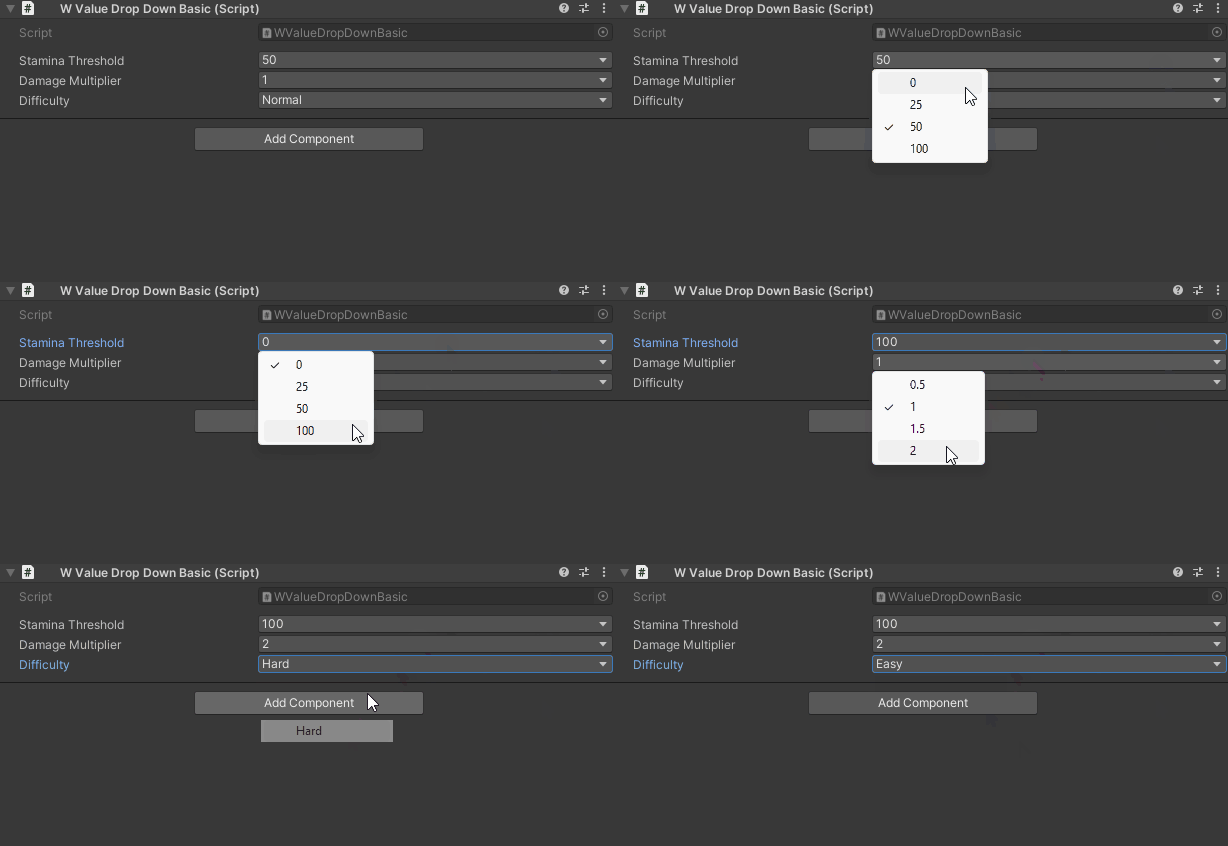
Basic Usage (Fixed Values)
// Primitive types
[WValueDropDown(0, 25, 50, 100)]
public int staminaThreshold = 50;

[WValueDropDown(0.5f, 1.0f, 1.5f, 2.0f)]
public float damageMultiplier = 1.0f;

[WValueDropDown("Easy", "Normal", "Hard", "Insane")]
public string difficulty = "Normal";
Visual Reference
Dropdown showing predefined integer, float, and string values
Provider Methods
using System.Collections.Generic;
using UnityEngine;
using WallstopStudios.UnityHelpers.Core.Attributes;

[CreateAssetMenu(fileName = "PowerUpDefinition", menuName = "Power-Up Definition")]
public class PowerUpDefinition : ScriptableObject
{
    public string name;
    public Sprite icon;
}

public class PowerUpConfig : MonoBehaviour
{
    [WValueDropDown(typeof(PowerUpLibrary), nameof(PowerUpLibrary.GetAvailablePowerUps))]
    public PowerUpDefinition selectedPowerUp;
}

public static class PowerUpLibrary
{
    public static IEnumerable<PowerUpDefinition> GetAvailablePowerUps()
    {
        // Return all power-ups from database/resources/etc.
        return Resources.LoadAll<PowerUpDefinition>("PowerUps");
    }
}
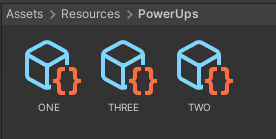
Visual Reference
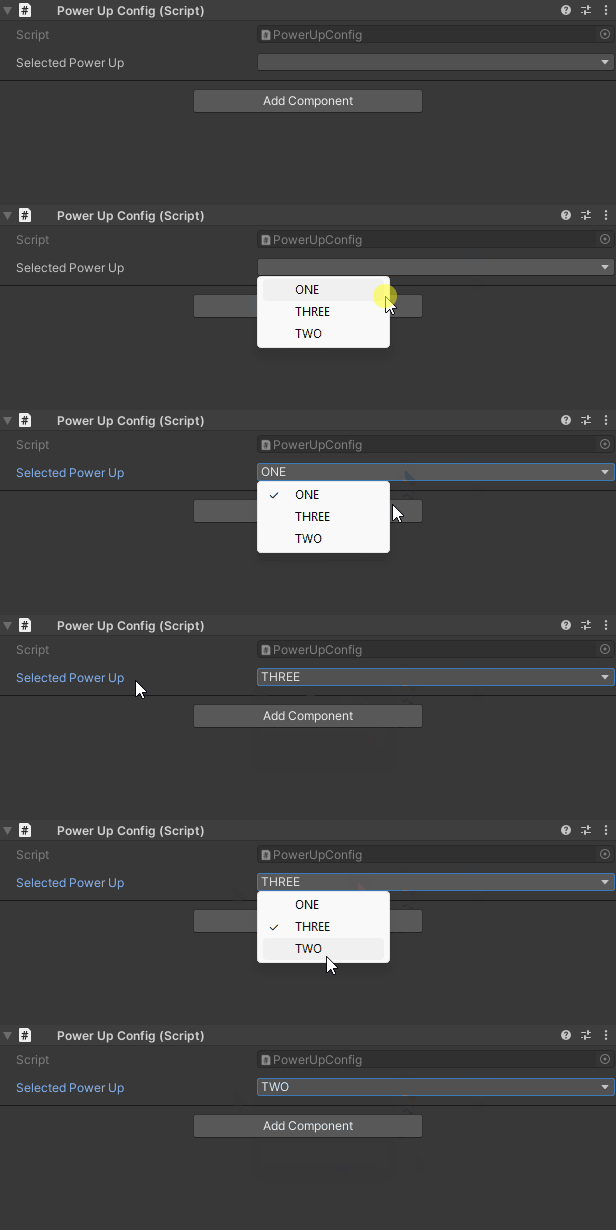
PowerUp definitions loaded from Resources folder
Dropdown populated dynamically from a provider method
Primitive Overloads
using System.Collections.Generic;
using UnityEngine;
using WallstopStudios.UnityHelpers.Core.Attributes;

public class WValueDropDownPrimitives : MonoBehaviour
{
    // All primitive types supported:
    [WValueDropDown(true, false)] // bool
    public bool boolValue;

    [WValueDropDown(true, false)] // bool
    public List<bool> boolValues;

    [WValueDropDown('A', 'B', 'C')] // char
    public char charValue;

    [WValueDropDown((byte)1, (byte)2, (byte)3)] // byte
    public byte byteValue;

    [WValueDropDown((short)10, (short)20, (short)30)] // short
    public short shortValue;

    [WValueDropDown(100, 200, 300)] // int
    public int intValue;

    [WValueDropDown(1000L, 2000L, 3000L)] // long
    public long longValue;

    [WValueDropDown(0.1f, 0.5f, 1.0f)] // float
    public float floatValue;

    [WValueDropDown(0.1, 0.5, 1.0)] // double
    public double doubleValue;
}
Visual Reference
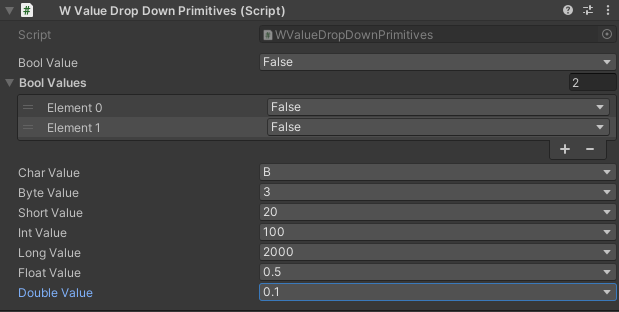
Multiple dropdowns showing all supported primitive types
Instance Provider (context-aware)
public class DynamicOptions : MonoBehaviour
{
    public string prefix = "Option";
    public int optionCount = 5;

    // Instance method - uses object state to build options
    [WValueDropDown(nameof(GetAvailableOptions), typeof(string))]
    public string selectedOption;

    private IEnumerable<string> GetAvailableOptions()
    {
        for (int i = 1; i <= optionCount; i++)
        {
            yield return $"{prefix}_{i}";
        }
    }
}
Passing only a method name instructs the drawer to search the decorated type for a parameterless method. Instance methods run on the serialized object; static methods are also supported. The second parameter specifies the value type for proper dropdown rendering.
Alternate Constructor Forms:
// Form 1: Instance method with explicit value type
[WValueDropDown(nameof(GetOptions), typeof(int))]
public int selection;

// Form 2: Static provider from external type
[WValueDropDown(typeof(DataProvider), nameof(DataProvider.GetItems))]
public Item selected;

// Form 3: Static provider with explicit value type conversion
[WValueDropDown(typeof(DataProvider), nameof(DataProvider.GetIds), typeof(int))]
public int selectedId;
Custom Types
using System;
using System.Collections.Generic;
using UnityEngine;
using WallstopStudios.UnityHelpers.Core.Attributes;

[Serializable]
public class Preset
{
    public string name;
    public float value;

    public override string ToString() => name;  // Used for dropdown label
}

public class Config : MonoBehaviour
{
    [WValueDropDown(typeof(Config), nameof(GetPresets))]
    public Preset selectedPreset;

    public static IEnumerable<Preset> GetPresets()
    {
        return new[]
        {
            new Preset { name = "Low", value = 0.5f },
            new Preset { name = "Medium", value = 1.0f },
            new Preset { name = "High", value = 2.0f },
        };
    }
}
Visual Reference
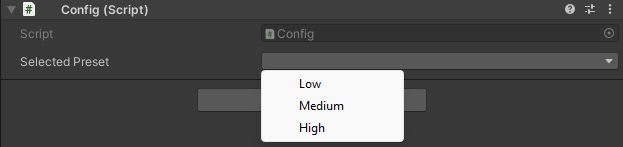
Dropdown showing custom serializable class options using ToString() for labels
Constructor Reference
| Constructor | Use Case |
|---|---|
WValueDropDown(params T[] values) |
Fixed list of primitive values (int, float, string, etc.) |
WValueDropDown(Type provider, string method) |
Static or instance method on external type |
WValueDropDown(Type provider, string method, Type valueType) |
Provider with explicit value type conversion |
WValueDropDown(string method, Type valueType) |
Instance/static method on the decorated type itself |
WValueDropDown(Type valueType, params object[] values) |
Fixed list with explicit type specification |
Best Practices for WValueDropDown
- Override
ToString()on custom types to control dropdown labels - Use static providers for data shared across objects
- Use instance providers when options depend on the object state
- Provider methods are called each render — keep them efficient or cache results
- Return empty collection instead of null from providers
IntDropDown
Integer field rendered as a dropdown with predefined options.
Basic Usage
[IntDropDown(0, 30, 60, 120, 240)]
public int refreshRate = 60;

[IntDropDown(1, 2, 4, 8, 16, 32)]
public int threadCount = 4;
Visual Reference
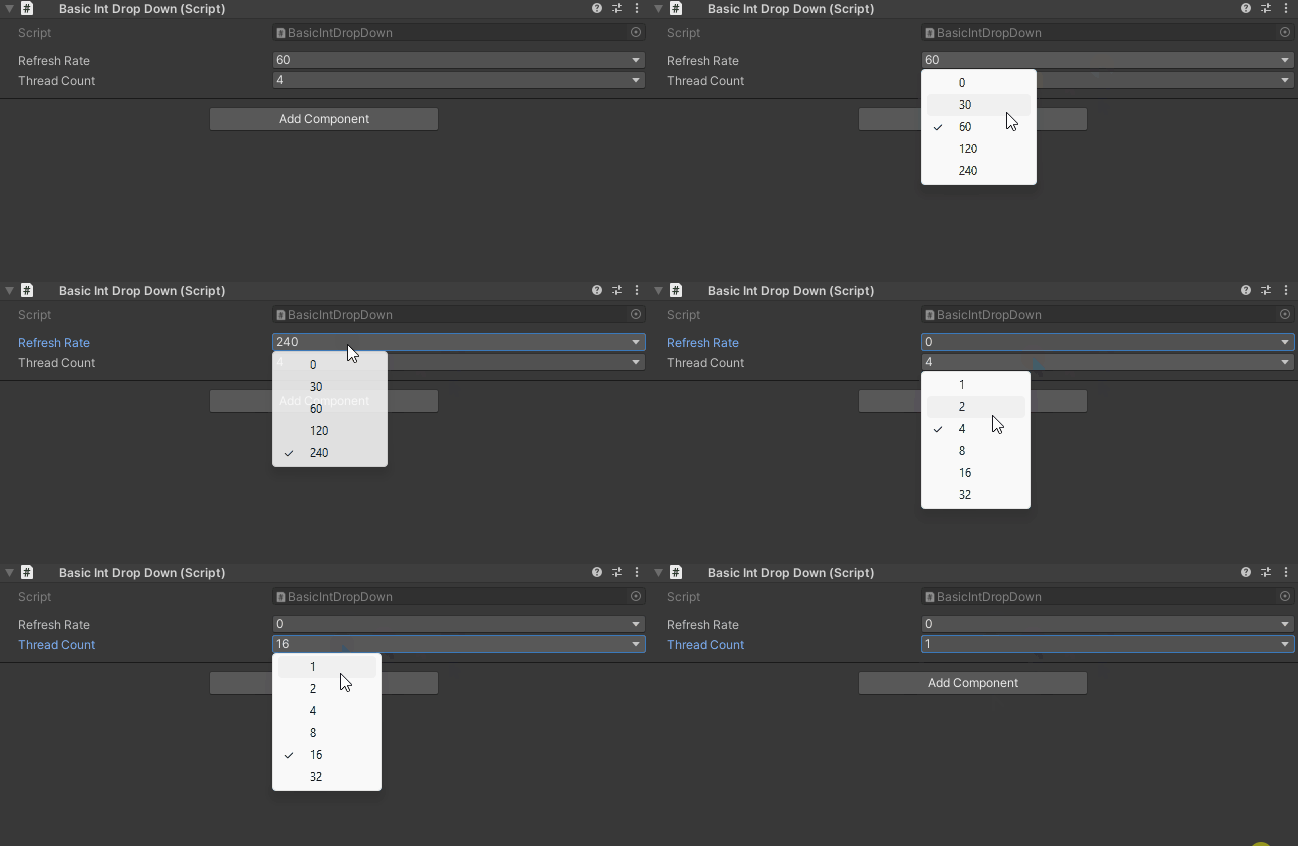
Integer dropdown showing predefined frame rate options
Provider Method
public class FrameRateConfig : MonoBehaviour
{
    [IntDropDown(typeof(FrameRateLibrary), nameof(FrameRateLibrary.GetSupportedFrameRates))]
    public int targetFrameRate = 60;
}

public static class FrameRateLibrary
{
    public static IEnumerable<int> GetSupportedFrameRates()
    {
        return new[] { 30, 60, 90, 120, 144, 240 };
    }
}
Fallback Behavior
[IntDropDown(10, 20, 30)]
public int value = 25;  // Not in list! Shows as standard IntField
Note: If the current value isn’t in the list, falls back to standard IntField for editing.
StringInList
String field constrained to a set of allowed values with an inline dropdown that opens a searchable popup.
Basic Usage
[StringInList("Easy", "Normal", "Hard", "Nightmare")]
public string difficulty = "Normal";

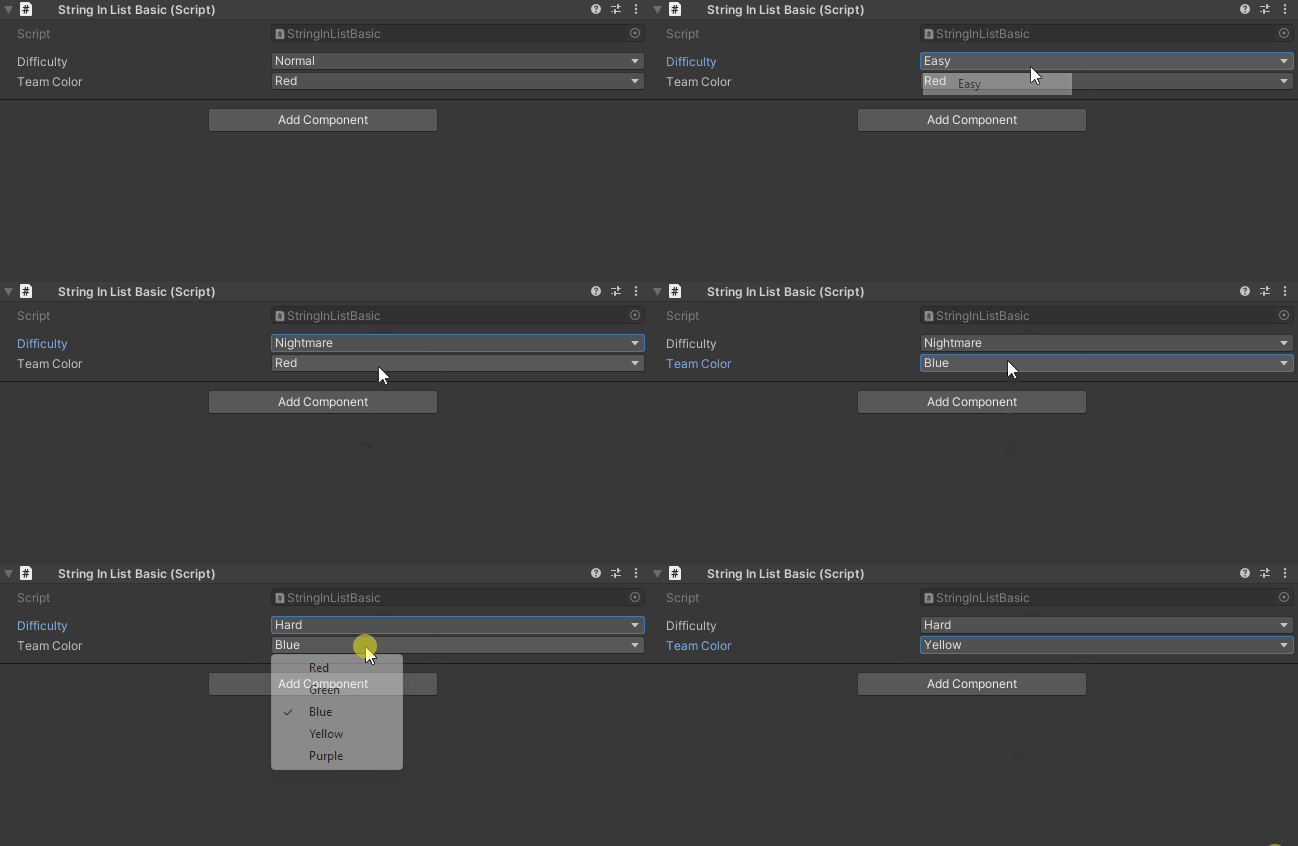
[StringInList("Red", "Green", "Blue", "Yellow", "Purple")]
public string teamColor = "Red";
Visual Reference
String dropdown with an inline popup showing search bar and results
Provider Method
public class LocalizationConfig : MonoBehaviour
{
    [StringInList(typeof(LocalizationKeys), nameof(LocalizationKeys.GetAllKeys))]
    public string dialogKey;
}

public static class LocalizationKeys
{
    public static IEnumerable<string> GetAllKeys()
    {
        // Return keys from localization database
        return new[] { "DIALOG_GREETING", "DIALOG_FAREWELL", "DIALOG_QUEST_START" };
    }
}
Instance Provider (context-aware)
public class StateMachine : MonoBehaviour
{
    [StringInList(nameof(BuildAvailableStates))]
    public string currentState;

    private IEnumerable<string> BuildAvailableStates()
    {
        // Instance data drives the dropdown
        yield return $"{gameObject.name}_Idle";
        yield return $"{gameObject.name}_Run";
    }

    public static IEnumerable<string> StaticStates()
    {
        // Static helpers still work when referenced by name
        return new[] { "Global_A", "Global_B" };
    }
}
Passing only a method name instructs the drawer to search the decorated type for a parameterless method. Instance methods run on the serialized object; static methods are also supported.
Search and Pagination
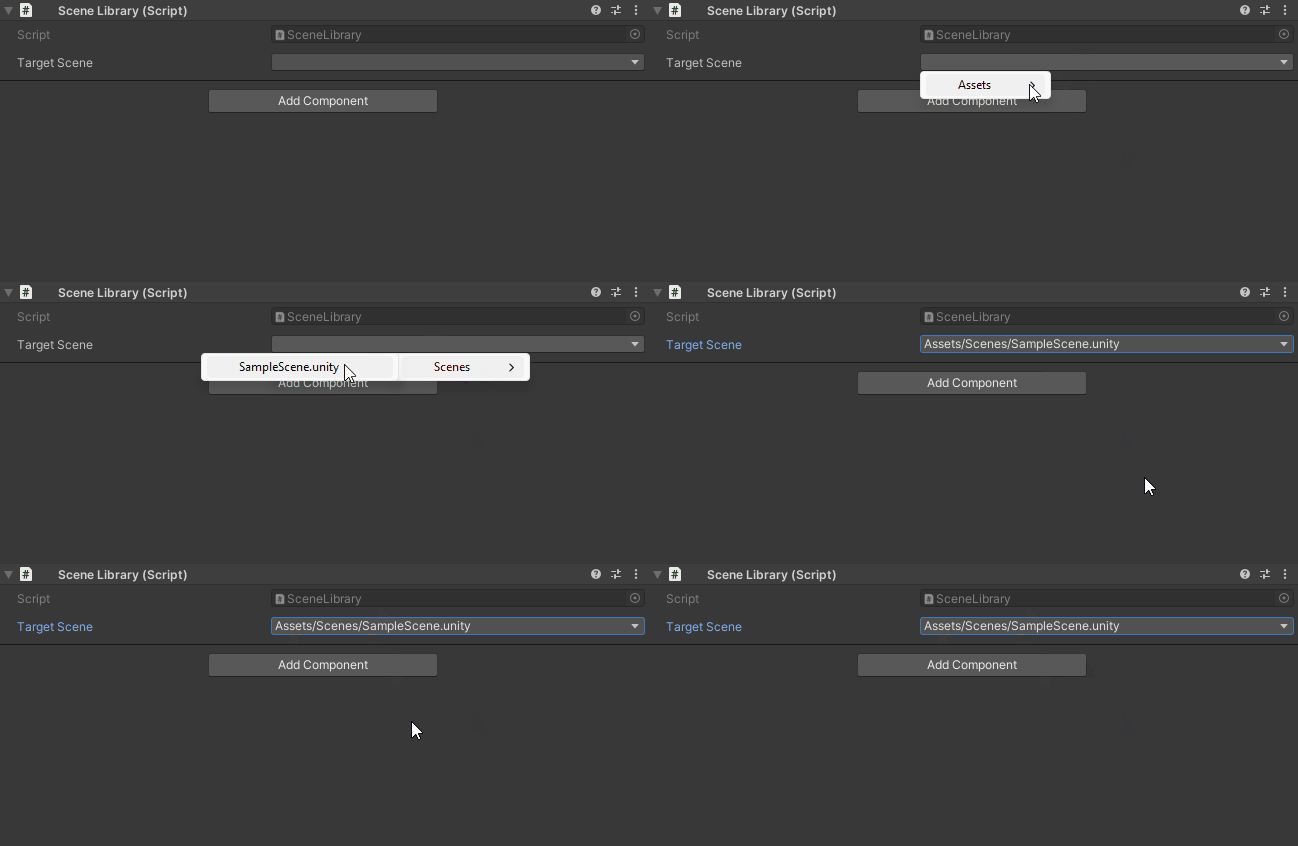
[StringInList(typeof(SceneLibrary), nameof(SceneLibrary.GetAllSceneNames))]
public string targetScene;

public static class SceneLibrary
{
    public static IEnumerable<string> GetAllSceneNames()
    {
        // Return 100+ scene names
        return EditorBuildSettings.scenes.Select(s => s.path);
    }
}
When the menu contains more entries than the configured limit, clicking the field opens a popup that embeds the search bar and pagination controls directly in the dropdown itself. The inspector row remains single-line, but the popup still supports fast filtering and page navigation.
Visual Reference
Popup window with a search box filtering results in real-time
Features:
- Dedicated popup hosts search + pagination when the option count exceeds
UnityHelpersSettings.StringInListPageLimit - Inspector row stays single-line; the popup includes filtering, paging, and keyboard navigation
- Works in both IMGUI and UI Toolkit inspectors (including
SerializableTypeDrawer) - Accepts fixed lists, static provider methods, or instance provider methods resolved on the component
Use Cases
Scene Names:
[StringInList(typeof(SceneHelper), nameof(SceneHelper.GetAllScenes))]
public string loadScene;
Animation States:
[StringInList("Idle", "Walk", "Run", "Jump", "Attack")]
public string currentAnimation = "Idle";
Localization Keys:
[StringInList(typeof(LocaleManager), nameof(LocaleManager.GetKeys))]
public string textKey;
Tag/Layer Names:
[StringInList("Player", "Enemy", "Projectile", "Environment")]
public string entityTag = "Player";
Comparison Table
| Feature | WEnumToggleButtons | WValueDropDown | IntDropDown | StringInList |
|---|---|---|---|---|
| Primary Use | Enums, flag enums | Any type | Integers | Strings |
| Visual Style | Toggle buttons | Dropdown | Dropdown | Dropdown + search |
| Multiple Selection | Yes (flags) | No | No | No |
| Pagination | Yes | No | No | Yes |
| Search | No | No | No | Yes |
| Provider Methods | No | Yes | Yes | Yes |
| Custom Types | No | Yes | No | No |
| Color Theming | Yes | No | No | No |
Best Practices
1. Choose the Right Attribute
// ✅ GOOD: WEnumToggleButtons for flags (visual toggle state)
[System.Flags]
public enum Features { None = 0, Feature1 = 1, Feature2 = 2, Feature3 = 4 }

[WEnumToggleButtons]
public Features enabledFeatures;

// ✅ GOOD: WValueDropDown for fixed type-safe options
[WValueDropDown(0.5f, 1.0f, 1.5f, 2.0f)]
public float speedMultiplier;

// ✅ GOOD: IntDropDown for integer-specific options
[IntDropDown(30, 60, 120, 240)]
public int frameRate;

// ✅ GOOD: StringInList for string validation
[StringInList("Easy", "Normal", "Hard")]
public string difficulty;

// ❌ BAD: Using strings when enum would be better
[StringInList("Easy", "Normal", "Hard")]
public string difficulty;  // Should be an enum!
2. Use Provider Methods for Dynamic Data
// ✅ GOOD: Provider method for data that changes
[WValueDropDown(typeof(AssetDatabase), nameof(GetAllPrefabs))]
public GameObject prefab;

public static IEnumerable<GameObject> GetAllPrefabs()
{
    return Resources.LoadAll<GameObject>("Prefabs");
}

// ❌ BAD: Hardcoded values for dynamic data
[WValueDropDown/* hardcoded list of 50 prefabs */]
public GameObject prefab;  // Nightmare to maintain!
3. Enable Helpful UI Features
// ✅ GOOD: Select All/None for flag enums
[System.Flags]
public enum Permissions { None = 0, Read = 1, Write = 2, Execute = 4 }

[WEnumToggleButtons(showSelectAll: true, showSelectNone: true)]
public Permissions permissions;

// ✅ GOOD: Pagination for many options
[WEnumToggleButtons(enablePagination: true, pageSize: 10)]
public ManyOptionsEnum options;

// ❌ BAD: No pagination with 50 options (cluttered inspector!)
[WEnumToggleButtons(enablePagination: false)]
public ManyOptionsEnum options;
Examples
Example 1: Damage Type Resistances
using UnityEngine;
using WallstopStudios.UnityHelpers.Core.Attributes;

public class Armor : MonoBehaviour
{
    [System.Flags]
    public enum DamageType
    {
        None = 0,
        Physical = 1 << 0,
        Fire = 1 << 1,
        Ice = 1 << 2,
        Lightning = 1 << 3,
        Poison = 1 << 4,
        Magic = 1 << 5,
    }

    [WEnumToggleButtons(showSelectAll: true, showSelectNone: true,
                        buttonsPerRow: 3, colorKey: "Default-Dark")]
    public DamageType resistances = DamageType.Physical;

    [WEnumToggleButtons(showSelectAll: true, showSelectNone: true,
                        buttonsPerRow: 3, colorKey: "Default-Light")]
    public DamageType vulnerabilities = DamageType.None;
}
Example 2: Graphics Presets
using UnityEngine;
using WallstopStudios.UnityHelpers.Core.Attributes;

public class GraphicsConfig : MonoBehaviour
{
    [System.Serializable]
    public class QualityPreset
    {
        public string name;
        public int textureQuality;
        public int shadowDistance;

        public override string ToString() => name;
    }

    [WValueDropDown(typeof(GraphicsConfig), nameof(GetPresets))]
    public QualityPreset selectedPreset;

    public static IEnumerable<QualityPreset> GetPresets()
    {
        return new[]
        {
            new QualityPreset { name = "Low", textureQuality = 0, shadowDistance = 50 },
            new QualityPreset { name = "Medium", textureQuality = 1, shadowDistance = 100 },
            new QualityPreset { name = "High", textureQuality = 2, shadowDistance = 200 },
            new QualityPreset { name = "Ultra", textureQuality = 3, shadowDistance = 500 },
        };
    }
}
Example 3: Scene Selection
using UnityEngine;
using WallstopStudios.UnityHelpers.Core.Attributes;
using System.Linq;

public class SceneLoader : MonoBehaviour
{
    [StringInList(typeof(SceneLoader), nameof(GetAllSceneNames))]
    public string mainMenuScene;

    [StringInList(typeof(SceneLoader), nameof(GetAllSceneNames))]
    public string gameplayScene;

    [StringInList(typeof(SceneLoader), nameof(GetAllSceneNames))]
    public string creditsScene;

    public static IEnumerable<string> GetAllSceneNames()
    {
#if UNITY_EDITOR
        return UnityEditor.EditorBuildSettings.scenes
            .Select(s => System.IO.Path.GetFileNameWithoutExtension(s.path));
#else
        return new string[0];
#endif
    }
}
Example 4: Framerate Configuration
using UnityEngine;
using WallstopStudios.UnityHelpers.Core.Attributes;

public class PerformanceSettings : MonoBehaviour
{
    [IntDropDown(30, 60, 90, 120, 144, 240, -1)]
    public int targetFrameRate = 60;  // -1 = unlimited

    [IntDropDown(0, 1, 2, 3, 4)]
    public int vsyncCount = 0;  // 0 = disabled

    [WEnumToggleButtons]
    public enum FrameLimitMode { Unlimited, Target, VSync }

    public FrameLimitMode limitMode = FrameLimitMode.Target;

    private void OnValidate()
    {
        Application.targetFrameRate = targetFrameRate;
        QualitySettings.vSyncCount = vsyncCount;
    }
}
See Also
- Inspector Overview - Complete inspector features overview
- Inspector Grouping Attributes - WGroup layouts
- Inspector Conditional Display - WShowIf
- Inspector Settings - Configuration reference
Next Steps:
- Replace flag enum dropdowns with
[WEnumToggleButtons]for better UX - Use
[StringInList]for scene names, animation states, localization keys - Create provider methods for dynamic option lists
- Experiment with
[WValueDropDown]for type-safe selection controls