Unity Helpers
Treasure chest of Unity developer tools. Professional inspector tooling, high-performance utilities, spatial queries, and 20+ editor tools.
Relational Component Attributes
Visual
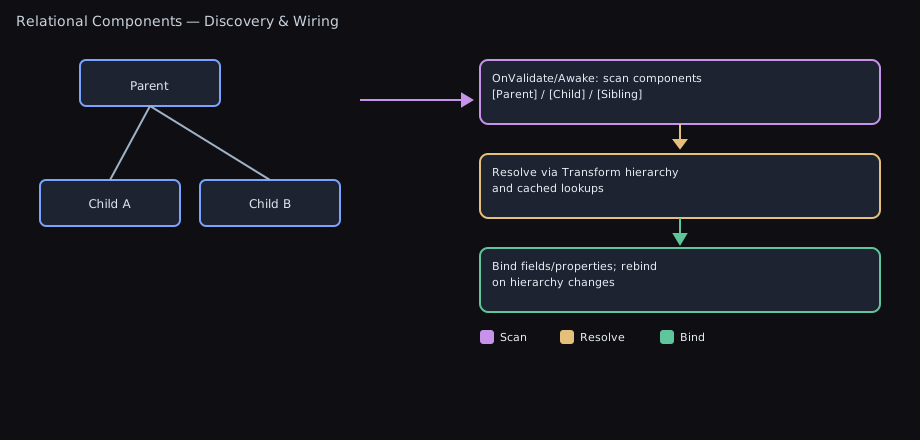
Auto-wire components in your hierarchy without GetComponent boilerplate. These attributes make common relationships explicit, robust, and easy to maintain.
SiblingComponent— same GameObjectParentComponent— up the transform hierarchyChildComponent— down the transform hierarchy (breadth-first)
Collection Type Support: Each attribute works with:
- Single fields (e.g.,
Transform) - Arrays (e.g.,
Collider2D[]) - Lists (e.g.,
List<Rigidbody2D>) - HashSets (e.g.,
HashSet<Renderer>)
All attributes support optional assignment, filters (tag/name), depth limits, max results, and interface/base-type resolution.
Having issues? Jump to Troubleshooting: see Troubleshooting.
Related systems: For data‑driven gameplay effects (attributes, tags, cosmetics), see Effects System and the README section Effects, Attributes, and Tags.
Curious how these attributes stack up against manual GetComponent* loops? Check the Relational Component Performance Benchmarks for operations-per-second and allocation snapshots.
TL;DR — What Problem This Solves
- ⭐ Replace 20+ lines of repetitive GetComponent boilerplate with 3 attributes + 1 method call.
- Self‑documenting, supports interfaces, filters, and validation.
- Time saved: 10-20 minutes per script × hundreds of scripts = weeks of development time.
The Productivity Advantage
Before (The Old Way):
void Awake()
{
    sprite = GetComponent<SpriteRenderer>();
    if (sprite == null) Debug.LogError("Missing SpriteRenderer!");

    rigidbody = GetComponentInParent<Rigidbody2D>();
    if (rigidbody == null) Debug.LogError("Missing Rigidbody2D in parent!");

    colliders = GetComponentsInChildren<Collider2D>();
    if (colliders.Length == 0) Debug.LogWarning("No colliders in children!");

    // Repeat for every component...
    // 15-30 lines of boilerplate per script
}
After (Relational Components):
[SiblingComponent] private SpriteRenderer sprite;
[ParentComponent] private Rigidbody2D rigidbody;
[ChildComponent] private Collider2D[] colliders;

void Awake() => this.AssignRelationalComponents();
// That's it. 4 lines total, all wired automatically with validation.
Pick the right attribute
- Same GameObject? Use
SiblingComponent. - Search up the hierarchy? Use
ParentComponent. - Search down the hierarchy? Use
ChildComponent.
One‑minute setup
[SiblingComponent] private SpriteRenderer sprite;
[ParentComponent(OnlyAncestors = true)] private Rigidbody2D rb;
[ChildComponent(OnlyDescendants = true, MaxDepth = 1)] private Collider2D[] childColliders;

void Awake() => this.AssignRelationalComponents();
Why Use These?
- Replace repetitive
GetComponentand fragile manual wiring - Make intent clear and local to the field that needs it
- Fail fast with useful errors (or opt-in to optional fields)
- Filter results precisely and control traversal cost
- Support interfaces for clean architecture
Quick Start
using UnityEngine;
using WallstopStudios.UnityHelpers.Core.Attributes;

public class Player : MonoBehaviour
{
    // Same-GameObject
    [SiblingComponent] private SpriteRenderer sprite;

    // First matching ancestor (excluding self)
    [ParentComponent(OnlyAncestors = true)] private Rigidbody2D ancestorRb;

    // Immediate children only, collect many
    [ChildComponent(OnlyDescendants = true, MaxDepth = 1)]
    private Collider2D[] immediateChildColliders;

    private void Awake()
    {
        // Wires up all relational fields on this component
        this.AssignRelationalComponents();
    }
}
How It Works
Decorate private (or public) fields on a MonoBehaviour with a relational attribute, then call one of:
this.AssignRelationalComponents()— assign all three categoriesthis.AssignSiblingComponents()— only siblingsthis.AssignParentComponents()— only parentsthis.AssignChildComponents()— only children
Assignments happen at runtime (e.g., Awake/OnEnable), not at edit-time serialization.
Visual Search Patterns
ParentComponent (searches UP the hierarchy):

  Grandparent ←────────── (included unless OnlyAncestors = true)
      ↑
      │
    Parent ←────────────── (always included)
      ↑
      │
   [YOU] ←────────────────  Component with [ParentComponent]
      │
    Child
      │
   Grandchild


ChildComponent (searches DOWN the hierarchy, breadth-first):

  Grandparent
      │
    Parent
      │
   [YOU] ←─────────────────  Component with [ChildComponent]
      ↓
      ├─ Child 1 ←────────── (depth = 1)
      │    ├─ Grandchild 1  (depth = 2)
      │    └─ Grandchild 2  (depth = 2)
      │
      └─ Child 2 ←────────── (depth = 1)
           └─ Grandchild 3  (depth = 2)

  Breadth-first means all Children (depth 1) are checked
  before any Grandchildren (depth 2).


SiblingComponent (searches same GameObject):

  Parent
    │
    └─ [GameObject] ←────── All components on this GameObject
         ├─ [YOU] ←─────── Component with [SiblingComponent]
         ├─ Component A
         ├─ Component B
         └─ Component C
Key Options
OnlyAncestors / OnlyDescendants:
OnlyAncestors = true→ Excludes self, searches only parents/grandparentsOnlyDescendants = true→ Excludes self, searches only children/grandchildren- Default (false) → Includes self in search
MaxDepth:
- Limits how far up/down the hierarchy to search
MaxDepth = 1withOnlyDescendants = true→ immediate children onlyMaxDepth = 2→ children + grandchildren (or parents + grandparents)
💡 Having Issues? Components not being assigned? Fields staying null? Jump to Troubleshooting for solutions to common problems.
Attribute Reference
SiblingComponent
- Scope: Same
GameObject - Use for: Standard component composition patterns
Examples:
[SiblingComponent] private Animator animator;                 // required by default
[SiblingComponent(Optional = true)] private Rigidbody2D rb;   // optional
[SiblingComponent(TagFilter = "Visual", NameFilter = "Sprite")] private Component[] visuals;
[SiblingComponent(MaxCount = 2)] private List<Collider2D> firstTwo;  // List<T> supported
[SiblingComponent] private HashSet<Renderer> allRenderers;     // HashSet<T> supported
Performance note: Sibling lookups do not cache results between calls. In profiling we found these assignments typically run once per GameObject (e.g., during
Awake), so the extra bookkeeping and invalidation cost of a cache outweighed the benefits. If you need updated references later, callAssignSiblingComponentsagain after the hierarchy changes.
ParentComponent
- Scope: Up the transform chain (optionally excluding self)
- Controls:
OnlyAncestors,MaxDepth
Examples:
// Immediate parent only
[ParentComponent(OnlyAncestors = true, MaxDepth = 1)] private Transform directParent;

// Up to 3 levels with a tag
[ParentComponent(OnlyAncestors = true, MaxDepth = 3, TagFilter = "Player")] private Collider2D playerAncestor;

// Interface/base-type resolution is supported by default
[ParentComponent] private IHealth healthProvider;
ChildComponent
- Scope: Down the transform chain (breadth-first; optionally excluding self)
- Controls:
OnlyDescendants,MaxDepth
Examples:
// Immediate children only
[ChildComponent(OnlyDescendants = true, MaxDepth = 1)] private Transform[] immediateChildren;

// First matching descendant with a tag
[ChildComponent(OnlyDescendants = true, TagFilter = "Weapon")] private Collider2D weaponCollider;

// Gather into a List (preserves insertion order)
[ChildComponent(OnlyDescendants = true)] private List<MeshRenderer> childRenderers;

// Gather into a HashSet (unique results, no duplicates) and limit count
[ChildComponent(OnlyDescendants = true, MaxCount = 10)] private HashSet<Rigidbody2D> firstTenRigidbodies;
Performance note: When you avoid depth limits and interface filtering, child assignments run through a cached
GetComponentsInChildren<T>()delegate to stay allocation-free. Turning onMaxDepthor interface searches still works, but the assigner reverts to the breadth-first traversal to honour those constraints.
Common Options (All Attributes)
Optional(default: false)- If
false, logs a descriptive error when no match is found - If
true, suppresses the error (field remains null/empty)
- If
IncludeInactive(default: true)- If
true, includes disabled components and inactive GameObjects - If
false, only assigns enabled components on active-in-hierarchy objects
- If
SkipIfAssigned(default: false)- If
true, preserves existing non-null value (single) or non-empty collection
- If
MaxCount(default: 0 = unlimited)- Applies to arrays, lists, and hash sets; ignored for single fields
TagFilter- Exact tag match using
CompareTag
- Exact tag match using
NameFilter- Case-sensitive substring match on the GameObject name
AllowInterfaces(default: true)- If
true, can assign by interface or base type; setfalseto restrict to concrete types
- If
Choosing the Right Collection Type
Use Arrays (T[]) when:
- Collection size is fixed or rarely changes
- Need the smallest memory footprint
- Interoperating with APIs that require arrays
Use Lists (List<T>) when:
- Need insertion order preserved
- Plan to add/remove elements after assignment
- Want indexed access with
[]operator - Need compatibility with most LINQ operations
Use HashSets (HashSet<T>) when:
- Need guaranteed uniqueness (no duplicates)
- Performing frequent membership tests (
Contains()) - Order doesn’t matter
- Want O(1) lookup performance
// Arrays: Fixed size, minimal overhead
[ChildComponent] private Collider2D[] colliders;

// Lists: Dynamic, ordered, index-based access
[ChildComponent] private List<Renderer> renderers;

// HashSets: Unique, fast lookups, unordered
[ChildComponent] private HashSet<AudioSource> audioSources;
Recipes
-
UI hierarchy references
[ParentComponent(OnlyAncestors = true, MaxDepth = 2)] private Canvas canvas; [ChildComponent(OnlyDescendants = true, NameFilter = "Button")] private Button[] buttons; -
Sensors/components living on children
[ChildComponent(OnlyDescendants = true, TagFilter = "Sensor")] private Collider[] sensors; -
Modular systems via interfaces
public interface IInputProvider { Vector2 Move { get; } }
[ParentComponent] private IInputProvider input; // PlayerInput, AIInput, etc.
Best Practices
- Call in
Awake()orOnEnable()so references exist early - Prefer selective calls (
AssignSibling/Parent/Child) when you only use one category - Use
MaxDepthto cap traversal cost in deep trees - Use
MaxCountto reduce allocations when you only need a subset - Mark non-critical references
Optional = trueto avoid noise
Explicit Initialization (Prewarm)
Relational components build high‑performance reflection helpers on first use. To eliminate this lazy cost and avoid first‑frame stalls on large projects or IL2CPP builds, explicitly pre‑initialize caches at startup:
// Call during bootstrap/loading
using WallstopStudios.UnityHelpers.Core.Attributes;

void Start()
{
    RelationalComponentInitializer.Initialize();
}
Notes:
- Uses AttributeMetadataCache when available, with reflection fallback per type if not cached.
- Logs warnings for missing fields/types and logs errors for unexpected exceptions; processing continues.
- Scope the work by providing specific types:
RelationalComponentInitializer.Initialize(new[]{ typeof(MyComponent) }); - To auto‑prewarm on app load, enable the toggle on the AttributeMetadataCache asset: “Prewarm Relational On Load”.
Dependency Injection Integrations
Stop choosing between DI and clean hierarchy references - Unity Helpers provides seamless integrations with Zenject/Extenject, VContainer, and Reflex that automatically wire up your relational component fields right after dependency injection completes.
The DI Pain Point
Without these integrations, you’re stuck writing Awake() methods full of GetComponent boilerplate even when using a DI framework:
public class Enemy : MonoBehaviour
{
    [Inject] private IHealthSystem _health;  // ✅ DI handles this

    private Animator _animator;               // ❌ Still manual boilerplate
    private Rigidbody2D _rigidbody;          // ❌ Still manual boilerplate

    void Awake()
    {
        _animator = GetComponent<Animator>();
        _rigidbody = GetComponent<Rigidbody2D>();
        // ... 15 more lines of GetComponent hell
    }
}
The Integration Solution
With the DI integrations, everything just works:
public class Enemy : MonoBehaviour
{
    [Inject] private IHealthSystem _health;         // ✅ DI injection
    [SiblingComponent] private Animator _animator;  // ✅ Relational auto-wiring
    [SiblingComponent] private Rigidbody2D _rigidbody; // ✅ Relational auto-wiring

    // No Awake() needed! Both DI and hierarchy references wired automatically
}
Why Use the DI Integrations
- Zero boilerplate - No
Awake()method needed, no manualGetComponentcalls, no validation code - Consistent behavior - Works seamlessly with constructor/property/field injection and runtime instantiation
- Safe fallback - Gracefully degrades to standard behavior if DI binding is missing
- Risk-free adoption - Use incrementally, mix DI and non-DI components freely
Supported Packages (Auto-detected)
Unity Helpers automatically detects these packages via UPM:
- Zenject/Extenject:
com.extenject.zenject,com.modesttree.zenject,com.svermeulen.extenject - VContainer:
jp.cysharp.vcontainer,jp.hadashikick.vcontainer - Reflex:
com.gustavopsantos.reflex
💡 UPM packages work out-of-the-box - No scripting defines needed!
Manual or Source Imports (Non-UPM)
If you import Zenject/VContainer/Reflex as source code, .unitypackage, or raw DLLs (not via UPM), you need to manually add scripting defines:
- Open
Project Settings > Player > Other Settings > Scripting Define Symbols - Add the appropriate define(s) for your target platforms:
ZENJECT_PRESENT- When using Zenject/ExtenjectVCONTAINER_PRESENT- When using VContainerREFLEX_PRESENT- When using Reflex
- Unity will recompile and the integration assemblies under
Runtime/Integrations/*will activate automatically
VContainer at a Glance
-
Enable once per scope
builder.RegisterRelationalComponents( new RelationalSceneAssignmentOptions(includeInactive: true, useSinglePassScan: true), enableAdditiveSceneListener: true ); - Runtime helpers
_resolver.InstantiateComponentWithRelations(componentPrefab, parent)_resolver.InstantiateGameObjectWithRelations(rootPrefab, parent, includeInactiveChildren: true)_resolver.AssignRelationalHierarchy(existingRoot, includeInactiveChildren: true)RelationalObjectPools.CreatePoolWithRelations(...)+pool.GetWithRelations(resolver)
- Full walkthrough: DI – VContainer sample
Zenject at a Glance
- Install once per scene
- Add
RelationalComponentsInstallerto yourSceneContext. - Toggles cover include-inactive scanning, single-pass strategy, and additive-scene listening.
- Add
- Runtime helpers
_container.InstantiateComponentWithRelations(componentPrefab, parent)_container.InstantiateGameObjectWithRelations(rootPrefab, parent, includeInactiveChildren: true)_container.AssignRelationalHierarchy(existingRoot, includeInactiveChildren: true)- Subclass
RelationalMemoryPool<T>to hydrate pooled items on spawn.
- Full walkthrough: DI – Zenject sample
Reflex at a Glance
- Install once per scene
- Reflex creates a
SceneScopein each scene. AddRelationalComponentsInstallerto the same GameObject (or a child) to bind the relational assigner, run the initial scene scan, and optionally register the additive-scene listener. - Toggles mirror the runtime helpers: include inactive objects, choose the scan strategy, and enable additive listening.
- Reflex creates a
- Runtime helpers
_container.InjectWithRelations(existingComponent)to inject DI fields and hydrate relational attributes on existing objects._container.InstantiateComponentWithRelations(componentPrefab, parent)for component prefabs._container.InstantiateGameObjectWithRelations(rootPrefab, parent, includeInactiveChildren: true)for full hierarchies._container.AssignRelationalHierarchy(existingRoot, includeInactiveChildren: true)to hydrate arbitrary hierarchies after manual instantiation.
-
Full walkthrough: DI – Reflex sample
- Reflex shares the same fallback behaviour: if the assigner is not bound, the helpers call
AssignRelationalComponents()directly so you can adopt incrementally.
Notes
- Both integrations fall back to the built-in
component.AssignRelationalComponents()call path if the DI container does not expose the assigner binding, so you can adopt them incrementally without breaking existing behaviour.
Troubleshooting
- Fields remain null in the Inspector
- Expected in Edit Mode. These attributes are assigned at runtime only and are not serialized. They are checked at runtime and log errors if they fail to find a match.
- Nothing assigned at runtime
- Ensure you call
AssignRelationalComponents()or the specificAssign*Components()inAwake()orOnEnable(). - Verify filters:
TagFiltermust match an existing tag;NameFilteris case-sensitive. - Check depth limits:
OnlyAncestors/OnlyDescendantsmay exclude self;MaxDepthmay be too small. - For interface/base type fields, confirm
AllowInterfaces = true(default) or use a concrete type.
- Ensure you call
- Inactive or disabled components unexpectedly included
- These are included by default. Set
IncludeInactive = falseto restrict to enabled components on active GameObjects.
- These are included by default. Set
- Too many results or large allocations
- Cap with
MaxCountand/orMaxDepth. PreferList<T>orHashSet<T>when you plan to mutate the collection after assignment.
- Cap with
- Child search doesn’t find the nearest match you expect
- Children are traversed breadth-first. If you want the nearest by hierarchy level, this is correct; if you need a custom order, gather a collection and sort manually.
- I only need one category (e.g., parents)
- Call the specific helper (
AssignParentComponents/AssignChildComponents/AssignSiblingComponents) instead of the all-in-one method for clarity and potentially less work.
- Call the specific helper (
FAQ
Q: Does this run in Edit Mode or serialize values?
- No. Assignment occurs at runtime only; values are not serialized by Unity.
Q: Are interfaces supported?
- Yes, when
AllowInterfaces = true(default). Set it tofalseto restrict to concrete types.
Q: What about performance?
- Work scales with the number of attributed fields and the search space. Use
MaxDepth,TagFilter,NameFilter, andMaxCountto limit work. Sibling lookups are O(1) when no filters are applied.
For quick examples in context, see the README’s “Auto Component Discovery” section. For API docs, hover the attributes in your IDE for XML summaries and examples.
DI Integrations: Testing and Edge Cases
Beginner-friendly overview
- Optional DI integrations compile only when symbols are present (
ZENJECT_PRESENT,VCONTAINER_PRESENT). With UPM, these are added via asmdefversionDefines. Without UPM (manual import), add them in Project Settings → Player → Scripting Define Symbols. - Both integrations register an assigner (
IRelationalComponentAssigner) and provide a scene initializer/entry point to hydrate relational fields once the container is ready.
VContainer (1.16.x)
-
Runtime usage (LifetimeScope): Call
builder.RegisterRelationalComponents()inLifetimeScope.Configure. The entry point runs automatically after the container builds. You can enable an additive-scene listener and customize scan options:using VContainer; using VContainer.Unity; using WallstopStudios.UnityHelpers.Integrations.VContainer; protected override void Configure(IContainerBuilder builder) { // Single-pass scan + additive scene listener var options = new RelationalSceneAssignmentOptions(includeInactive: true, useSinglePassScan: true); builder.RegisterRelationalComponents(options, enableAdditiveSceneListener: true); } -
Tests without LifetimeScope: Construct the entry point and call
Initialize()yourself, and register yourAttributeMetadataCacheinstance so the assigner uses it:var cache = ScriptableObject.CreateInstance<AttributeMetadataCache>(); // populate cache._relationalTypeMetadata with your test component types cache.ForceRebuildForTests(); // rebuild lookups so the initializer can discover your types var builder = new ContainerBuilder(); builder.RegisterInstance(cache).AsSelf(); builder.Register<RelationalComponentAssigner>(Lifetime.Singleton) .As<IRelationalComponentAssigner>() .AsSelf(); var resolver = builder.Build(); var entry = new RelationalComponentEntryPoint( resolver.Resolve<IRelationalComponentAssigner>(), cache, RelationalSceneAssignmentOptions.Default ); entry.Initialize();- Inject vs BuildUp: Use
resolver.InjectWithRelations(component)to inject + assign in one call, orresolver.Inject(component)thenresolver.AssignRelationalComponents(component). - Prefabs & GameObjects:
resolver.InstantiateComponentWithRelations(prefab, parent)orresolver.InstantiateGameObjectWithRelations(prefab, parent); to inject existing hierarchies useresolver.InjectGameObjectWithRelations(root).
- Inject vs BuildUp: Use
- EditMode reliability: In EditMode tests, prefer
[UnityTest]andyield return nullafter creating objects and after initializing the entry point so Unity has a frame to register new objects beforeFindObjectsOfTyperuns and to allow assignments to complete. - Active scene filter: Entry points operate on the active scene only. In EditMode, create a new scene with
SceneManager.CreateScene, set it active, and move your test hierarchy into it before callingInitialize(). - IncludeInactive: Control with
RelationalSceneAssignmentOptions(includeInactive: bool).
Zenject/Extenject
- Runtime usage: Add
RelationalComponentsInstallerto yourSceneContext. It bindsIRelationalComponentAssignerand runsRelationalComponentSceneInitializeronce the container is ready. The installer exposes toggles to assign on initialize and to listen for additive scenes. - Tests: Bind a concrete
AttributeMetadataCacheinstance and construct the assigner with that cache. Then resolveIInitializableand callInitialize(). - EditMode reliability: As with VContainer, consider
[UnityTest]with ayield return nullafter creating objects and after callingInitialize()to allow Unity to register objects and complete assignments. - Active scene filter: Initial one-time scan operates on the active scene only. The additive-scene listener processes only newly loaded scenes (not all loaded scenes).
- Prefabs & GameObjects:
container.InstantiateComponentWithRelations(...),container.InstantiateGameObjectWithRelations(...), orcontainer.InjectGameObjectWithRelations(root); to inject + assign a single instance:container.InjectWithRelations(component).
- Prefabs & GameObjects:
Object Pools (DI-aware)
- Zenject: use
RelationalMemoryPool<T>(or<TParam, T>) to assign relational fields inOnSpawnedautomatically. - VContainer: create pools with
RelationalObjectPools.CreatePoolWithRelations(...)and rent viapool.GetWithRelations(resolver)to inject + assign.
Common pitfalls and how to avoid them
- “No such registration … RelationalComponentEntryPoint”: You’re resolving in a plain container without
LifetimeScope. Construct the entry point manually as shown above. - Optional integrations don’t compile: Ensure the scripting define symbols are present. UPM adds them automatically via
versionDefines; manual imports require adding them in Player Settings. - Fields remain null in tests: Ensure your test
AttributeMetadataCachehas the relational metadata for your test component types and that the DI container uses the same cache instance (register it and prefer constructors that accept the cache).
📚 Related Documentation
Core Guides:
- Getting Started - Your first 5 minutes with Unity Helpers
- Main README - Complete feature overview
- Feature Index - Alphabetical reference
Related Features:
- Effects System - Data-driven buffs/debuffs with attributes and tags
- Singletons - Runtime and ScriptableObject singleton patterns
- Editor Tools - Attribute Metadata Cache generator
DI Integration Samples:
- VContainer Integration - Complete VContainer setup guide
- Zenject Integration - Complete Zenject setup guide
- Reflex Integration - Complete Reflex setup guide
| Need help? Open an issue | Troubleshooting |