Unity Helpers

Treasure chest of Unity developer tools. Professional inspector tooling, high-performance utilities, spatial queries, and 20+ editor tools.
Serialization Types
Unity-friendly wrappers for complex data.
Unity Helpers provides serializable wrappers for types that Unity can’t serialize natively: GUIDs, dictionaries, sets, type references, and nullable values. All types include custom property drawers for a seamless inspector experience and support JSON/Protobuf serialization.
Table of Contents
- WGuid
- SerializableDictionary
- SerializableHashSet & SerializableSortedSet
- SerializableType
- SerializableNullable
- Best Practices
- Examples
WGuid
Immutable version-4 GUID wrapper using two longs for efficient Unity serialization.
Why WGuid?
Problem: Unity doesn’t serialize System.Guid directly
Solution: WGuid stores as two long fields (_low and _high) for fast Unity serialization
Performance:
- 2x faster serialization than string-based GUID storage
- Smaller memory footprint (16 bytes vs. 36 bytes for string)
- Immutable design prevents accidental modification
Basic Usage
using UnityEngine;
using WallstopStudios.UnityHelpers.Core.DataStructure.Adapters;

public class Entity : MonoBehaviour
{
    public WGuid entityId = WGuid.NewGuid();
}
Visual Reference

Creating GUIDs
// Generate new GUID
WGuid id1 = WGuid.NewGuid();

// From System.Guid
System.Guid sysGuid = System.Guid.NewGuid();
WGuid id2 = (WGuid)sysGuid;

// Parse from string
WGuid id3 = WGuid.Parse("12345678-1234-1234-1234-123456789abc");

// Try parse (safe)
if (WGuid.TryParse("...", out WGuid id4))
{
    Debug.Log($"Parsed: {id4}");
}

// Empty GUID
WGuid empty = WGuid.EmptyGuid;
Inspector Features
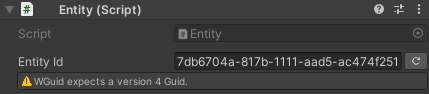
Custom Drawer:
- Text field displays GUID in standard format
- “Generate” button creates new GUID
- Validation warns if GUID is not version-4
- Undo/redo support


Conversions
// WGuid <-> System.Guid
WGuid wguid = WGuid.NewGuid();
System.Guid sysGuid = wguid.ToGuid();
WGuid back = (WGuid)sysGuid;

// ToString() formats
string standard = wguid.ToString();  // "xxxxxxxx-xxxx-xxxx-xxxx-xxxxxxxxxxxx"
string formatted = wguid.ToString("N");  // Without hyphens
Equality & Comparison
WGuid id1 = WGuid.NewGuid();
WGuid id2 = id1;

// Implements IEquatable<WGuid>
bool equal = id1.Equals(id2);  // true
bool opEqual = id1 == id2;     // true

// Implements IComparable<WGuid>
int comparison = id1.CompareTo(id2);  // 0
Serialization Support
- Unity: Serialized as two
longfields - JSON: Serialized as GUID string
- Protobuf: Serialized as two
longfields
using ProtoBuf;

[ProtoContract]
public class SaveData
{
    [ProtoMember(1)] public WGuid playerId;
    [ProtoMember(2)] public WGuid sessionId;
}
SerializableDictionary
Unity-friendly dictionary with synchronized key/value arrays and custom drawer.
Why SerializableDictionary?
Problem: Unity doesn’t serialize Dictionary<TKey, TValue>
Solution: SerializableDictionary<TKey, TValue> maintains synchronized arrays for Unity serialization and a runtime dictionary for fast lookups
Basic Usage
using UnityEngine;
using WallstopStudios.UnityHelpers.Core.DataStructure.Adapters;

public class PrefabRegistry : MonoBehaviour
{
    public GameObject enemyPrefab;
    public GameObject playerPrefab;

    public SerializableDictionary<string, GameObject> prefabs;

    private void Start()
    {
        // Access entries
        if (prefabs.TryGetValue("Enemy", out GameObject prefab))
        {
            Instantiate(prefab);
        }

        // Count
        Debug.Log($"Prefab count: {prefabs.Count}");

        // Iteration
        foreach (var kvp in prefabs)
        {
            Debug.Log($"{kvp.Key}: {kvp.Value}");
        }

        /*
            Add entries (or overwrite)
            WARNING: This is just for demo purposes! SerializableDictionary is meant for editor-mode persistence.
            Nothing stops you from changing this at runtime, but it will be lost on next playthrough.
        */
        prefabs["Player"] = playerPrefab;
        prefabs["Enemy"] = enemyPrefab;
    }
}
Inspector Features
Visual Reference
Dictionary inspector showing key-value pairs with pagination and inline editing
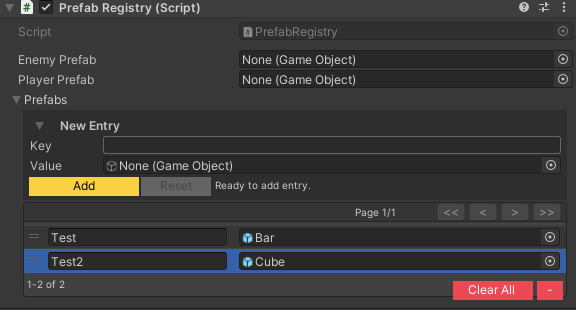
Custom Drawer:
- Key/value pair editing
- Add/Remove buttons
- Reorderable list
- Duplicate key detection (visual warning)
- Null value highlighting
- Pagination for large dictionaries
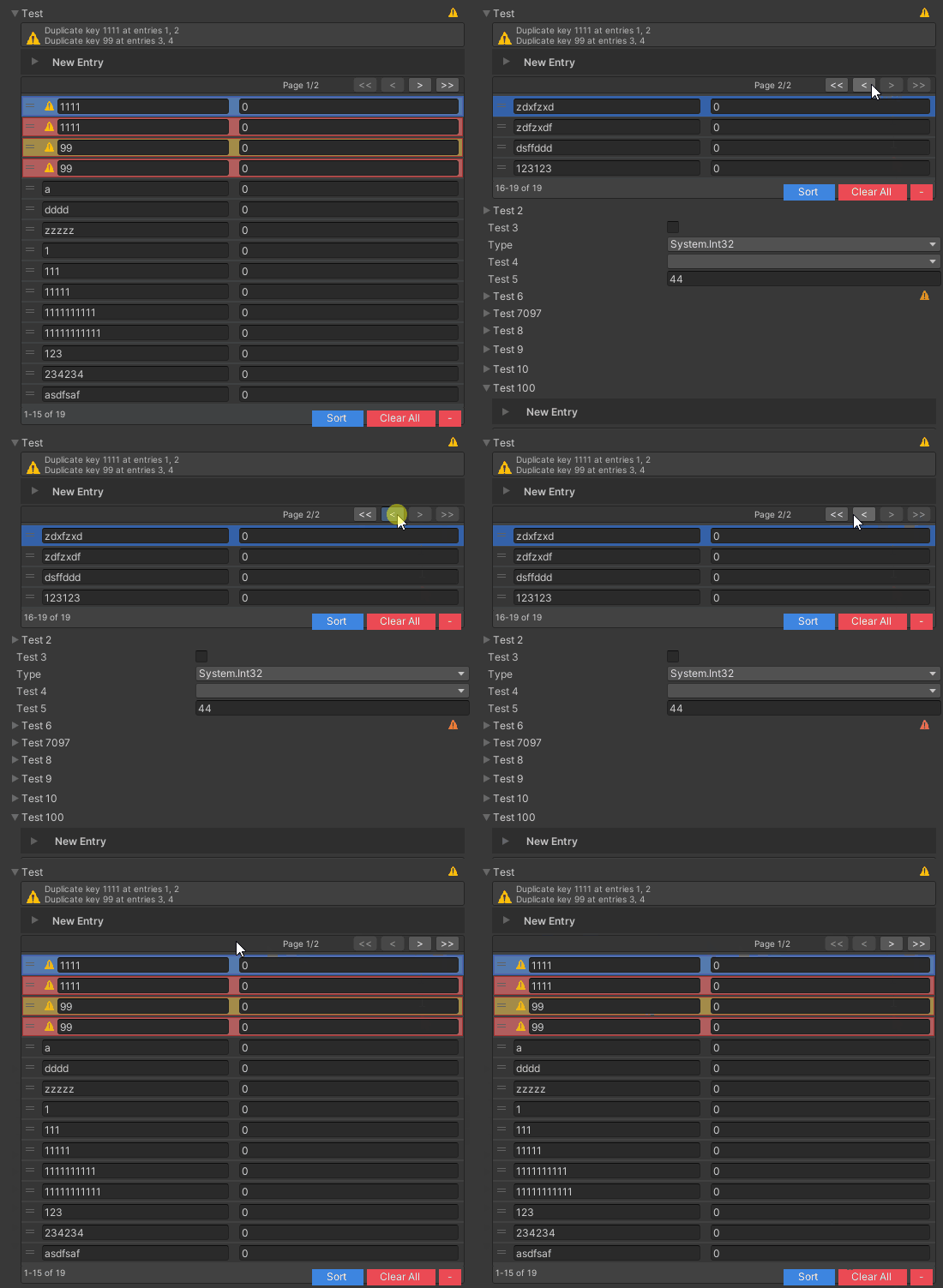
Dictionary Operations
// Implements IDictionary<TKey, TValue> and IReadOnlyDictionary<TKey, TValue>
SerializableDictionary<int, string> dict = new();

// Add
dict.Add(1, "One");
dict[2] = "Two";

// Read
string value = dict[1];
bool exists = dict.TryGetValue(2, out string val);
bool contains = dict.ContainsKey(1);

// Update
dict[1] = "First";

// Remove
dict.Remove(1);
dict.Clear();

// Iteration
foreach (KeyValuePair<int, string> kvp in dict)
{
    Debug.Log($"{kvp.Key} = {kvp.Value}");
}

// Keys/Values collections
ICollection<int> keys = dict.Keys;
ICollection<string> values = dict.Values;
Specialized Dictionaries
// Sorted dictionary (maintains key order)
public SerializableSortedDictionary<int, string> sortedDict;
Note: SerializableSortedDictionary uses SortedDictionary<TKey, TValue> internally for ordered keys.
Serialization Support
Unity: Synchronized _keys and _values arrays
JSON: Standard dictionary format
Protobuf: Supported via surrogates
// JSON example
{
    "prefabs": {
        "Enemy": { "instanceId": 12345 },
        "Player": { "instanceId": 67890 }
    }
}
SerializableHashSet & SerializableSortedSet
Unity-friendly set collections with duplicate detection and custom drawers.
Why Serializable Sets?
Problem: Unity doesn’t serialize HashSet<T> or SortedSet<T>
Solution: SerializableHashSet<T> and SerializableSortedSet<T> maintain a serialized array and runtime set for fast lookups
Basic Usage
using UnityEngine;
using WallstopStudios.UnityHelpers.Core.DataStructure.Adapters;

public class UniqueItemTracker : MonoBehaviour
{
    public SerializableHashSet<string> collectedItems;

    private void Start()
    {
        foreach (var item in collectedItems)
        {
            Debug.Log($"Found item: {item}");
        }
    }
}
Visual Reference
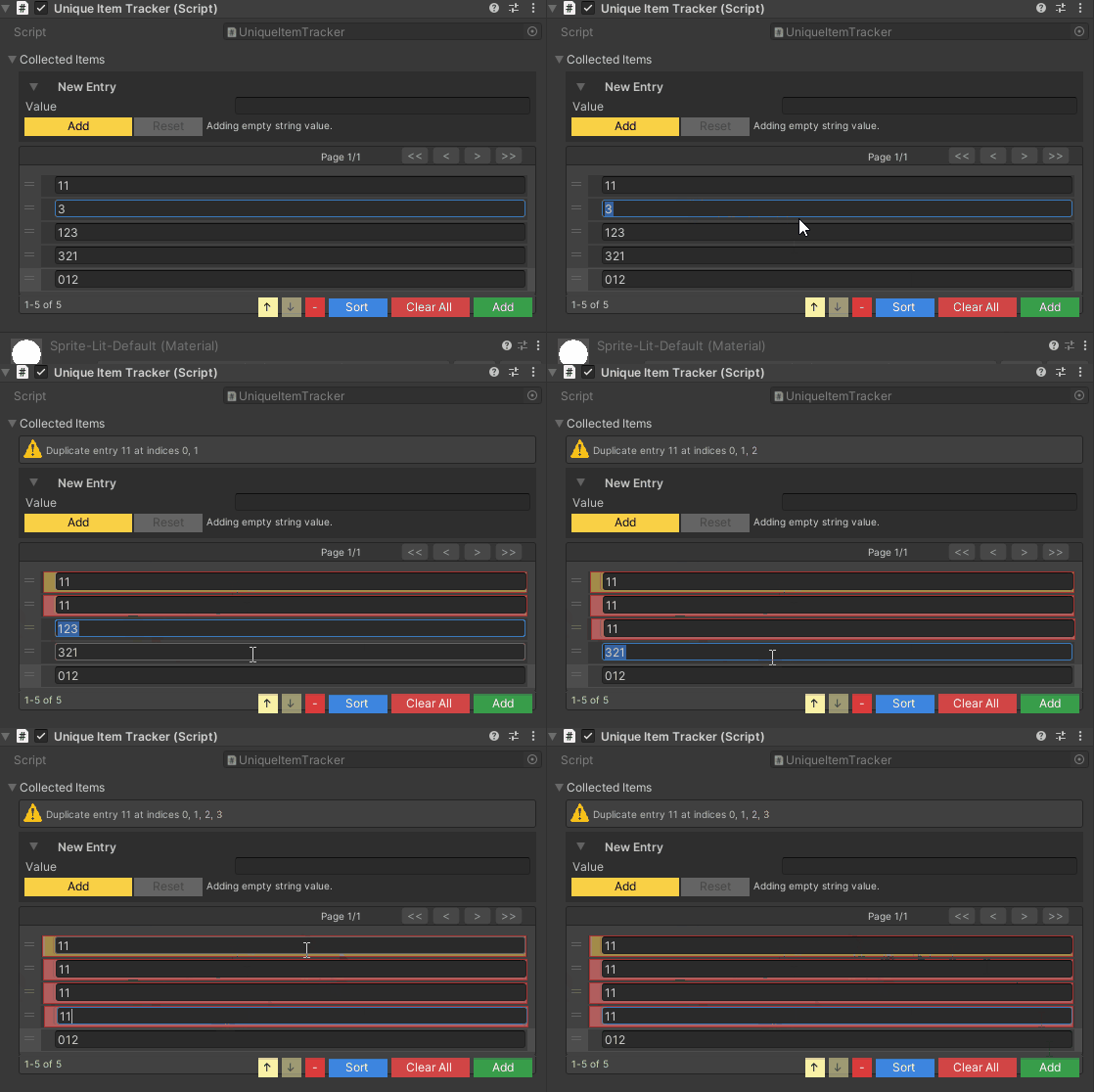
Set inspector with add/remove controls, duplicate highlighting, and pagination
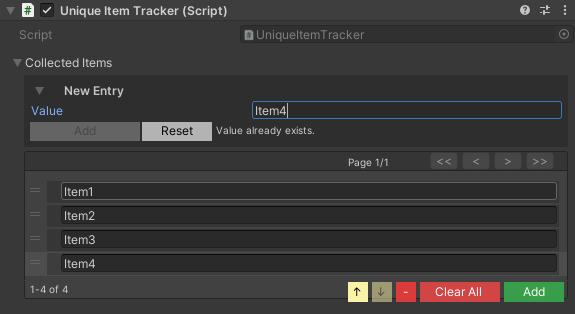
Inspector Features
Custom Drawer:
- Reorderable list
- Add/Remove/Clear/Sort buttons
- Duplicate detection with visual highlighting (shake animation + color)
- Null entry highlighting (red background)
- Pagination for large sets
- Move Up/Down buttons
- Current selection badge for items on other pages
- New Entry foldout to stage values before adding them to the runtime set (tune its animation via Project Settings ▸ Wallstop Studios ▸ Unity Helpers ▸ Set Foldouts)
Visual Reference
Visual feedback for duplicate entries (yellow shake) and null values (red background)

Set Operations
// Implements ISet<T> and IReadOnlyCollection<T>
SerializableHashSet<int> set = new();

// Add (returns true if new)
bool added = set.Add(42);

// Read
bool contains = set.Contains(42);
int count = set.Count;

// Remove
bool removed = set.Remove(42);
set.Clear();

// Set operations
HashSet<int> other = new HashSet<int> { 1, 2, 3 };
set.UnionWith(other);        // Add all from other
set.IntersectWith(other);    // Keep only common elements
set.ExceptWith(other);       // Remove elements in other
bool overlaps = set.Overlaps(other);

// Iteration
foreach (int item in set)
{
    Debug.Log(item);
}
New Entry Foldout
Expandable “New Entry” controls let you configure the exact value that will be inserted, which is especially helpful for complex structs, managed references, or ScriptableObjects. The foldout supports the same field variety as the inline list and respects your duplicate/null validation. Animation for the New Entry foldout is governed by the Serializable Set Foldouts settings; adjust tweening and speed independently for SerializableHashSet<T> and SerializableSortedSet<T>.
Foldout Defaults & Overrides
By default, SerializableSet inspectors start collapsed until you open them. This baseline comes from Project Settings ▸ Wallstop Studios ▸ Unity Helpers via the Serializable Set Start Collapsed toggle (and the equivalent Serializable Dictionary Start Collapsed toggle for dictionaries). You can override the default per-field with [WSerializableCollectionFoldout]:
using WallstopStudios.UnityHelpers.Core.Attributes;

[WSerializableCollectionFoldout(WSerializableCollectionFoldoutBehavior.StartExpanded)]
public SerializableHashSet<string> unlockedBadges = new();
- Project setting establishes the initial state only.
[WSerializableCollectionFoldout]can request expanded or collapsed behavior for specific collections.- Explicit changes to
SerializedProperty.isExpanded(scripts, custom inspectors, or tests) take ultimate precedence. The drawer now respects those manual decisions, so opting-in via code no longer gets undone by the attribute or the global default.
The attribute applies to both SerializableHashSet<T>/SerializableSortedSet<T> and the dictionary equivalents, making it straightforward to mix project-wide defaults with per-field intentions.
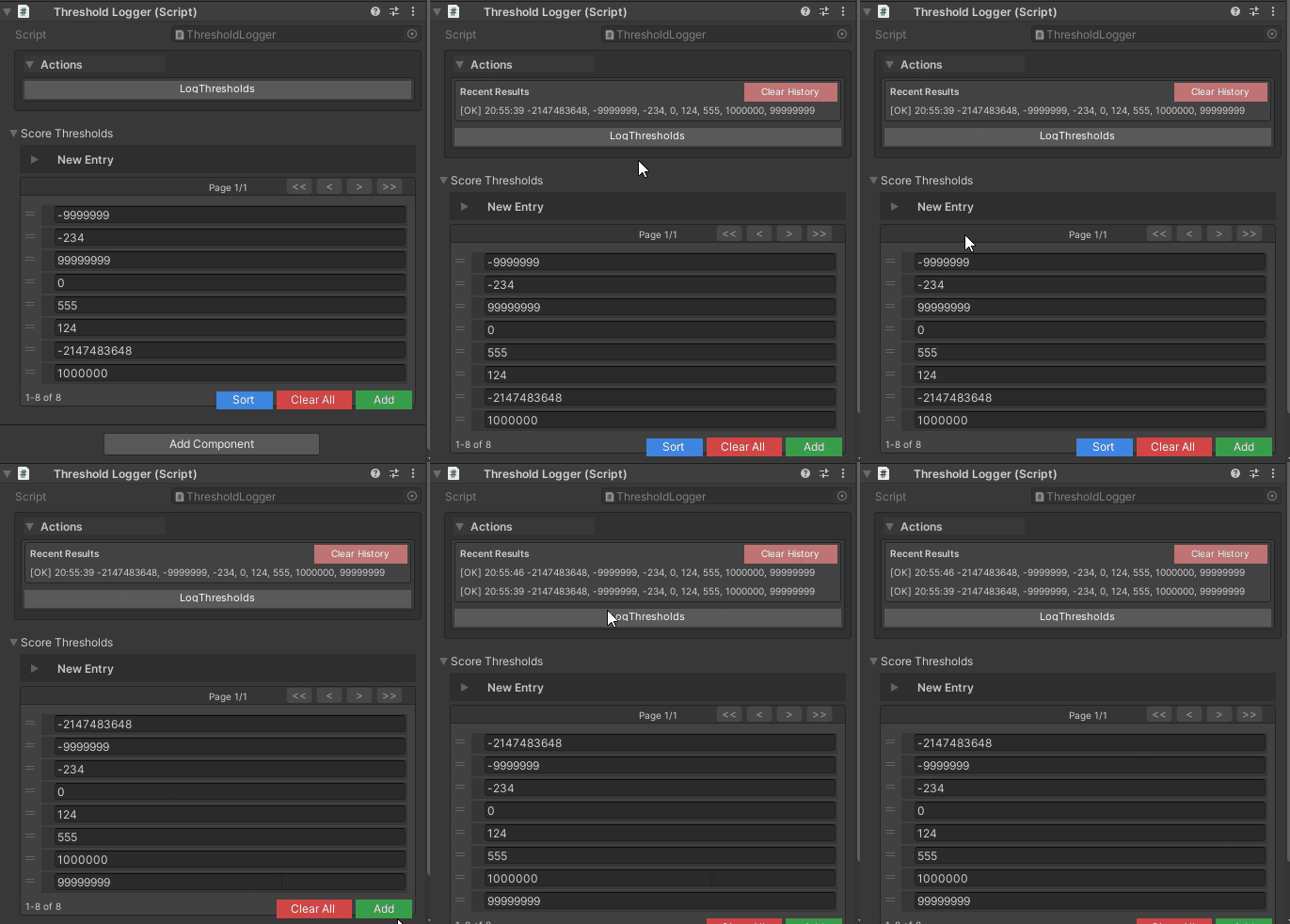
Sorted Sets
using UnityEngine;
using WallstopStudios.UnityHelpers.Core.Attributes;
using WallstopStudios.UnityHelpers.Core.DataStructure.Adapters;

public class ThresholdLogger : MonoBehaviour
{
    public SerializableSortedSet<int> scoreThresholds = new();

    [WButton]
    private string LogThresholds()
    {
        foreach (int threshold in scoreThresholds)
        {
            Debug.Log(threshold);
        }
        return $"Logged {scoreThresholds.Count} thresholds";
    }
}
Serialization Support
Unity: Serialized _items array
JSON: Array format
Protobuf: Supported via collection surrogates
// JSON example
{
    "collectedItems": ["item_001", "item_042", "item_137"]
}
SerializableType
Unity-friendly type reference that survives refactoring and namespace changes.
using UnityEngine;
using WallstopStudios.UnityHelpers.Core.DataStructure.Adapters;

public class SerializableTypeExample : MonoBehaviour
{
    public SerializableType type;
}
Visual Reference
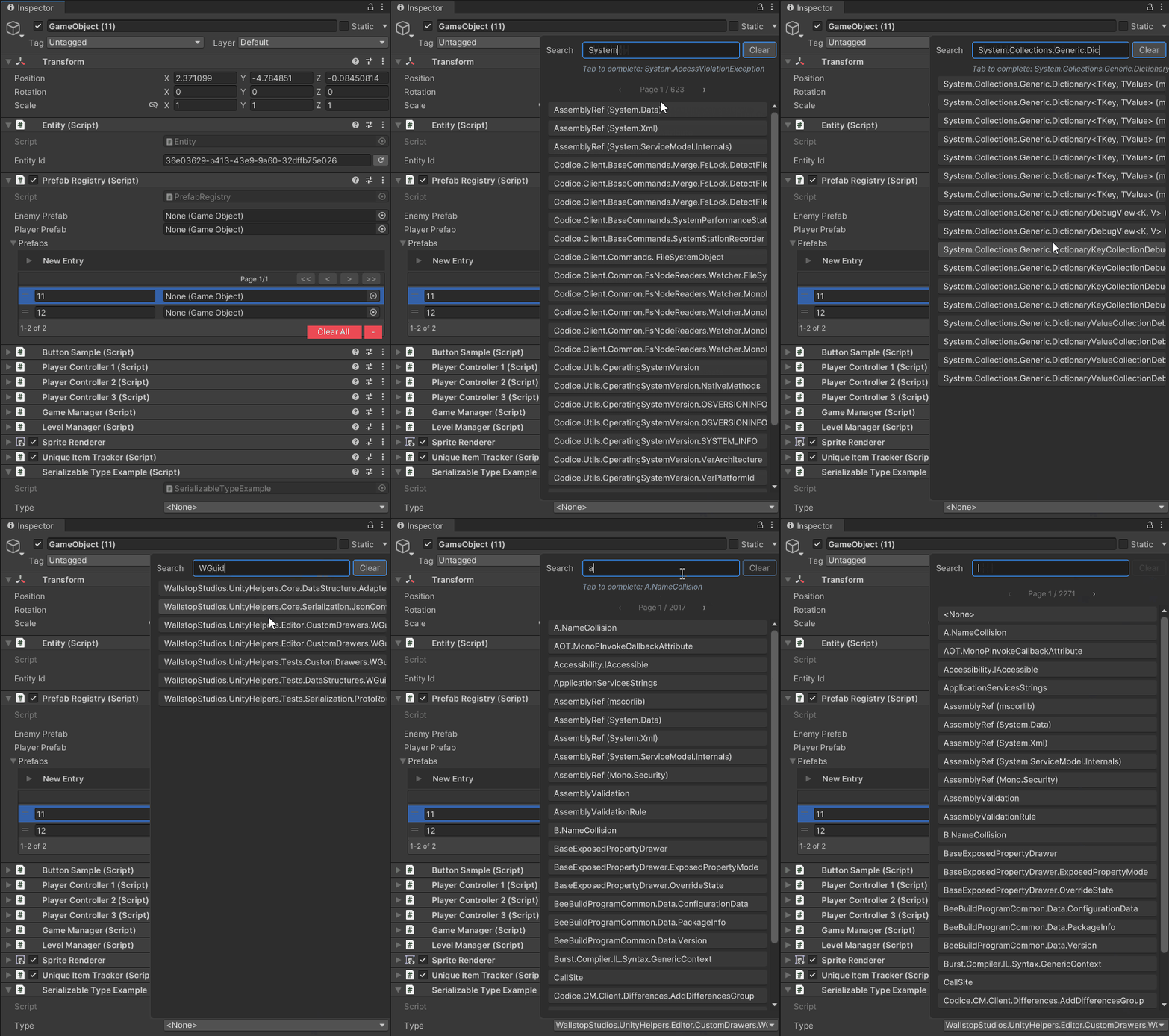
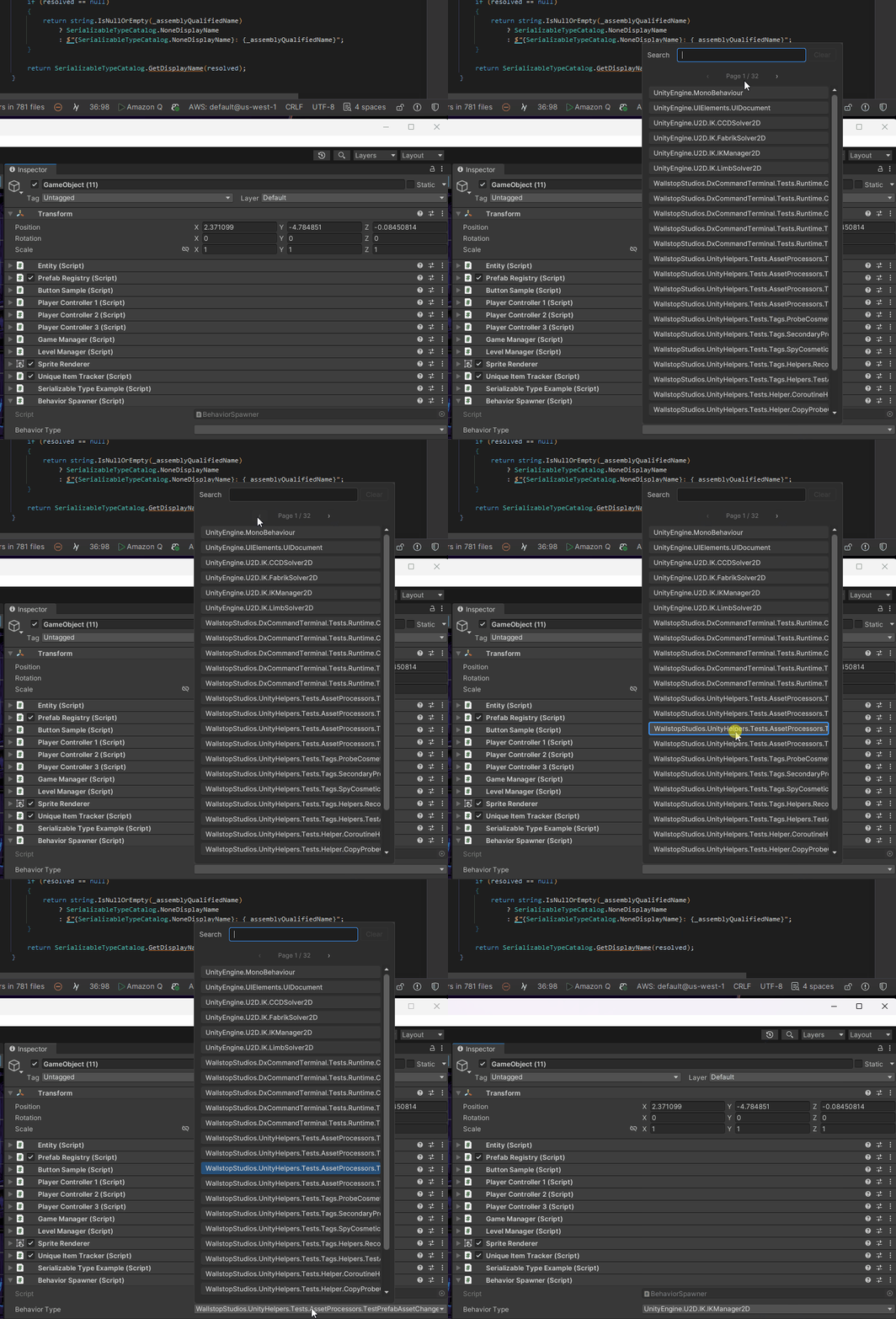
Type selection with searchable dropdown, namespace filtering, and validation
Why SerializableType?
Problem: Unity doesn’t serialize System.Type, and type names break when refactoring
Solution: SerializableType stores assembly-qualified names with fallback resolution on rename/namespace changes
Basic Usage
using System;
using System.Collections.Generic;
using System.Linq;
using UnityEngine;
using WallstopStudios.UnityHelpers.Core.Attributes;
using WallstopStudios.UnityHelpers.Core.DataStructure.Adapters;
using WallstopStudios.UnityHelpers.Core.Helper;

public class BehaviorSpawner : MonoBehaviour
{
    [WValueDropDown(typeof(BehaviorSpawner), nameof(GetAllMonoBehaviourNames))]
    public SerializableType behaviorType;

    private void SpawnBehavior()
    {
        if (behaviorType.IsEmpty)
        {
            Debug.LogWarning("No behavior type assigned!");
            return;
        }

        Type type = behaviorType.Value;
        if (type != null)
        {
            GameObject go = new GameObject(type.Name);
            go.AddComponent(type);
        }
    }

    private static IEnumerable<Type> GetAllMonoBehaviourNames()
    {
        return ReflectionHelpers
            .GetAllLoadedTypes()
            .Where(type => typeof(MonoBehaviour).IsAssignableFrom(type) && !type.IsAbstract);
    }
}
Inspector Features
Custom Drawer (Two-Line):
- Search row: Text field for filtering types
- Popup row: Dropdown showing matched types
- Clear button to unset the type
- Pagination for large type catalogs
- Auto-complete suggestions
Type Operations
// Create
SerializableType typeRef = new SerializableType(typeof(PlayerController));

// Resolve
Type resolvedType = typeRef.Value;
if (resolvedType != null)
{
    object instance = Activator.CreateInstance(resolvedType);
}

// Check
bool isEmpty = typeRef.IsEmpty;
string displayName = typeRef.DisplayName;  // User-friendly name

// Equality
bool equal = typeRef.Equals(new SerializableType(typeof(PlayerController)));
Refactoring Resilience
Scenario: You rename PlayerController to PlayerBehavior or move it to a new namespace.
Standard Approach: Type reference breaks, data loss SerializableType: Automatically resolves via assembly scanning and fallback matching
How it works:
- Stores assembly-qualified name (e.g.,
Namespace.PlayerController, Assembly-CSharp) - On deserialization, tries exact match first
- If the exact match fails, it scans assemblies for the best partial match
- Updates internal name if resolved to the new type
Serialization Support
Unity: Stores assembly-qualified name string JSON: Type name string with custom converter Protobuf: Supported via string surrogates
// JSON example
{
    "behaviorType": "MyNamespace.PlayerController, Assembly-CSharp"
}
SerializableNullable
Unity-friendly nullable value type wrapper.
Why SerializableNullable?
Problem: Unity doesn’t serialize Nullable<T> (e.g., int?, float?)
Solution: SerializableNullable<T> wraps any value type with HasValue and Value properties
Basic Usage
using UnityEngine;
using WallstopStudios.UnityHelpers.Core.DataStructure.Adapters;

public class BonusConfig : MonoBehaviour
{
    public SerializableNullable<float> criticalHitMultiplier;

    private float GetDamage(float baseDamage, bool isCritical)
    {
        if (isCritical && criticalHitMultiplier.HasValue)
        {
            return baseDamage * criticalHitMultiplier.Value;
        }
        return baseDamage;
    }
}

Inspector Features
Custom Drawer:
- Checkbox for
HasValuestate - Inline value field (enabled when
HasValue == true) - Height adapts based on the nullable state
Nullable Operations
// Create with value
SerializableNullable<int> nullableInt = new SerializableNullable<int>(42);

// Create without value (null)
SerializableNullable<int> nullInt = new SerializableNullable<int>();

// Check
if (nullableInt.HasValue)
{
    int value = nullableInt.Value;
    Debug.Log($"Value: {value}");
}

// Implicit conversion from T
SerializableNullable<float> nullableFloat = 3.14f;

// Conversion to Nullable<T>
int? systemNullable = nullableInt.HasValue ? nullableInt.Value : null;
Use Cases
Optional Configuration:
public SerializableNullable<float> overrideSpeed; // null = use default
Conditional Bonuses:
public SerializableNullable<int> bonusGold; // null = no bonus
Dynamic Properties:
public SerializableNullable<Color> customColor; // null = use preset
Serialization Support
Unity: Stores _hasValue bool and _value T fields
JSON: Standard nullable format
Protobuf: Supported via nullable surrogates
// JSON example (has value)
{
    "criticalHitMultiplier": 2.5
}

// JSON example (null)
{
    "criticalHitMultiplier": null
}
Best Practices
1. Choose the Right Type
// ✅ GOOD: WGuid for entity IDs
public WGuid entityId = WGuid.NewGuid();

// ✅ GOOD: SerializableDictionary for key/value mappings
public SerializableDictionary<string, GameObject> prefabRegistry;

// ✅ GOOD: SerializableHashSet for unique collections
public SerializableHashSet<string> uniqueItemIds;

// ✅ GOOD: SerializableSortedSet for ordered unique values
public SerializableSortedSet<int> scoreThresholds;

// ✅ GOOD: SerializableType for type references
public SerializableType behaviorType;

// ✅ GOOD: SerializableNullable for optional values
public SerializableNullable<float> overrideSpeed;

// ❌ BAD: String-based GUID
public string entityId = System.Guid.NewGuid().ToString();  // Use WGuid!

// ❌ BAD: Parallel arrays instead of dictionary
public string[] keys;
public GameObject[] values;  // Use SerializableDictionary!

// ❌ BAD: List with manual duplicate checking
public List<string> uniqueItems;  // Use SerializableHashSet!
2. Initialize Collections
// ✅ GOOD: Initialize in field declaration
public SerializableDictionary<string, int> scores = new();
public SerializableHashSet<string> tags = new();

// ❌ BAD: Null collections (NullReferenceException!)
public SerializableDictionary<string, int> scores;  // null!

private void Start()
{
    scores.Add("player", 100);  // Crash!
}
3. Use Sorted Variants for Ordered Data
// ✅ GOOD: SortedSet for ordered priorities
public SerializableSortedSet<int> unlockLevels;

// ✅ GOOD: SortedDictionary for ordered display
public SerializableSortedDictionary<string, string> alphabeticalNames;

// ❌ BAD: HashSet for ordered data (no guaranteed order!)
public SerializableHashSet<int> unlockLevels;  // Order is random!
4. Handle WGuid Generation Carefully
// ✅ GOOD: Generate once, then immutable
public WGuid entityId = WGuid.NewGuid();

// ✅ GOOD: Generate in Awake if needed
private void Awake()
{
    if (entityId == WGuid.EmptyGuid)
    {
        entityId = WGuid.NewGuid();
    }
}

// ❌ BAD: Regenerating on every access
public WGuid EntityId => WGuid.NewGuid();  // New GUID every time!
Examples
Example 1: Item Database with Dictionary
using UnityEngine;
using WallstopStudios.UnityHelpers.Core.DataStructure.Adapters;

[System.Serializable]
public class ItemData
{
    public string name;
    public Sprite icon;
    public int value;
}

public class ItemDatabase : MonoBehaviour
{
    public SerializableDictionary<string, ItemData> items;

    public bool TryGetItem(string itemId, out ItemData data)
    {
        return items.TryGetValue(itemId, out data);
    }

    public void AddItem(string itemId, ItemData data)
    {
        items[itemId] = data;
    }
}
Example 2: Player Achievement Tracking
using UnityEngine;
using WallstopStudios.UnityHelpers.Core.DataStructure.Adapters;

public class PlayerProfile : MonoBehaviour
{
    public WGuid playerId = WGuid.NewGuid();
    public SerializableHashSet<string> unlockedAchievements;
    public SerializableSortedSet<int> highScores;

    public void UnlockAchievement(string achievementId)
    {
        if (unlockedAchievements.Add(achievementId))
        {
            Debug.Log($"Unlocked: {achievementId}");
            // Trigger UI notification, etc.
        }
    }

    public void RecordScore(int score)
    {
        highScores.Add(score);

        // Keep only top 10
        while (highScores.Count > 10)
        {
            highScores.Remove(highScores.Min);
        }
    }
}
Example 3: Dynamic Behavior Spawning
using UnityEngine;
using WallstopStudios.UnityHelpers.Core.DataStructure.Adapters;
using System;

public class BehaviorFactory : MonoBehaviour
{
    [StringInList(typeof(TypeHelper), nameof(TypeHelper.GetAllMonoBehaviours))]
    public SerializableType defaultBehavior;

    public SerializableDictionary<string, SerializableType> namedBehaviors;

    public GameObject SpawnWithBehavior(string behaviorName = null)
    {
        SerializableType typeToSpawn = defaultBehavior;

        if (!string.IsNullOrEmpty(behaviorName) &&
            namedBehaviors.TryGetValue(behaviorName, out SerializableType namedType))
        {
            typeToSpawn = namedType;
        }

        if (typeToSpawn.IsEmpty)
        {
            Debug.LogWarning("No behavior type specified!");
            return null;
        }

        Type type = typeToSpawn.Value;
        if (type == null || !typeof(MonoBehaviour).IsAssignableFrom(type))
        {
            Debug.LogError($"Invalid behavior type: {typeToSpawn.DisplayName}");
            return null;
        }

        GameObject go = new GameObject(type.Name);
        go.AddComponent(type);
        return go;
    }
}

public static class TypeHelper
{
    public static IEnumerable<Type> GetAllMonoBehaviours()
    {
        return AppDomain.CurrentDomain.GetAssemblies()
            .SelectMany(a => a.GetTypes())
            .Where(t => typeof(MonoBehaviour).IsAssignableFrom(t) && !t.IsAbstract);
    }
}
Example 4: Optional Configuration with Nullable
using UnityEngine;
using WallstopStudios.UnityHelpers.Core.DataStructure.Adapters;

public class CharacterConfig : MonoBehaviour
{
    public float baseSpeed = 5f;
    public SerializableNullable<float> speedOverride;  // null = use baseSpeed

    public Color defaultColor = Color.white;
    public SerializableNullable<Color> colorOverride;  // null = use defaultColor

    private void Start()
    {
        float actualSpeed = speedOverride.HasValue ? speedOverride.Value : baseSpeed;
        Color actualColor = colorOverride.HasValue ? colorOverride.Value : defaultColor;

        Debug.Log($"Speed: {actualSpeed}, Color: {actualColor}");
    }
}
See Also
- Inspector Overview - Complete inspector features overview
- Serialization Guide - JSON/Protobuf serialization
- Data Structures - Other data structures
- Editor Tools Guide - Editor utilities
Next Steps:
- Replace string/int-based IDs with
WGuid - Use
SerializableDictionaryinstead of parallel arrays - Track unique collections with
SerializableHashSet - Store type references with
SerializableType - Add optional configuration with
SerializableNullable