Unity Helpers
Treasure chest of Unity developer tools. Professional inspector tooling, high-performance utilities, spatial queries, and 20+ editor tools.
Core Math & Extensions
TL;DR — Why Use These
- Small helpers that fix everyday math and Unity annoyances: safe modulo, wrapped indices, robust equality, fast bounds math, color utilities, and more.
- Copy/paste examples and diagrams show intent; use as building blocks in hot paths.
This guide summarizes the math primitives and extension helpers in this package and shows how to apply them effectively, with examples, performance notes, and practical scenarios.
Contents
- Numeric helpers — Positive modulo, wrapped arithmetic, approximate equality, clamping
- Geometry — Lines, ranges, parabolas, point-in-polygon, polyline simplification
- Unity extensions — Rect/Bounds conversions, RectTransform bounds, camera bounds, bounds aggregation
- Color utilities — Averaging (LAB/HSV/Weighted/Dominant), hex conversion
- Collections — IEnumerable helpers, buffering, infinite sequences
- Strings — Casing, encoding/decoding, distance
- Direction helpers — Enum conversions and operations
- Enum helpers — Zero-allocation flag checks, cached names, display names
- Random generators — Weighted selection, vector generation, subset sampling
- Async/Coroutine interop — Bridge Unity AsyncOperation with async/await
- Best Practices
Numeric Helpers
- Positive modulo and wrap-around arithmetic
- Use
PositiveModto ensure non-negative modulo results for indices and cyclic counters. - Use
WrappedAdd/WrappedIncrementfor ring buffer indexes and cursor navigation.
- Use
Example:
using WallstopStudios.UnityHelpers.Core.Helper;

int i = -1;
i = i.PositiveMod(5); // 4
i = i.WrappedAdd(2, 5); // 1

float angle = -30f;
float normalized = angle.PositiveMod(360f); // 330f
Diagram (wrap-around on a ring of size 5):
Index:   0   1   2   3   4
           ↖           ↙
            \  +2 from 4  => 1

Start at 4, add 2 → 6 → 6 % 5 = 1
- Approximate equality
float.Approximately(rhs, tolerance)anddouble.Approximatelyadd a magnitude-scaled fudge factor.
Example:
bool close = 0.1f.Approximately(0.10001f, 0.0001f); // true
- Generic
ClampClamp<T>(min, max)works for anyIComparable<T>.
Geometry
Line2D — 2D line segment operations
Why it exists: Provides fast, battle-tested 2D line segment math for collision detection, ray-casting, and geometric queries.
When to use:
- Ray-casting for bullets, lasers, or line-of-sight checks
- Detecting if paths cross obstacles
- Click detection near edges or borders
- Finding closest points on paths or walls
When NOT to use:
- For 3D geometry (use Line3D instead)
- For curves or arcs (lines are always straight)
Example:
using WallstopStudios.UnityHelpers.Core.Math;
var a = new Line2D(new Vector2(0,0), new Vector2(2,0));
var b = new Line2D(new Vector2(1,-1), new Vector2(1,1));
bool hit = a.Intersects(b); // true
Diagram (segment intersection):
y↑           b.to (1,1)
 |             │
 |             │  b
 |   a ────────┼────────▶ x
 |         (1,0)×  ← intersection
 |             │
 |             │
 +─────────────┼────────
               b.from (1,-1)
Getting the exact intersection point:
var wall = new Line2D(new Vector2(0, 0), new Vector2(10, 0));
var ray = new Line2D(playerPos, targetPos);

if (wall.TryGetIntersectionPoint(ray, out Vector2 hitPoint))
{
    // Spawn bullet impact effect at exact hitPoint
    Instantiate(sparksPrefab, hitPoint, Quaternion.identity);
}
Circle intersection (bullets hitting circular enemies):
var bulletPath = new Line2D(bulletStart, bulletEnd);
var enemy = new Circle(enemyPosition, enemyRadius);

if (bulletPath.Intersects(enemy))
{
    // Bullet hit the enemy
    enemy.TakeDamage(bulletDamage);
}
Closest point on line (snapping to paths):
var path = new Line2D(pathStart, pathEnd);
Vector2 snappedPosition = path.ClosestPointOnLine(mouseWorldPos);
// Use for UI snapping, path following, or grid alignment
Performance tip: Use DistanceSquaredToPoint instead of DistanceToPoint when comparing distances (avoids expensive square root):
// Fast distance comparison (no sqrt)
float distSq = line.DistanceSquaredToPoint(point);
if (distSq < thresholdSquared)
{
    // Point is within threshold
}
Line3D — 3D line segment operations
Why it exists: Extends Line2D concepts to 3D space with sophisticated algorithms for sphere intersection, bounding box clipping, and skew line distance.
When to use:
- 3D ray-casting for weapons, lasers, or grappling hooks
- Visibility checks between 3D objects
- Cable/rope collision detection
- Finding closest approach between moving objects
When NOT to use:
- For 2D games (use Line2D for better performance)
- For complex curved paths (lines are always straight)
Basic operations:
using WallstopStudios.UnityHelpers.Core.Math;

var ray = new Line3D(gunBarrel.position, hitPoint);
var enemyBounds = new BoundingBox3D(enemy.bounds);

// Check if ray hits enemy bounding box
if (ray.Intersects(enemyBounds))
{
    enemy.TakeDamage(bulletDamage);
}
Closest points between two 3D lines (skew lines):
Problem: In 3D, two lines might not actually intersect (imagine two pipes that pass by each other). This finds the closest approach.
var ropeA = new Line3D(ropeAStart, ropeAEnd);
var ropeB = new Line3D(ropeBStart, ropeBEnd);

if (ropeA.TryGetClosestPoints(ropeB, out Vector3 pointOnA, out Vector3 pointOnB))
{
    float separation = Vector3.Distance(pointOnA, pointOnB);
    if (separation < 0.1f)
    {
        // Ropes are touching or tangled
    }
}
Sphere intersection (force fields, explosions):
var laserBeam = new Line3D(laserStart, laserEnd);
var shield = new Sphere(shieldCenter, shieldRadius);

if (laserBeam.Intersects(shield))
{
    float distance = laserBeam.DistanceToSphere(shield);
    // distance == 0 means line passes through sphere
    // distance > 0 means line misses sphere
}
Range — Numeric ranges with flexible boundaries
Why it exists: Solves the “is this value in a valid range” problem with clear, readable code and support for different boundary conditions.
When to use:
- Validating user input (is health between 0-100?)
- Time windows (is this event during business hours?)
- Array bounds checking with custom inclusivity
- Overlap detection (do these time slots conflict?)
When NOT to use:
- For single comparisons (just use
if (x >= min && x <= max)) - When you don’t care about boundary inclusivity
Example:
using WallstopStudios.UnityHelpers.Core.Math;
var r = Range<int>.Inclusive(0, 10);
bool inside = r.Contains(10); // true (10 is included)
Choosing the right inclusivity:
// [0, 10] - both endpoints included (closed interval)
var healthRange = Range<int>.Inclusive(0, 10);
healthRange.Contains(0);  // true
healthRange.Contains(10); // true

// [0, 10) - start included, end excluded (common for indices)
var arrayRange = Range<int>.InclusiveExclusive(0, 10);
arrayRange.Contains(0);  // true
arrayRange.Contains(10); // false (typical for array[0..10))

// (0, 1) - neither endpoint included (open interval)
var normalized = Range<float>.Exclusive(0f, 1f);
normalized.Contains(0f); // false
normalized.Contains(0.5f); // true
normalized.Contains(1f); // false
Overlap detection:
var morningShift = Range<int>.Inclusive(9, 13);  // 9am-1pm
var afternoonShift = Range<int>.Inclusive(13, 17); // 1pm-5pm

bool conflict = morningShift.Overlaps(afternoonShift); // true (overlap at 1pm)
Date ranges:
var january = Range<DateTime>.Inclusive(
    new DateTime(2025, 1, 1),
    new DateTime(2025, 1, 31)
);

if (january.Contains(someDate))
{
    // Event happened in January
}
Parabola — Projectile trajectories and smooth curves
Why it exists: Provides easy-to-use parabolic math for projectile motion, jump arcs, and smooth animation curves without writing quadratic equations by hand.
When to use:
- Throwing/shooting projectiles (grenades, arrows, basketballs)
- Character jump arcs
- Camera dolly movements along smooth paths
- Particle fountain effects
When NOT to use:
- For straight-line motion (use Vector3.Lerp)
- For complex curves with multiple peaks (parabola has only one peak)
- When gravity/physics simulation is already handling it
Example:
using WallstopStudios.UnityHelpers.Core.Math;

var p = new Parabola(maxHeight: 5f, length: 10f);
if (p.TryGetValueAtNormalized(0.5f, out float y))
{
    // y == 5 (at the peak)
}
Diagram (normalized parabola):
y↑          * vertex (0.5, 5)
 |        *
 |      *
 |    *
 |  *
 |*           *
 +────────*────────▶ x (t from 0..1)
 0        0.5       1
Custom coefficients (when you have a specific equation):
// Create parabola from equation y = -0.5x² + 5x
var p = Parabola.FromCoefficients(a: -0.5f, b: 5f, length: 10f);
Performance tip: Use GetValueAtUnchecked when you know the input is in range (skips bounds checking):
// In a tight loop updating many projectiles
for (int i = 0; i < projectiles.Length; i++)
{
    float x = projectiles[i].distanceTraveled;
    if (x >= 0 && x <= parabola.Length)
    {
        float y = parabola.GetValueAtUnchecked(x); // No bounds check
        projectiles[i].position.y = y;
    }
}
Normalized vs Absolute coordinates:
// Normalized: Use when working with 0-1 interpolation (animations)
float t = animationTime / totalDuration; // 0-1
parabola.TryGetValueAtNormalized(t, out float y);

// Absolute: Use when working with world-space coordinates
float worldX = transform.position.x;
parabola.TryGetValueAt(worldX, out float worldY);
Point-in-Polygon — Test if points are inside shapes
Why it exists: Detects whether a point lies inside an irregular polygon, solving the “did the player click this shape” problem.
When to use:
- Click detection in irregular UI shapes or game zones
- Testing if characters are inside territory boundaries
- Checking if waypoints are in walkable areas
- Testing if 3D points project inside mesh faces
When NOT to use:
- For circles (use
Vector2.Distance(point, center) <= radius) - For rectangles (use
Rect.Contains) - For complex 3D volumes (use Collider.bounds or raycasts)
Important: This uses the ray-casting algorithm — it counts how many times a ray from the point crosses polygon edges. Odd count = inside, even count = outside.
2D polygon test:
using WallstopStudios.UnityHelpers.Core.Math;

Vector2[] zoneShape = new Vector2[]
{
    new(0, 0), new(10, 0), new(10, 5), new(5, 10), new(0, 5)
};

Vector2 clickPos = Camera.main.ScreenToWorldPoint(Input.mousePosition);

if (PointPolygonCheck.IsPointInsidePolygon(clickPos, zoneShape))
{
    Debug.Log("Clicked inside the zone!");
}
3D polygon with plane projection:
// Test if 3D point is inside a 3D triangle (projects onto plane)
Vector3[] triangleFace = new Vector3[]
{
    new(0, 0, 0), new(5, 0, 0), new(2.5f, 5, 0)
};
Vector3 faceNormal = Vector3.forward; // Must be normalized

Vector3 testPoint = new Vector3(2.5f, 2f, 1f); // Will project onto z=0 plane

if (PointPolygonCheck.IsPointInsidePolygon(testPoint, triangleFace, faceNormal))
{
    Debug.Log("Point projects inside triangle");
}
Zero-allocation version for hot paths:
// Use ReadOnlySpan to avoid heap allocations
Span<Vector2> vertices = stackalloc Vector2[4]
{
    new(0, 0), new(1, 0), new(1, 1), new(0, 1)
};

bool inside = PointPolygonCheck.IsPointInsidePolygon(clickPos, vertices);
// No GC allocations, great for per-frame checks
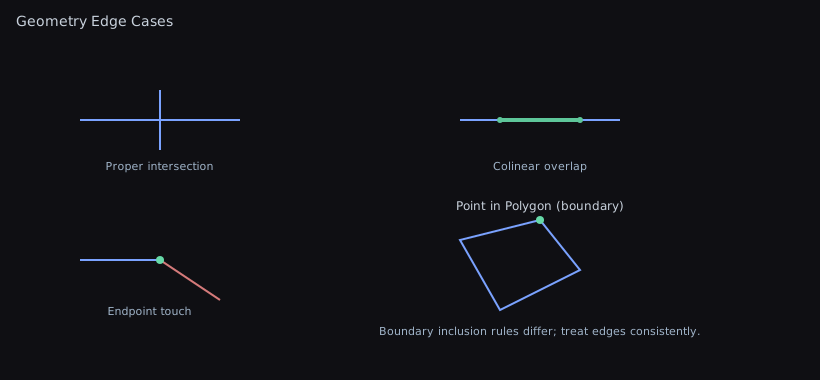
Edge cases to know:
- Points exactly on polygon edges may return inconsistent results (floating-point precision issues)
- Assumes simple (non-self-intersecting) polygons
- Winding order (clockwise vs counter-clockwise) doesn’t matter
- For 3D: all polygon vertices must be coplanar for accurate results
- Polyline simplification (Douglas–Peucker)
Simplify(float epsilon) andSimplifyPrecise(double tolerance) reduce vertex count while preserving shape.
Example:
using WallstopStudios.UnityHelpers.Core.Helper;
List<Vector2> simplified = LineHelper.Simplify(points, epsilon: 0.1f);
Diagram (original vs simplified):
Original:     *----*--*---*--*-----*
Simplified:   *-----------*--------*

Fewer vertices within epsilon of the original polyline.
Visual:

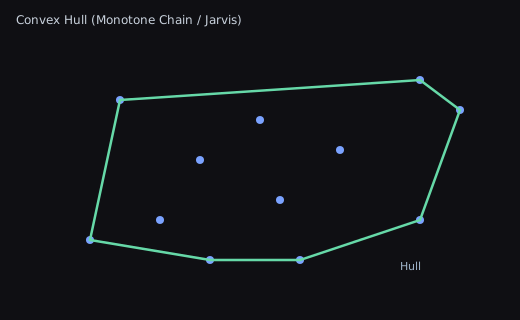
Convex hull (monotone chain / Jarvis examples used by helpers):
Points:     ·  ·   ·
          ·      ·   ·
            ·  ·

Hull:     ┌───────────┐
          │           │
          └───────┬───┘
                  └─┐
Visual:
Edge Cases Gallery
Unity Extensions
- Rect/Bounds conversions, RectTransform world bounds
- Camera
OrthographicBounds - Bounds aggregation from collections
Example:
Rect r = rectTransform.GetWorldRect();
Bounds view = Camera.main.OrthographicBounds();
Diagrams:
- RectTransform world rect (axis-aligned bounds of rotated UI):
   • corner         ┌───────────────┐
      ╲             │   AABB (r)    │
       ╲  rotated   │   ┌──────┐    │
        ╲ rectangle │  ╱│ UI  ╱│    │
         •          │ ╱ └────╱─┘    │
                    └───────────────┘
- Orthographic camera bounds (centered on camera):
            ┌──────── view (Bounds) ────────┐
            │           height=2*size      │
            │         ┌────────────────┐    │
   near ───▶│         │   camera FOV   │    │◀── far
            │         └────────────────┘    │
            └────────────────────────────────┘
Color Utilities
- Averaging methods:
- LAB: perceptually accurate
- HSV: preserves vibrancy
- Weighted: luminance-aware
- Dominant: bucket-based mode
Example:
using WallstopStudios.UnityHelpers.Core.Extension;
Color avg = sprite.GetAverageColor(ColorAveragingMethod.LAB);
string html = avg.ToHex();
Dominant color example (bucket-based):
// Emphasize palette extraction (posterized sprites, UI swatches)
var dominant = pixels.GetAverageColor(ColorAveragingMethod.Dominant, alphaCutoff: 0.05f);
Diagram (dominant buckets):
RGB space buckets → counts
 [R][G][B] …  [R+Δ][G][B]  …  [R][G+Δ][B]  …
          ↑ pick max bucket centroid as dominant
Collections
IEnumerable Helpers
Infinite cycling:
using WallstopStudios.UnityHelpers.Core.Extension;

// Cycle through elements endlessly (great for repeating patterns)
var colors = new[] { Color.red, Color.blue, Color.green };
foreach (var color in colors.Infinite())
{
    // Loops forever: red, blue, green, red, blue, green...
    if (shouldStop) break;
}
Partition into chunks:
// Split large collections into fixed-size batches
var items = Enumerable.Range(0, 100);
foreach (var batch in items.Partition(10))
{
    // Process 10 items at a time
    ProcessBatch(batch); // batch is a List<int> of size 10
}

// Zero-allocation version for hot paths
using (var batchBuffer = items.PartitionPooled(10))
{
    foreach (var batch in batchBuffer)
    {
        // batch is reused from pool, no allocations
    }
} // Automatically returns buffer to pool
Shuffled (non-destructive):
// Get shuffled copy without modifying original
var shuffled = items.Shuffled();
// Original list unchanged
IList Operations
Remove O(1) by swapping with last element:
// Fast removal when order doesn't matter (particle systems, entity lists)
List<Enemy> enemies = GetActiveEnemies();
enemies.RemoveAtSwapBack(3); // Swaps enemy[3] with last enemy, then removes
// Much faster than List.RemoveAt which shifts all elements
Partition (split by predicate):
var numbers = new List<int> { 1, 2, 3, 4, 5, 6 };
var (evens, odds) = numbers.Partition(n => n % 2 == 0);
// evens: [2, 4, 6]
// odds: [1, 3, 5]
Custom sorting:
// GhostSort: Faster hybrid sort for medium-sized lists
largeList.GhostSort(); // Uses IComparable<T>

// Custom comparison function
list.Sort((a, b) => a.priority.CompareTo(b.priority));
Dictionary Helpers
Thread-safe get-or-create:
using WallstopStudios.UnityHelpers.Core.Extension;

// Thread-safe for ConcurrentDictionary
var value = dict.GetOrAdd(key, () => new ExpensiveObject());

// Read-only version (doesn't modify dict)
var value = readOnlyDict.GetOrElse(key, defaultValue);
Merge dictionaries:
var defaults = new Dictionary<string, int> { ["health"] = 100, ["mana"] = 50 };
var overrides = new Dictionary<string, int> { ["health"] = 150 };

var merged = defaults.Merge(overrides);
// Result: { ["health"] = 150, ["mana"] = 50 }
Deep equality:
// Compare dictionary contents (not just references)
bool same = dict1.ContentEquals(dict2); // Compares all key-value pairs
Bounds from Collections
Bounds from points example:
using WallstopStudios.UnityHelpers.Core.Extension;

// Compute BoundsInt for occupied grid cells
Vector3Int[] positions = GetOccupiedCells();
BoundsInt? area = positions.GetBounds(inclusive: false);
if (area is BoundsInt b)
{
    // b contains all positions
}
Bounds aggregation example:
// Merge many Bounds (e.g., from Renderers)
Renderer[] renderers = GetComponentsInChildren<Renderer>();
Bounds? merged = renderers.Select(r => r.bounds).GetBounds();
if (merged is Bounds totalBounds)
{
    // totalBounds encompasses all renderers
}
Strings
Case Conversions
Why it exists: Automatically convert between common programming case styles without writing regex or manual parsing.
using WallstopStudios.UnityHelpers.Core.Extension;

string input = "XMLHttpRequest";

input.ToPascalCase();  // "XmlHttpRequest"
input.ToCamelCase();   // "xmlHttpRequest"
input.ToSnakeCase();   // "xml_http_request"
input.ToKebabCase();   // "xml-http-request"
input.ToTitleCase();   // "Xml Http Request"
Smart tokenization handles mixed cases intelligently.
String Utilities
Levenshtein Distance (edit distance):
// Calculate how many edits to transform one string into another
string a = "kitten";
string b = "sitting";
int distance = a.LevenshteinDistance(b); // 3 edits
// Use for: fuzzy matching, spell correction, search suggestions
Base64 encoding:
string text = "Hello, World!";
string encoded = text.ToBase64();       // "SGVsbG8sIFdvcmxkIQ=="
string decoded = encoded.FromBase64();  // "Hello, World!"
String analysis:
bool isNum = "12345".IsNumeric();         // true
bool isAlpha = "Hello".IsAlphabetic();    // true
bool isAlphaNum = "Hello123".IsAlphanumeric(); // true
Truncate with ellipsis:
string long = "This is a very long string";
string short = long.Truncate(10); // "This is a..."
Encoding Helpers
// Quick UTF-8 conversions
byte[] bytes = "Hello".GetBytes();
string text = bytes.GetString();
Directions
- Conversions between enum and vectors; splitting flag sets; combining
Example:
using WallstopStudios.UnityHelpers.Core.Extension;
Vector2Int v = Direction.NorthWest.AsVector2Int(); // (-1, 1)
Enum Helpers
Why it exists: Standard C# enum operations cause boxing allocations and are slow in hot paths. These helpers solve performance problems.
Zero-Allocation Flag Checking
The problem: Standard HasFlag() boxes both enums, causing GC pressure.
using WallstopStudios.UnityHelpers.Core.Extension;

[Flags]
public enum Permissions
{
    None = 0,
    Read = 1,
    Write = 2,
    Execute = 4
}

Permissions userPerms = Permissions.Read | Permissions.Write;

// ❌ BAD: Causes boxing allocations
if (userPerms.HasFlag(Permissions.Write)) { }

// ✅ GOOD: Zero allocations
if (userPerms.HasFlagNoAlloc(Permissions.Write)) { }
Use HasFlagNoAlloc in:
- Per-frame checks
- Hot loops
- Frequently-called methods
- Performance-critical code paths
Fast Enum-to-String Conversion
The problem: enum.ToString() is slow (reflection) and allocates every call.
public enum GameState { MainMenu, Playing, Paused, GameOver }

GameState state = GameState.Playing;

// ❌ SLOW: Uses reflection every time
string name = state.ToString();

// ✅ FAST: Cached in array/dictionary after first call
string cached = state.ToCachedName();
// Subsequent calls are O(1) lookups with zero allocation
Performance: ToCachedName is ~100x faster after the first call.
Display Names for UI
The problem: Enum values often need different names in UI than in code.
using WallstopStudios.UnityHelpers.Core.Attribute;

public enum Difficulty
{
    [EnumDisplayName("Easy Mode")]
    Easy,

    [EnumDisplayName("Normal")]
    Medium,

    [EnumDisplayName("NIGHTMARE MODE!!!")]
    Hard
}

Difficulty current = Difficulty.Hard;
string displayName = current.ToDisplayName(); // "NIGHTMARE MODE!!!"
// Falls back to enum name if attribute not present
Use for:
- Dropdown labels in UI
- Localization keys
- User-facing text that doesn’t match code names
Random Generators
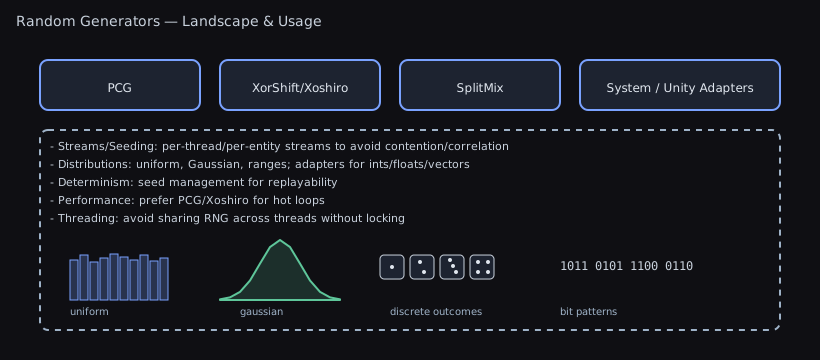
Why it exists: Unity’s Random class is limited and not suitable for all scenarios. These extensions provide rich random generation.
Weighted Random Selection
The problem: Selecting items based on probability weights (loot tables, spawn chances).
using WallstopStudios.UnityHelpers.Core.Extension;

// Items with different drop chances
var loot = new[]
{
    (item: "Common Sword", weight: 50),
    (item: "Rare Shield", weight: 30),
    (item: "Epic Helmet", weight: 15),
    (item: "Legendary Ring", weight: 5)
};

IRandom rng = PRNG.Instance;
string drop = rng.NextWeighted(loot); // More likely to get Common Sword

// Get index instead of value
int dropIndex = rng.NextWeightedIndex(loot.Select(x => x.weight));
Vector and Quaternion Generation
Uniform random vectors:
// Random point in rectangle
Vector2 point = rng.NextVector2(minX, maxX, minY, maxY);

// Random point inside circle
Vector2 inCircle = rng.NextVector2InRange(radius);

// Random point ON sphere surface (uniform distribution)
Vector3 onSphere = rng.NextVector3OnSphere(radius);
// Uses Marsaglia's method for true uniform distribution

// Random rotation (uniform distribution)
Quaternion rotation = rng.NextQuaternion();
// Uses Shoemake's algorithm
Color Generation
// Random opaque color
Color color = rng.NextColor();

// Random color in HSV range (for similar hues)
Color tint = rng.NextColorInRange(
    baseColor: Color.red,
    hueVariance: 0.1f,
    saturationVariance: 0.2f,
    valueVariance: 0.2f
);
Subset Sampling
Reservoir sampling — Pick k random items from a large collection without loading it all into memory:
// Select 5 random enemies from potentially huge list
IEnumerable<Enemy> allEnemies = GetAllEnemiesInWorld();
List<Enemy> randomFive = rng.NextSubset(allEnemies, k: 5);
// O(n) time, uses reservoir sampling for uniform probability
Random Utilities
bool coinFlip = rng.NextBool();              // 50/50
bool biasedFlip = rng.NextBool(0.7f);        // 70% true
int sign = rng.NextSign();                   // Randomly -1 or +1
Async/Coroutine Interop
Why it exists: Unity’s AsyncOperation and coroutines don’t natively support modern async/await patterns. This bridges the gap.
Await AsyncOperation (Unity < 2023.1)
The problem: Unity’s AsyncOperations (scene loading, asset loading) don’t support await.
using WallstopStudios.UnityHelpers.Core.Extension;
using UnityEngine.SceneManagement;

// ✅ Now you can await scene loading
async Task LoadGameScene()
{
    var operation = SceneManager.LoadSceneAsync("GameLevel");
    await operation; // Just works!

    Debug.Log("Scene loaded!");
}
Note: Unity 2023.1+ has built-in await support, but this works in older versions.
Convert AsyncOperation to Task
// As Task
Task task = asyncOperation.AsTask();
await task;

// As ValueTask (better performance for short operations)
ValueTask valueTask = asyncOperation.AsValueTask();
await valueTask;
Run Task as Coroutine
The problem: You have async/await code (from a library, or your own), but need to run it in a Unity coroutine context.
using WallstopStudios.UnityHelpers.Core.Extension;

async Task<string> DownloadDataAsync()
{
    // Some async operation (HttpClient, database, etc.)
    await Task.Delay(1000);
    return "Downloaded data";
}

// In MonoBehaviour
IEnumerator Start()
{
    // ✅ Convert Task to IEnumerator
    return DownloadDataAsync().AsCoroutine();
}
Chain Continuations
// Chain operations on ValueTask
await myValueTask.WithContinuation(() => Debug.Log("Done!"));
When to use:
- Integrating third-party async libraries with Unity
- Mixing async/await code with existing coroutine systems
- Background operations that need to update Unity objects on completion
- Modernizing legacy coroutine code
When NOT to use:
- Unity 2023.1+ (use built-in await support)
- Simple fire-and-forget operations (just use coroutines)
- When you have control over both ends (just use all-async or all-coroutines)
Best Practices
- Use
PositiveModinstead of%for indices and angles when negatives are possible. - Prefer
SimplifyPrecisefor offline tooling; useSimplifyduring gameplay for speed. - Choose color averaging method per goal: LAB for perceptual palette, Weighted for speed, Dominant for swatches.
- Favor IReadOnlyList/HashSet specializations to minimize allocations; pooled buffers are used where applicable.
- Run Unity-dependent extensions (e.g.,
RectTransform,Camera,Grid) on the main thread.
Related Docs
- Random performance details — Random Performance
- Serialization formats — Serialization Guide
- Effects system — Effects System
- Relational Components — Relational Components